
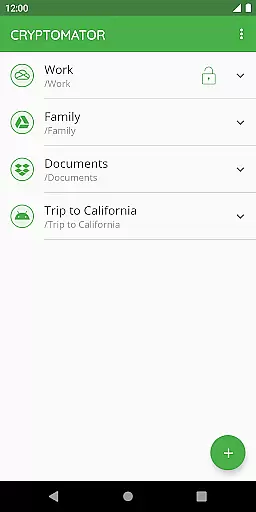
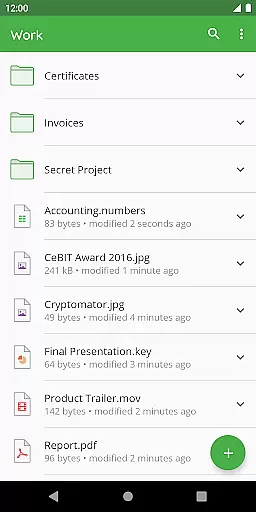
Cryptomator is a user-friendly encryption tool designed to secure your cloud-stored data. With its easy-to-use interface, you can create secure vaults and protect them with a password or even your fingerprint. This ensures that only you have access to your sensitive files, providing peace of mind when uploading data to cloud services like Dropbox, Google Drive, and OneDrive.
Compatibility is at the heart of Cryptomator's design. It works seamlessly across all major operating systems and integrates effortlessly with popular cloud storage solutions. Whether you're using Android’s local storage or third-party sync apps, Cryptomator allows you to encrypt files locally before syncing them to the cloud. This cross-platform functionality ensures you can access your encrypted files on any device, anywhere.
The security of your data is Cryptomator's top priority. Utilizing AES encryption with 256-bit key length, it provides robust protection for both file content and filenames. The software is open-source, meaning its code is publicly accessible and verifiable. Additionally, features like automatic vault locking and enhanced brute-force resistance through scrypt ensure your data remains safe even if your device falls into the wrong hands.
Cryptomator offers a comprehensive suite of features that make it an essential tool for anyone concerned about digital privacy. Its standout feature is the ability to create secure vaults with just a few clicks. These vaults are protected by strong encryption algorithms, ensuring that your data remains confidential. The simplicity of this process means no additional accounts or complex configurations are required, making it accessible even to non-technical users.
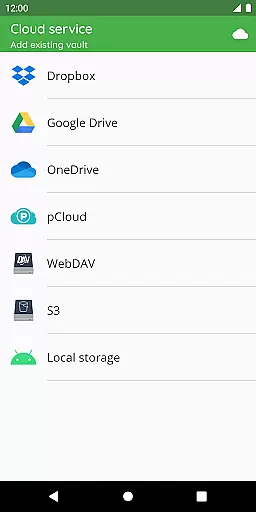
One of Cryptomator's key strengths is its compatibility with various cloud storage services. Whether you use Dropbox, Google Drive, OneDrive, or WebDAV-based services, Cryptomator integrates smoothly, allowing you to encrypt files before they are uploaded. This ensures end-to-end security, protecting your data from unauthorized access during transmission and storage. Furthermore, the app supports Android’s local storage, enabling encryption for files synced via third-party applications.
Security is where Cryptomator truly shines. The app employs advanced encryption standards, including AES with 256-bit key length, and secures your vault passwords with scrypt to resist brute-force attacks. All cryptographic implementations are well-documented and publicly available for scrutiny, reinforcing trust in the software's integrity. Additional features such as automatic vault locking and biometric authentication provide an extra layer of protection, ensuring your data remains secure under all circumstances.
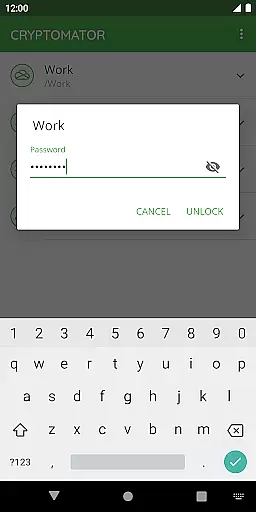
At the heart of Cryptomator lies its robust core task management system, designed to simplify how users handle sensitive data. This feature allows you to create secure vaults effortlessly, ensuring that your files are encrypted before they reach the cloud.
The application eliminates the need for additional accounts or complex configurations, making it accessible even to non-technical users. With just a few taps, you can assign strong passwords to your vaults and manage them with ease.
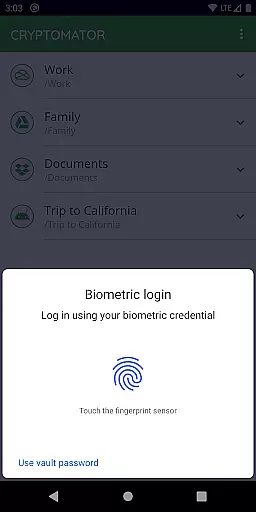
One standout aspect is the ability to unlock vaults using your fingerprint, adding both convenience and security. This seamless integration of biometric authentication streamlines access while maintaining high-security standards.
By focusing on user-friendly task management, Cryptomator empowers individuals to take control of their digital privacy without compromising on usability or performance.
Cryptomator excels in providing reliable cross-device synchronization, allowing users to access their encrypted files from any mobile device or computer. This ensures that your data remains consistent and up-to-date across all platforms.
The app supports major cloud storage services like Dropbox, Google Drive, OneDrive, and WebDAV-based services. This compatibility means you can choose your preferred cloud provider without worrying about encryption compatibility.
Moreover, Cryptomator's implementation of automatic locking after sending the app to the background enhances security during synchronization. You can trust that your vaults will remain protected even as they sync between devices.
This synchronization reliability, combined with top-notch security features, makes Cryptomator an ideal choice for those seeking a secure yet flexible solution for managing encrypted data across multiple devices.
Easy-to-use interface
Strong AES encryption
Compatible with major cloud services
Automatic vault locking
Open-source transparency
Limited free features
No built-in cloud sync
Fingerprint sensor required
Occasional performance lag
Subscription cost for full access

A Revolutionary All-in-One Artificial Intelligence Tools
 3.80
3.80
8 custom complications. Custom Time Fonts. Beautiful color schemes. A++ Design.
5.00
Pwnagotchi companion app
4.20
Docker, Kubernetes management over Portainer Mobile
4.40
Great calculator for Android named one of USA TODAY's "25 Essential Apps".
4.90
Secure your apps with lock screens, use custom themes and different features.
4.40
Set up, print, and get support—in one place
4.20
Browse and view your photos and videos from the phone with photo & video hide.
4.10
Note taking, handwriting, record audio, PDF annotation, planner & journal
4.20
Understand anything with a personalized AI research assistant
4.80
Secure, fast, open-source, VNC and SSH Remote Desktop for Windows, Linux and Mac
4.70
All document reader, all in one file viewer read PDF, DOCX, XLS, PPT, TXT files.
4.60
Access, manage and transfer files on Android, PC, Mac, NAS and cloud storages.
4.30
Total remote control for your Android device, PC and cloud services (IFTTT)!
4.20
Make apps & sites with natural language prompts
4.10
Experience real multitasking on your Android!
4.00
Wake up & get tasks done! Add alarms & reminders on the Clock Launcher.
4.00
Access your phone's notifications, calls, apps, photos & texts on your PC
3.90
Code on-the-go with VScode for Android. Edit,debug and collaborate from mobile!!
3.10


User Reviews