
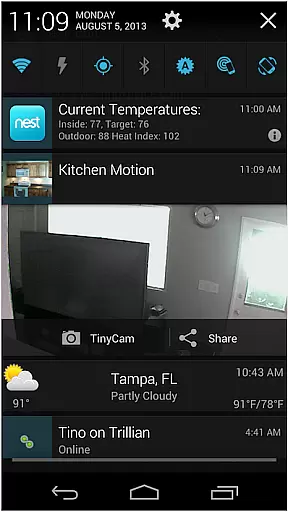
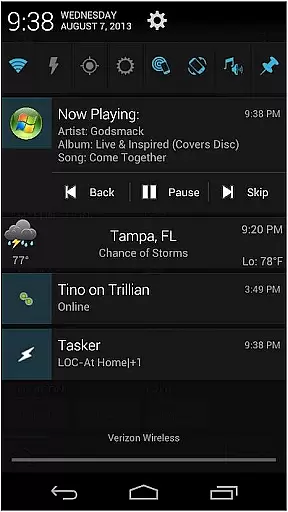
AutoNotification Unlock Key is a productivity-enhancing application that unlocks the full potential of AutoNotification. By purchasing this key, users gain access to advanced features for automating notifications and actions on their Android devices. This tool is perfect for power users looking to streamline their digital experience by setting up sophisticated automation rules without manual intervention.
The app works as a license key and must be used alongside the main AutoNotification app. Once unlocked, users can enjoy an extended range of customization options, including wearables support, custom UIs, and more. It's especially useful for those who want to maximize efficiency in personal and professional settings through smart device management.
This unlock key provides access to premium functionalities within AutoNotification, such as enhanced notification filtering, customizable action buttons, and integration with other applications. These features allow users to create complex automation workflows tailored to their specific needs.
One standout feature is the ability to interact with notifications from wearable devices, making it easier than ever to manage your phone or tablet remotely. Additionally, users can design personalized user interfaces for notifications, ensuring they see only relevant information at a glance. Such capabilities make daily tasks more efficient while offering unparalleled control over how you interact with your device.
Effective task management is essential for productivity applications, serving as the backbone for organizing and executing tasks efficiently. AutoNotification Unlock Key enhances this aspect by unlocking the full potential of AutoNotification, allowing users to manage notifications and tasks seamlessly.
This application enables users to create complex notification rules, ensuring that important alerts are never missed while less critical ones do not cause distractions. With the unlock key, users gain access to advanced features such as custom notification actions, which allow direct interaction with notifications, streamlining task management processes significantly.
The benefits of using AutoNotification with the unlock key include increased efficiency in handling daily tasks and improved focus by prioritizing notifications. Users can tailor their notification experiences to fit their workflow, making task management more intuitive and less intrusive.
Cross-device synchronization is a pivotal feature for users who operate across multiple devices, ensuring that their data and settings remain consistent and up-to-date. AutoNotification Unlock Key amplifies this capability by providing reliable synchronization options that keep all user devices in sync.
With the unlock key, AutoNotification offers enhanced synchronization features, including cloud-based backup and restore functionalities. This ensures that user preferences and notification settings are preserved and can be easily transferred between devices, maintaining continuity in the user's digital environment.
Users benefit from this reliable synchronization by experiencing seamless transitions between devices without losing any personalized configurations. Whether switching from a phone to a tablet or vice versa, the consistency provided by AutoNotification ensures that users maintain their productivity without interruption.
Unlocks full functionality
Enhances productivity
Seamless integration
Customizable options
Wearable support
Requires base app
Premium cost
Complex setup
Limited standalone use
Device compatibility

 4.20
4.20
Client for Nextcloud Deck
4.60
The Pro Version of Android's tiniest Notepad app. Just 0.3MB but feature-packed!
4.60
Mind Map and brainstorm, note taking and idea collection
4.80
Subscribe to Webcal & .ics calendars and keep them up-to-date!
4.50
Secure, open-source, SPICE and SSH Remote Desktop for QEMU KVM virtual machines
4.00
Tally and goal counter for Wear OS & mobile
4.50
Quickly and easily keep track of your work shifts
4.70
Daily processing of PDF documents.
4.40
Seamlessly integrate data and reports to build your presentation to impress
4.80
We're working to become the best machining app on the market! www.cncdirt.com
4.80
App lock - lock apps with fingerprint, password, pin or pattern, protect privacy
4.70
PDF scanner & converter for files, photos, lottery, QR codes. One swipe away!
4.50
A lightweight JSON & XML files creator, editor and viewer (Premium Version)
4.40
Easily read and manage all your PDF files
4.10
The ultimate file manager for rooted devices. The original and still the best.
4.00
Take control of your clipboard with Clipper!
3.90
Make your handwriting beautiful, even more than pen on paper.
3.60
Auto-shutoff Alarm with Sunrise, Sunset & Fixed Options.
3.50


User Reviews