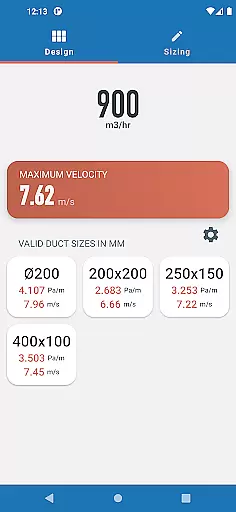
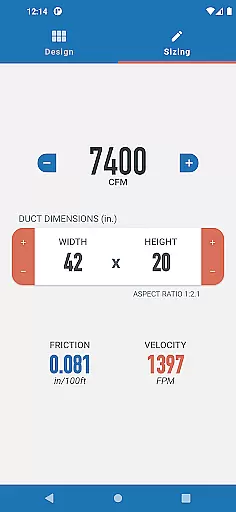
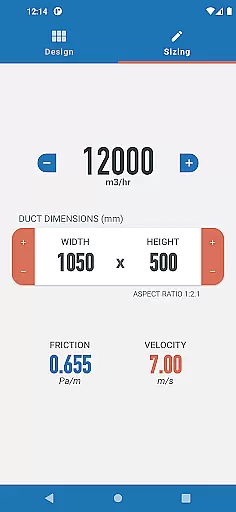
Ductulator is a productivity-focused app designed specifically for HVAC engineers and professionals. This innovative tool serves as a digital equivalent to traditional duct sizing charts, offering faster and more versatile calculations. The app allows users to switch between Imperial and SI units, catering to an international audience of engineers.
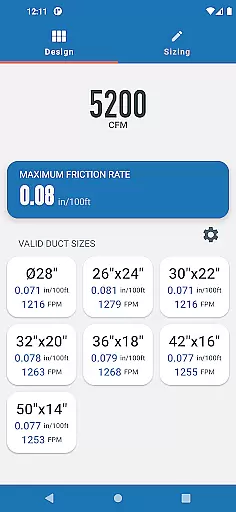
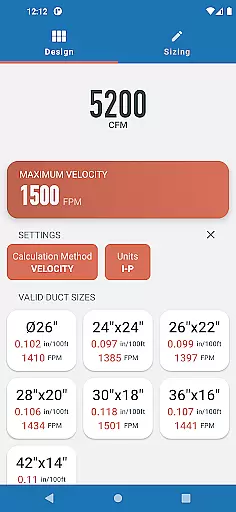
In Design Mode, users can input parameters such as maximum friction rate or velocity to receive a range of suitable duct sizes, including both rectangular and circular options. The Sizing Mode functions like a digital ductulator, enabling real-time adjustments to duct dimensions and airflow rates while automatically updating friction and velocity values. These features make it particularly valuable for both designing new duct systems and analyzing existing ones.
The application's calculations are based on standard air properties in clean galvanized steel ducts (0.075 lb/ft3 or 1.2 kg/m3), ensuring industry-standard accuracy. Its development was guided by direct feedback from engineering professionals, making it an essential tool for HVAC system design and analysis.
Ductulator distinguishes itself through several key features that enhance HVAC design workflows. The app's dual-mode functionality provides both Design Mode and Sizing Mode capabilities, addressing different aspects of duct system engineering. In Design Mode, the app generates multiple suitable duct size options based on user-defined constraints, streamlining the initial design phase.
The automatic calculation feature stands out as a major advantage, instantly updating friction rates and velocities as users adjust duct dimensions or airflow parameters. This real-time feedback mechanism saves valuable engineering time and reduces manual calculation errors. The ability to switch between Imperial and SI measurement systems further enhances its versatility for global use.
Developed based on direct surveys with engineers, the app incorporates practical features suggested by actual users. The Sizing Mode, for instance, was added specifically based on user feedback, demonstrating the developer's commitment to creating tools that meet real-world engineering needs. These features collectively make Ductulator a comprehensive solution for HVAC duct system design and analysis.
In the realm of productivity applications, core task management is pivotal for organizing and prioritizing work efficiently. Ductulator excels in this area by offering two distinct modes tailored to HVAC engineers' needs.
In Design Mode, users can input parameters such as maximum friction rate or velocity to receive a list of suitable duct sizes. This feature streamlines the selection process, allowing engineers to quickly identify optimal duct dimensions without manually referencing charts.
Additionally, the Sizing Mode functions akin to a traditional ductulator, enabling real-time adjustments to duct dimensions and airflow rates. As users modify these variables, they receive instantaneous feedback on the resulting friction and velocity, facilitating comprehensive analysis of existing systems.
By integrating both design and sizing capabilities, Ductulator ensures that engineers have the necessary tools at their disposal to manage tasks effectively, enhancing overall productivity in their workflow.
Cross-device synchronization is essential for ensuring that critical data is accessible across various platforms, thus maintaining workflow continuity. While Ductulator's primary focus is on providing precise calculations for duct sizing, it indirectly supports reliable data access through its intuitive interface.
Although explicit details about cloud-based synchronization are not provided, the app's ability to deliver consistent results based on user inputs implies an underlying stability. Engineers can rely on Ductulator to provide accurate computations whether they're using it on a smartphone or tablet, ensuring uniformity in their work process.
The application's foundation on standard air properties and clean galvanized steel ducts further reinforces the consistency of its outputs. This reliability is crucial when transitioning between devices, as discrepancies could lead to significant errors in project specifications.
While direct cross-device sync features may not be highlighted, Ductulatoru2019s steadfast performance across sessions and devices underpins dependable task management for HVAC professionals on the go.
Fast calculation speed
User-friendly interface
Real-time updates
Unit flexibility
Professional accuracy
Limited to duct sizing
No offline support
Single material type
Few customization options
Requires internet

Client for Nextcloud Deck
 4.60
4.60
A customizable calendar for your Wear OS watch
4.20
Easily read and manage all your PDF files
4.10
A simple, portable logger for POTA, SOTA, Field Day, and more
4.4
Make apps & sites with natural language prompts
4.10
Find and delete junk files & block unwanted notifications & manage files
3.70
Lightweight PDF, Word, Excel reader.
4.60
Daily processing of PDF documents.
4.40
Browse and view your photos and videos from the phone with photo & video hide.
4.10
Use powerful, industry-leading AI tools to generate visual charts from any data
4.80
Secure, fast, open-source, VNC and SSH Remote Desktop for Windows, Linux and Mac
4.70
Absolutely the best CNC machinist speed and feed calculator around. fswizard.com
4.60
Tally and goal counter for Wear OS & mobile
4.50
CalenGoo is a very flexible and feature-rich calendar app
4.40
A Pixel Art watchface inspired by other iconic 90s designs for Wear OS devices!
4.40
Total remote control for your Android device, PC and cloud services (IFTTT)!
4.20
Font maker keyboard with your own handwriting
4.10
Wake up & get tasks done! Add alarms & reminders on the Clock Launcher.
4.00
Make your handwriting beautiful, even more than pen on paper.
3.60


User Reviews