
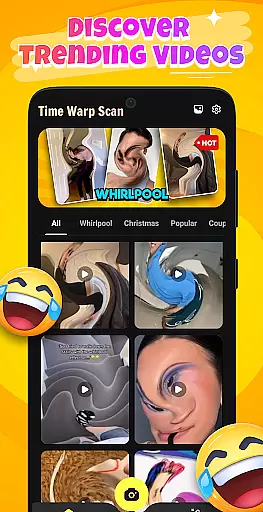
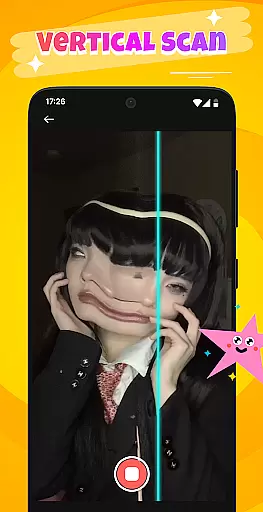
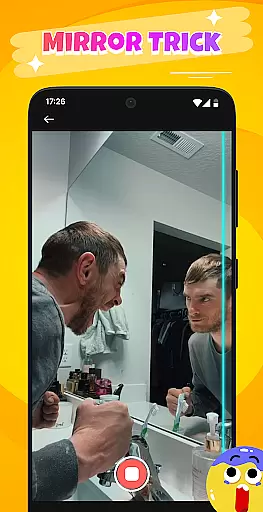
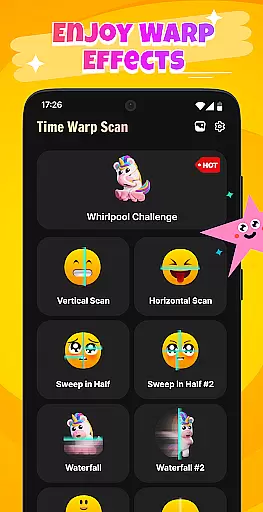
Time Warp Scan: Scanner Filter is an innovative photography app that brings magical time warp effects and creative face filters to your mobile device. The app's core feature is its real-time image distortion capability, where a moving scan line creates stunning "virtual but real" visual effects. This makes it perfect for users looking to add a unique twist to their photos and videos.
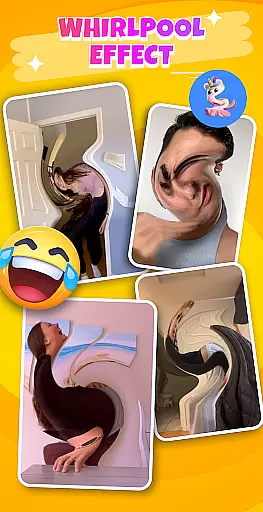
In addition to its signature time warp effect, the app offers a Whirlpool Filter that stretches and twists space in the frame, transforming ordinary objects into surreal forms. With intuitive video capture and recording features, users can easily create viral filter clips that are highly shareable on social networks. Whether you're altering facial features or crafting artistic landscapes, this app provides endless opportunities for creativity.
Use Time Warp Scan to craft unique content like magical eyebrows, leg-lengthening effects, or flowing watercolor-like mouths. It's especially valuable for social media enthusiasts and content creators who want to stand out with visually striking posts. The app's ability to inspire creativity while offering easy-to-use tools makes it a must-have for modern digital expression.
Time Warp Scan: Scanner Filter stands out with its diverse range of creative features designed to elevate your photography experience. At its heart is the real-time Time Warp Effect, which uses a dynamic scan line to distort images as you watch, creating a seamless blend of reality and illusion. This feature alone sets the app apart from traditional photo editors.
The Whirlpool Filter adds another layer of creativity by swirling, stretching, and twisting objects within the frame. This allows users to transform rigid shapes into fluid, dreamlike forms, making every photo or video uniquely captivating. Additionally, the app supports video recording with these effects applied in real time, enabling users to produce engaging clips that are primed for sharing on social platforms.
With suggested ideas such as "magical eyebrows," "flowing mouths," and holiday-themed filters like shimmering sunsets or Christmas trees, the app ensures there’s always something new to explore. Its one-touch operation simplifies the creative process, allowing both beginners and experts to achieve professional-grade results effortlessly.
Real-time capture and preview functionality is essential for any photography app, allowing users to see the effects applied to their images or videos instantly. This immediate feedback ensures that users can make necessary adjustments on the fly, enhancing their creative process.
Time Warp Scan: Scanner Filter excels in this area by providing unique scanning effects that distort the image as the scan line moves across the screen. Users can witness their photos transform into mesmerizing visuals with whirlpool filters and other time warp effects in real time, ensuring they capture the exact moment they envision.
The benefit of such a feature is multifold; it not only saves time by reducing the need for post-processing but also opens up new avenues for creativity. Users can experiment with different effects and see the results instantly, which is both engaging and educational, pushing the boundaries of traditional photography.
Ultimately, the real-time capture and preview feature in Time Warp Scan: Scanner Filter empowers users to produce content that stands out on social networks. By delivering instant visual feedback, it enhances user interaction and satisfaction, making the app a go-to tool for creating viral and impressive filter clips.
AI beauty and enhancement features have become a staple in modern photography apps, offering users the ability to refine and beautify their images with a single touch. The naturalness of these enhancements is crucial, as overly processed images can appear artificial and unappealing.
In Time Warp Scan: Scanner Filter, AI-powered tools assist in creating stunning yet believable effects. From magical face filters that alter facial features whimsically to creative video capture that adds an element of fun, the app uses AI to ensure that each modification enhances the photo without compromising its authenticity.
This focus on natural enhancement allows users to express their creativity freely while maintaining the genuineness of their content. Whether it's lengthening legs, distorting mouths, or drawing sunsets, the AI works to preserve the essence of the original image, resulting in share-worthy content that doesn't look over-edited.
By prioritizing the naturalness of AI beauty and enhancement features, Time Warp Scan: Scanner Filter provides a balance between creativity and realism. This approach not only boosts user engagement but also encourages sharing, as users are more likely to distribute content that looks authentic and visually pleasing across their social platforms.
Unique time warp effects
Easy one-touch usage
Viral social media potential
Creative filter variety
Real-time video support
May drain battery quickly
Learning curve for beginners
Limited free features
Occasional glitches
Ads between uses

What celebrity do you look like? Celebs will find your celebrity match!
 4.10
4.10
Perfect body tune & face app - photo retouch, makeup, slim body & beautify face.
4.80
Create AI Photos, Improve and restore quality of blurry, old or damaged pics.
4.20
The #1 app for B&W film developing featuring an advanced darkroom timer.
4.10
Photo editor & gallery. Crop pictures & edit photos offline, no wifi!
4.50
Fit multiple photos on one post. Create carousels & scroll layouts for Instagram
4.50
AI-powered video creator by MiniMax - Where ideas meet cinema
4.20
RAW video capture with advanced controls
4.40
Photo & Video Gallery app to manage albums and save WA Status easily.
4.70
Photo editor: AI filters, photo enhancer, pic collage maker, AI art generator.
4.80
Light-weight Media Gallery app for Android made with Jetpack Compose
4.60
Create collages easily! Nice pic collage maker & background eraser for Instagram
4.50
Search, tag and rate your way to an organized image gallery
4.40
A reflected light meter with spot metering and incident light metering.
4.40
Professional camera app that brings DSLR manual photography controls to Android.
4.20
All-in-One Editor & AI Photo Enhancer, Collage, Cartoonify, Funny Stickers & BGS
4.10
Photo editor: face & body editor, beauty cam, filters and quality enhancer.
4.00
Application for remote controlling DSLR
3.00
Remote control the phone camera shutter from your smartwatch and take a picture
1.60


User Reviews