


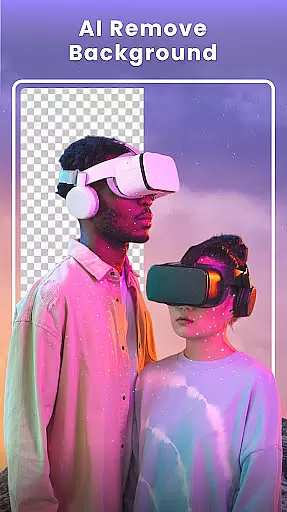



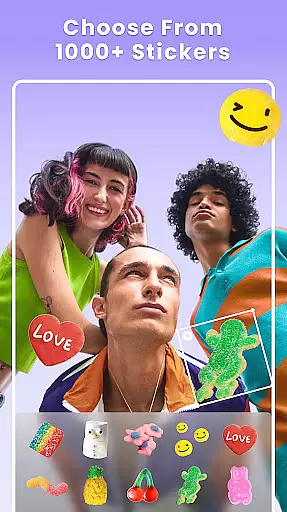

Photo Collage Maker - FunPic is a versatile photography app designed to help users create stunning photo collages and video stories. With over 300 layouts, users can combine photos into eye-catching arrangements while utilizing creative tools like filters, text, stickers, and brushes. The app also features AI-powered editing options such as background removal and object erasure, making it easy to craft flawless images.
In addition to its collage-making capabilities, the app offers video collage functionality, allowing users to merge videos and photos with music, transitions, and decorative elements. Whether you're looking to enhance your Instagram feed or relive memories through dynamic slideshows, this app provides all the tools necessary for expressing creativity and personalizing visual content.
One of the standout features of Photo Collage Maker - FunPic is its extensive library of design assets. Users have access to over 1000 stickers, backgrounds, and templates tailored for various occasions, ensuring every collage feels unique. The app supports advanced customization options, including aspect ratio adjustments, doodling, and personalized text overlays, which make it suitable for both casual sharing and professional projects.
The app's AI-driven tools set it apart from competitors. From automatic background removal to object cleanup, these intelligent features simplify complex editing tasks. Additionally, the video collage maker lets users blend media formats seamlessly, complete with audio tracks and animated effects. This combination of rich creative resources and smart editing technology ensures that users can produce high-quality visuals without needing prior design experience.
Real-time capture and preview functionality is essential for any photography app, allowing users to see exactly what their final image will look like before taking the shot. Photo Collage Maker - FunPic offers a dynamic preview feature that lets users experiment with different collage layouts, filters, and effects instantly.
This application provides over 300 layouts and countless combinations of stickers, backgrounds, and text options, all visible in real-time as you create your collage. This immediate feedback empowers users to make creative decisions on the fly, ensuring their final product matches their vision.
With the ability to adjust photo ratios, apply artistic filters, and add music or doodles, users can craft unique collages that are perfectly suited for platforms like Instagram or WhatsApp without any guesswork. The real-time preview ensures every adjustment, from border width to sticker placement, appears exactly as intended.
The instant rendering of complex edits, such as background removal or adding animation effects, showcases the app's powerful processing capabilities. Users can seamlessly integrate these advanced features into their projects, confident that the final output will reflect their creative intent with precision.
AI-powered beauty and enhancement tools have become a cornerstone of modern photo editing, allowing users to refine and perfect their images while maintaining a natural look. Photo Collage Maker - FunPic incorporates sophisticated AI algorithms to deliver enhancements that elevate photos without appearing artificial or over-processed.
One standout feature is the AI background remover, which intelligently isolates subjects and allows for one-tap replacement of backgrounds. This tool ensures clean edges and seamless integration with new backdrops, preserving the authenticity of the original image. Additionally, the AI eraser lets users remove unwanted objects effortlessly, keeping the focus on the main subject.
Beyond basic edits, the app offers artistic filters, blur effects, and precise cropping tools that enhance the overall composition. These features work harmoniously to bring out the best in every photo, whether itu2019s a professional portrait or a casual snapshot. The emphasis on natural results makes it ideal for users who value subtlety in their edits.
By combining intuitive design with powerful AI capabilities, Photo Collage Maker - FunPic ensures that even novice editors can achieve polished, professional-quality results. The balance between enhancement and realism sets this app apart, making it a reliable choice for anyone looking to elevate their photography with minimal effort.
User-friendly interface
Extensive layout options
AI-powered editing tools
Versatile design assets
Creative freedom
Premium features locked
Ads may interrupt workflow
Occasional bugs reported
Learning curve for beginners
Limited free templates

All-in-One Editor & AI Photo Enhancer, Beautify & Retouch, Collage, Cartoonify
 4.20
4.20
Professional video recording application with manual controls for filmmakers!
2.80
How old age camera Gender Swap App Face Shape Hairstyle App Hair Styler App fun!
4.00
Photo editor & gallery. Crop pictures & edit photos offline, no wifi!
4.50
A reflected light meter with spot metering and incident light metering.
4.40
See your baby AI baby face generator AI baby maker Face generator babymaker fun!
4.70
Collage your moments in one tap: 1000+ layouts, filters, stickers, and texts.
4.90
Remote control the phone camera shutter from your smartwatch and take a picture
1.60
Edit photos with the picture generator: PS2 & AI Clay filters, cartoon effects.
4.50
Create funny photos and videos with the popular Time Warp Scan filter.
4.90
Photo prints, cards, & gifts at Walgreens. Easy ordering & fast local pickup !
4.80
Android Native system HD camera app. Never been so simple and faster.
4.70
Add Watermark - Sign your pictures with a text or logo. Effective, quick, easy!
4.50
Movie camera, supports pro recording settings for filming. Try it and be amazed!
4.50
Trendy TikTok time warp scan funny filter app brings you unique photos & videos.
4.40
Professional camera app that brings DSLR manual photography controls to Android.
4.20
How would you look like with a differently shaped nose, chin or lips?
3.90
USB Storage Access for Photos, Videos, Music and Documents
3.80
Hair color changer, AI haircut app, fun hair editor and buzz cut filter for all!
3.80


User Reviews