

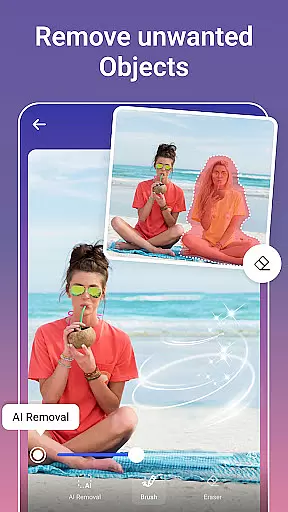
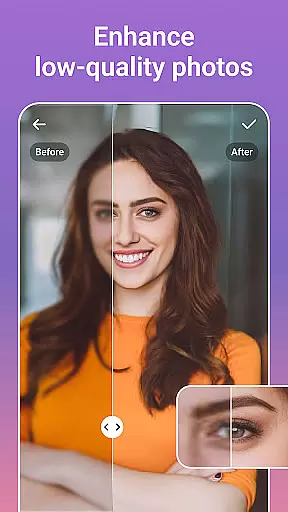
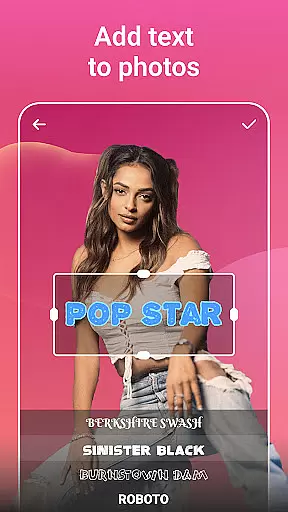


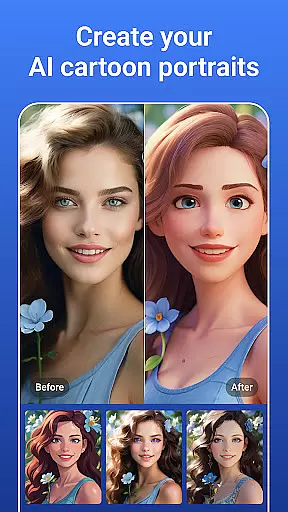

PicsLeap is an advanced AI-powered photo editing application that offers a comprehensive suite of tools for enhancing, transforming, and personalizing your images. The app provides users with features such as One-Tap Enhance, Magic Eraser, AI Face Swap, AI Cartoon Filters, and AI Background Removal, making it easy to achieve professional-quality edits with minimal effort. Whether you're looking to restore old photos, create stunning collages, or experiment with artistic effects, PicsLeap has the tools to meet all your photo editing needs.
One of the standout aspects of PicsLeap is its user-friendly interface, which allows even beginners to produce high-quality results. With over 100 filters and effects, including textures, retro styles, and light effects, users can embrace their signature style and make their photos truly unique. Additionally, PicsLeap supports instant sharing on platforms like Instagram and Facebook, ensuring your creations can be showcased without any hassle.
The app's powerful AI technology simplifies complex tasks such as removing unwanted objects, enhancing resolution, and creating custom stickers. These capabilities ensure that PicsLeap is not just a tool for editing but also a platform for unleashing creativity. Whether you're a casual photographer or a professional artist, PicsLeap empowers you to shape your photos easily and professionally, giving them the love they deserve.
PicsLeap stands out in the photography category due to its rich array of innovative features tailored to enhance user experience. At the core of its offering is the cutting-edge AI technology that powers tools like Magic Eraser, AI Face Swap, and AI Cartoon Filters. These tools allow users to effortlessly remove unwanted elements from photos, swap faces for fun transformations, and turn ordinary snaps into whimsical cartoon art. Each feature is designed to provide precise control while maintaining ease of use, ensuring that both amateur and professional photographers can achieve their desired outcomes.
In addition to its creative tools, PicsLeap offers practical solutions such as photo restoration and resolution enhancement. Users can breathe new life into old or low-quality images by boosting resolution and eliminating imperfections. The app also includes a robust collage maker, enabling users to weave together multiple snapshots into visually appealing compositions. With adjustable layouts, custom backgrounds, and borders, PicsLeap makes storytelling through photos simple yet impactful.
Another key aspect of PicsLeap is its commitment to accessibility and convenience. The intuitive interface ensures that even those with no prior editing experience can navigate the app with ease. Features like one-tap enhancements and intelligent background removal save time while delivering impressive results. Moreover, PicsLeap supports instant sharing across social media platforms, allowing users to showcase their work effortlessly. This combination of powerful functionality and user-centric design makes PicsLeap a top choice for anyone looking to elevate their photo editing game.
Real-time capture and preview functionality is essential for any photography app, allowing users to see exactly what their final image will look like before taking the shot. PicsLeap offers a seamless experience with its advanced AI-powered real-time effects that instantly apply filters and adjustments as you frame your photo.
The app's sophisticated algorithms ensure that every change, from light effects to background swaps, appears smoothly in the preview window. This immediate feedback empowers photographers to make creative decisions on the fly without interrupting their shooting flow.
With PicsLeap's intuitive interface, users can experiment with over 100 filters and effects such as texture overlays, double exposure combinations, and background blursu2014all visible in real time. This feature not only saves time but also enhances creativity by enabling quick iterations until achieving the perfect shot.
Ultimately, PicsLeapu2019s real-time capture and preview capabilities provide an invaluable tool for both amateur and professional photographers who seek precision and efficiency in their photo editing process while maintaining high-quality output ready for platforms like Instagram or Facebook.
AI beauty and enhancement features are revolutionizing how we approach photo editing by offering natural-looking improvements without manual intervention. PicsLeap stands out with its One-Tap Enhance tool which intelligently boosts photo resolution, restores old photos, and removes imperfections while preserving authenticity.
The Magic Eraser function allows users to remove unwanted objects effortlessly; it intelligently fills gaps left behind ensuring edits appear organic rather than artificial. Similarly, AI Face Swap technology provides realistic results when swapping faces between imagesu2014a popular yet challenging task made simple through PicsLeapu2019s cutting-edge algorithms.
In addition to these powerful tools, PicsLeap includes AI Cartoon Filters that transform ordinary photos into whimsical artworks reminiscent of vintage cartoons or manga stylesu2014all while retaining original facial expressions and details intact. These enhancements cater to diverse aesthetic preferences without compromising image integrity.
By leveraging PicsLeapu2019s comprehensive suite of AI-driven enhancementsu2014from skin smoothing to intricate background changesu2014users can achieve polished yet genuine-looking edits suitable for personal memories or professional portfolios alike.
User-friendly interface
Advanced AI tools
Versatile editing options
Instant social sharing
Free to download
Limited advanced controls
Occasional ads
Internet connection required
Some features may need subscription
Learning curve for beginners

Safe & smart flight with Go Fly drone controller for 40+ drone camera, zone map
 4.50
4.50
Create funny photos and videos with the popular Time Warp Scan filter.
4.90
An interval timer to automate photo taking process for timelapse
2.90
Edit like a pro with Hypic. Apply filters, AI effects, & magic touch.
4.40
Turn your phone into a professional camera - full DSLR manual photography
4.30
Add a dreamy vibe to your selfies and videos with soft style filters
4.3
Easily view, share, delete photos with Gallery.
4.70
Your personal guide to the sun and moon. Plan ahead, visualize and predict!
4.70
Discover How to Plan any Sun, Moon and Milky Way Photo You Imagine in Seconds
4.70
Perfect body tune & face app - photo retouch, makeup, slim body & beautify face.
4.80
Photo prints, cards, & gifts at Walgreens. Easy ordering & fast local pickup !
4.80
1M influencer's special filter
4.60
Transform photos into videos! Create realistic or anime-style images easily!
4.50
AI photo enhancer with Sora 2! Enhance, descratch, and colorize your old photos.
4.50
Use AI Video Generator to turn your words to ai generated videos.
4.50
Effortlessly organize, view and share your photos & videos with Gallery app!
4.40
How would you look like with a differently shaped nose, chin or lips?
3.90
Turn photos into cartoons & avatars! - Photo Editor, Cartoon Face!
3.90
HD Photo gallery and photo manager to edit, hide private photos, videos & albums
4.2


User Reviews