
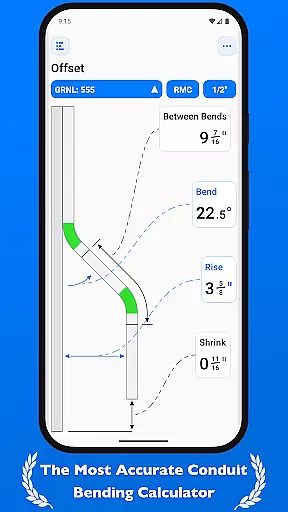
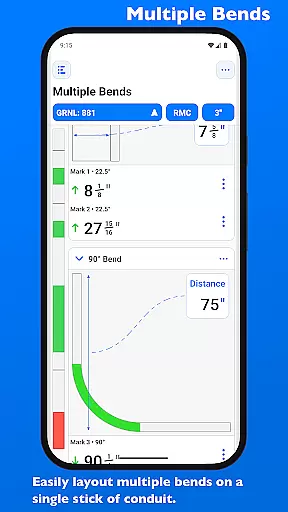
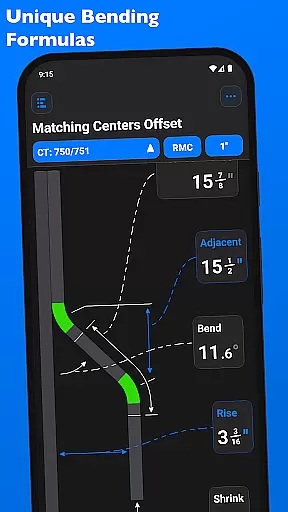
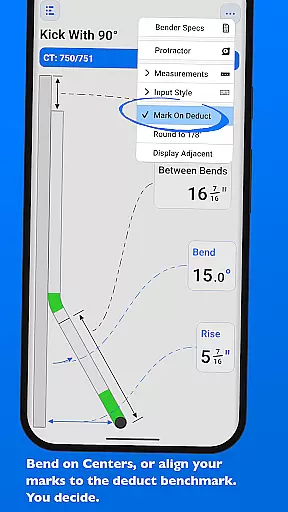
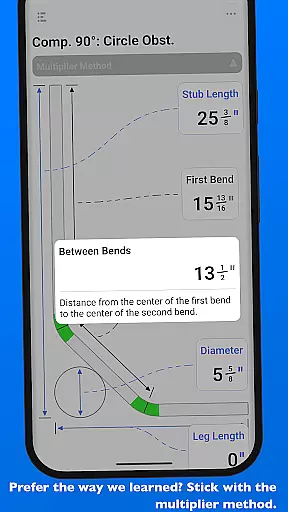
QuickBend is a cutting-edge conduit bending calculator app designed for precision and ease of use. It stands out by offering the most accurate measurements, accounting for the radius of the shoe and bender, conduit type, and size diameter. The app employs a centerline radius algorithm to ensure rigorous and field-tested calculations, making it an essential tool for electricians and DIY enthusiasts alike.
Beyond its core functionality, QuickBend provides an intuitive interface for inputting data, allowing users to toggle between inches and centimeters. Its innovative features include visual feedback through QuickCheck, which uses color-coded text to indicate the feasibility of a bend. With support for various bends and the ability to layout multiple bends on a single conduit, QuickBend ensures efficiency and accuracy in every project.
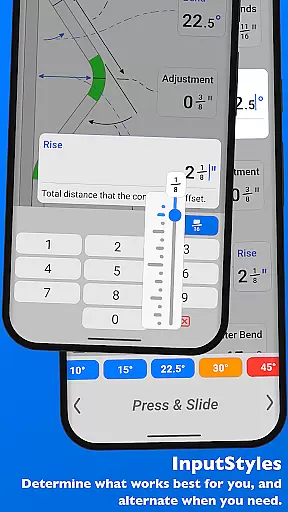
QuickBend boasts a range of advanced features tailored for professionals working with conduits. One standout feature is the ability to switch between different input styles, such as a number pad or slider bar, catering to user preference and task complexity. This flexibility enhances both speed and precision when entering measurements.
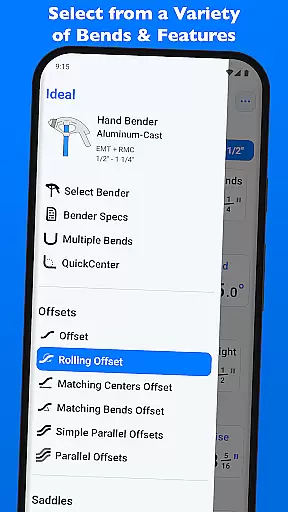
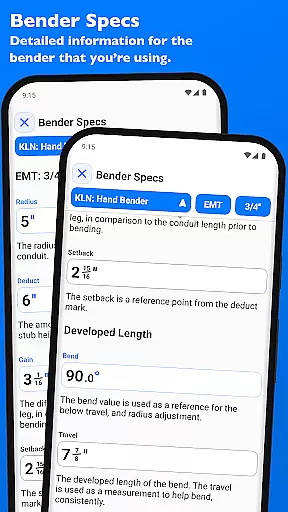
The app supports numerous types of bends including Offset, Rolling Offset, Three-Point Saddle, and more. Each calculation is meticulously processed using specifications provided by manufacturers, ensuring reliable results. Additionally, QuickBend allows users to edit and view detailed bender specifications, providing insights into centerline radius, deduct, gain, and setback values. These comprehensive tools make QuickBend indispensable for any conduit-related work.
QuickBend revolutionizes task management for electricians and professionals working with conduits by offering precise calculations and comprehensive planning tools. The app's core functionality centers around its advanced conduit bending calculator, which takes into account critical factors such as shoe radius, bender specifications, and conduit dimensions.
The application provides an intuitive interface that allows users to input data using various methods including a number pad or slider bar. This flexibility ensures that both experienced professionals and novices can efficiently manage their bending tasks. With real-time feedback on bend feasibility through the QuickCheck feature, users can avoid costly mistakes before they even begin the bending process.
What sets QuickBend apart is its ability to handle complex bending scenarios while maintaining accuracy. The app supports multiple bend types and offers detailed measurements for each mark on the conduit, enabling users to plan and execute even the most intricate conduit layouts with confidence.
While QuickBend focuses primarily on conduit bending calculations, its reliability extends to seamless cross-device functionality. Electricians can work on their projects across multiple devices without losing any progress or data integrity. The app maintains consistent information about bender specifications, conduit types, and saved calculations regardless of which device is being used.
QuickBend's synchronization capabilities are particularly valuable for professional electricians who need to access their work both on-site and in the office. The app allows users to pin frequently used benders for quick access across all devices, ensuring that their preferred tools are always readily available. This feature saves valuable time when switching between different work environments.
The application's robust synchronization system also includes detailed bender specifications and custom settings, making it easy for teams to collaborate and share standardized bending parameters. Whether working individually or as part of a team, users can trust that their data will remain consistent and up-to-date across all their devices.
User-friendly interface
Accurate measurement calculations
Supports multiple bend types
Intuitive input methods
Comprehensive bender specifications
Premium version required for full access
Steep learning curve for beginners
Limited free features
Occasional performance lags
High system requirements

Secure, fast, open-source, VNC and SSH Remote Desktop for Windows, Linux and Mac
 4.70
4.70
Mega cloud explorer plugin for Solid Explorer
3.80
Send files, sync SMS, notifications & clipboard across devices via local network
4.40
IP Camera Viewer - Android TV : RTSP Surveillance camera viewer for Android TV
4.0
Functional QR scanner and barcode reader that requires little storage space.
4.60
ID.me Authenticator is a simple and free Two Factor Authentication solution
3.50
Great calculator for Android named one of USA TODAY's "25 Essential Apps".
4.90
Best Tool for the professionals Electrician, Electrical contractors, etc.
4.90
Lightweight PDF, Word, Excel reader.
4.60
Multilingual translator for text, voice, and image translation!
4.90
A beautiful digital clock with autostart and many other functions
4.70
Planet Free VPN - The best Fast Unlimited and Secure VPN Without Logs
4.50
Device's storage information in a simple and clear graphical form (infographics)
4.10
Font maker keyboard with your own handwriting
4.10
Unlock AutoNotification
4.00
Smart PDF reader & editor to view, organize and manage PDF documents easily.
3.70
Find and delete junk files & block unwanted notifications & manage files
3.70
Auto-shutoff Alarm with Sunrise, Sunset & Fixed Options.
3.50
Code on-the-go with VScode for Android. Edit,debug and collaborate from mobile!!
3.10


User Reviews