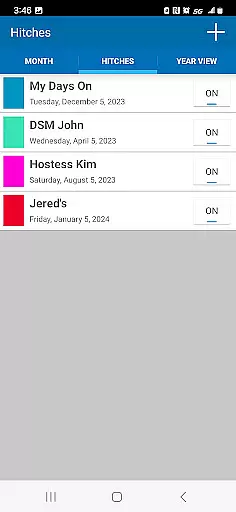
Oilfield Calendar is a productivity app designed specifically for oilfield workers, helping them efficiently manage their demanding schedules. The app offers an intuitive interface to customize work hitches for various roles in the oil and gas industry, including drilling, production, and facility workers. With features like multiple schedule creation, PDF export, and holiday tracking, it ensures users can organize both their professional and personal lives seamlessly.
The app's unique selling point is its specialized functionality tailored to the oilfield sector. Users can compare different work schedules, plan for important dates using month and year views, and even track DSM tours for vendors. Whether you're checking if Christmas falls on your days off or coordinating with your team, Oilfield Calendar provides the tools needed to stay organized in this challenging industry.
This app proves invaluable for those working in the oil patch, offering practical solutions such as easy-to-use hitch editors and visual indicators for holidays. By streamlining schedule management, it helps workers maintain better work-life balance while operating in one of the most demanding work environments.
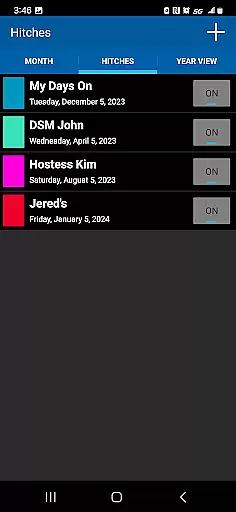
Oilfield Calendar stands out with its comprehensive set of features designed specifically for the oil and gas industry. The app's core functionality revolves around its powerful scheduling system, allowing users to create and modify custom hitches through an intuitive editor interface. This feature caters to various industry roles, from field workers to vendors, providing tailored solutions for each position's unique scheduling needs.
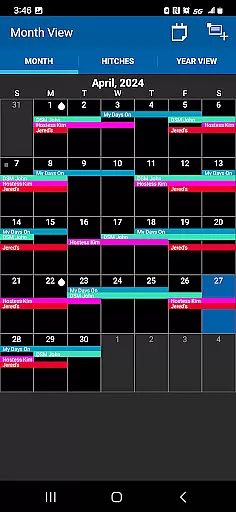
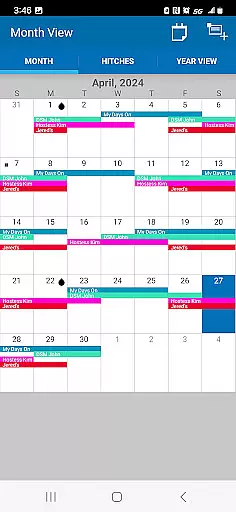
A key innovation is the app's ability to handle multiple schedules simultaneously, enabling users to compare different work arrangements and plan accordingly. The inclusion of detailed month and year views, marked with oil drop indicators for holidays, helps workers plan both their professional commitments and personal events effectively. Additionally, the app supports PDF printing and sharing capabilities, making it easy to distribute schedules among teams or family members.
Other notable features include vendor-specific tools for tracking DSM tours and signing tickets, plus integration-friendly options that make it an essential tool alongside other industry-standard equipment. These specialized functions demonstrate how Oilfield Calendar goes beyond basic calendar apps to address the specific challenges faced by oilfield professionals.
Effective task management is crucial for oilfield workers who need to balance demanding work schedules with personal time. The Oilfield Calendar app excels in this area by providing a comprehensive suite of tools designed specifically for the unique needs of the oil and gas industry.
The app allows users to create and modify work hitches through an intuitive hitch editor, ensuring that each worker's schedule is personalized to their specific role, whether they are involved in drilling, production, or facility management. This customization extends to marking important dates and holidays, which are highlighted with oil drop icons in the month view, making it easier to plan time off and family events.
Additionally, the ability to generate and compare multiple schedules in different viewsu2014such as monthly or yearlyu2014enables better long-term planning. Users can export these schedules as PDFs for sharing with family or colleagues, thus enhancing communication and coordination.
By integrating essential features like vendor tracking and DSM scheduling, Oilfield Calendar ensures that all aspects of an oilfield workeru2019s professional life are seamlessly managed, allowing them to focus on their core responsibilities without losing sight of personal priorities.
In today's fast-paced world, having reliable cross-device synchronization is vital for maintaining productivity, especially for oilfield workers who are often on the move. The Oilfield Calendar app addresses this need by offering robust synchronization capabilities that ensure your schedule is always up-to-date, no matter which device you use.
Whether you're at home planning your next hitch or at the rig checking your upcoming shifts, the app provides consistent access to your calendar across multiple devices. This means you can start creating a schedule on your tablet and finish it on your smartphone without missing a beat.
The app also supports real-time updates, so any changes made to your calendar are instantly reflected on all linked devices. This feature is particularly useful for last-minute schedule adjustments or when coordinating with team members and vendors, ensuring everyone is on the same page.
Furthermore, the ability to print and share schedules in PDF format adds another layer of convenience, allowing for offline access and easy distribution. With Oilfield Calendar, staying organized and connected has never been easier, empowering oilfield professionals to manage their busy lives efficiently and effectively.
User-friendly interface
Industry-specific features
Multiple schedule management
PDF export capability
Holiday tracking system
Limited to oilfield industry
No automatic syncing
Premium features locked
Occasional bugs reported
Learning curve for new users

Experience Reading - Night Mode for Documents
 4.40
4.40
Create study competitions, track your hours, and stay consistent with friends
4.4
Direct Chat without saving contacts & Dual WA Account on Single Device
4.70
Fill, sign & send docs, forms, agreements & contracts via electronic signature.
4.50
Activate Two Factor Authentication (2FA or Multi OTP), Password manager and more
4.10
Create and edit presentations with Google Slides, part of Google Workspace.
4.00
Docker, Kubernetes management over Portainer Mobile
4.40
A comprehensive suite of tools designed specifically for Lactation Consultants
4.3
QuickEdit is a fast, stable and full featured text and code editor.
4.20
Native client for Forgejo and Gitea
5.00
Android Wallet Password Manager
4.80
Understand anything with a personalized AI research assistant
4.80
All document reader, all in one file viewer read PDF, DOCX, XLS, PPT, TXT files.
4.60
CalenGoo is a very flexible and feature-rich calendar app
4.40
Experience real multitasking on your Android!
4.00
Wake up & get tasks done! Add alarms & reminders on the Clock Launcher.
4.00
Remotely view listen control and record cameras.
3.70
Simple and reliable communication between inmates, friends and family
3.20
Code on-the-go with VScode for Android. Edit,debug and collaborate from mobile!!
3.10


User Reviews