




Microsoft Copilot is an advanced AI productivity tool designed to enhance your daily workflow. This application combines the latest OpenAI and Microsoft AI models, offering users a comprehensive AI companion that excels in reasoning, chat capabilities, and creative tasks. The app's core functionality lies in its ability to generate text, images, and even complex visual designs through simple conversational prompts.
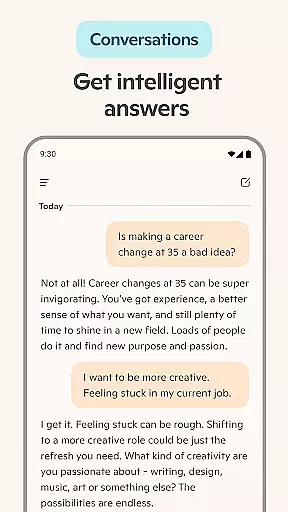
One of Copilot's standout features is its versatility across various use cases. Whether you need help drafting professional documents, creating marketing materials, or generating unique artwork, this app delivers exceptional results. Its intuitive interface allows users to seamlessly switch between different modes, including 'Smart' mode powered by GPT-5 technology. The application proves particularly valuable for professionals seeking to boost their productivity while maintaining high-quality output.
The true value of Microsoft Copilot emerges in its ability to adapt to different professional scenarios. From streamlining business communications to facilitating creative projects, this AI assistant provides meaningful support that saves time and enhances work quality. Users can leverage its capabilities for everything from writing assistance to image generation, making it an indispensable tool for modern knowledge workers.
Microsoft Copilot distinguishes itself through several innovative features that set it apart from traditional productivity tools. The application's most notable capability is its integration of multiple AI models into a unified experience. Users can access both reasoning and creative functions through a single interface, eliminating the need to switch between different applications for various tasks.
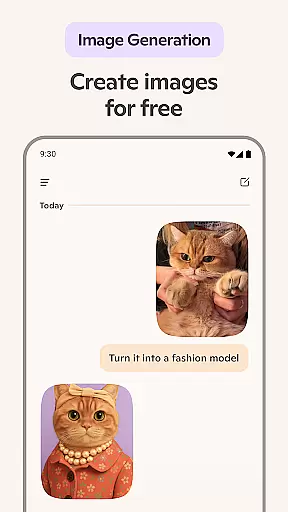
The app's feature set includes advanced text generation, multi-language support, and sophisticated image creation tools. Its AI photo generator can transform textual descriptions into visual content ranging from abstract designs to photorealistic images. Additionally, the voice chat functionality enables hands-free operation, allowing users to compose documents or generate visuals through spoken commands alone. These features work together to create a seamless user experience that adapts to different working styles.
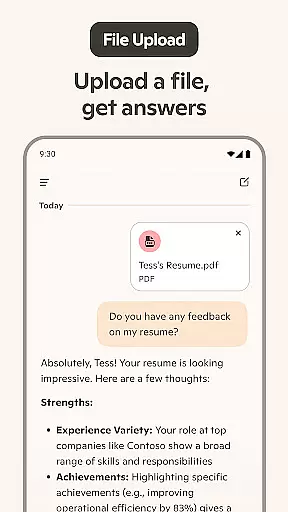
What truly sets Microsoft Copilot apart is its ability to handle complex tasks with remarkable efficiency. The app's smart summarization feature distills lengthy information into concise insights, while its writing assistant helps craft professional-grade documents. Furthermore, its multilingual capabilities extend beyond basic translation to include regional dialect optimization. These sophisticated features make Copilot an invaluable asset for global teams and international projects.
At the heart of Microsoft Copilot lies its robust core task management capabilities, designed to streamline both personal and professional workflows. This AI-driven productivity tool excels in organizing tasks, setting priorities, and managing deadlines, ensuring that users can focus on what truly matters.
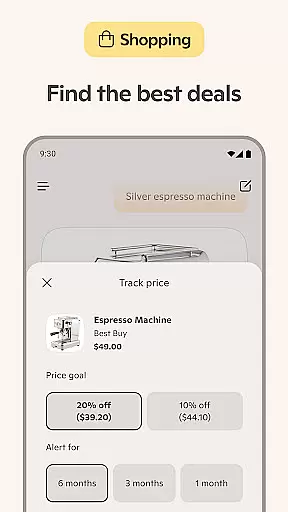
The application leverages advanced AI algorithms to provide summarized answers and insights, empowering users to accomplish more with less effort. Whether it's drafting emails, creating shopping lists, or planning weekly meals, Copilot's intuitive interface simplifies these processes through smart suggestions and automated task handling.
Users benefit from seamless integration across various platforms, allowing them to access their tasks and workflows from any device. This cross-platform functionality ensures that whether you're at your desk or on the go, your productivity is never compromised.
Ultimately, Microsoft Copilot transforms how individuals approach task management by combining powerful AI assistance with user-friendly features. The result is an efficient, reliable system that adapts to each user's unique needs, enhancing overall productivity and effectiveness.
Microsoft Copilot sets a new standard for cross-device synchronization reliability, ensuring that your data and workflows remain consistent and up-to-date across all your devices. This feature is crucial for users who rely on multiple platforms throughout their day, maintaining continuity in their digital experiences.
The application employs cutting-edge synchronization technologies that guarantee real-time updates without compromising data integrity. Whether you're switching from your desktop to your mobile device or vice versa, you can trust that your information will be accurately reflected, allowing for uninterrupted productivity.
This reliable synchronization extends beyond mere text documents, encompassing AI-generated images, chat histories, and personalized settings. Such comprehensive coverage ensures that every aspect of your interaction with Copilot remains cohesive and accessible, regardless of the device you choose to use.
By prioritizing cross-device synchronization reliability, Microsoft Copilot not only enhances user convenience but also reinforces data security and consistency. Users can confidently engage with their tasks knowing that their work environment is seamlessly maintained across all touchpoints, fostering a truly integrated and efficient digital lifestyle.
Advanced AI capabilities
Multi-functional platform
Intuitive user interface
High-quality outputs
Versatile use cases
Premium subscription required
Steep learning curve
Resource-intensive
Limited offline functionality
Occasional response delays

Seamlessly integrate data and reports to build your presentation to impress
 4.80
4.80
All in one sketching tool. Technical and General drawing. Online Maps support.
3.70
A lightweight JSON & XML files creator, editor and viewer (Premium Version)
4.40
We're working to become the best machining app on the market! www.cncdirt.com
4.80
All in One PDF Reader: Manage, Read and Edit your Documents
4.20
PDF scanner & converter for files, photos, lottery, QR codes. One swipe away!
4.50
Activate Two Factor Authentication (2FA or Multi OTP), Password manager and more
4.10
Quickly and easily keep track of your work shifts
4.70
Okta MFA
4.70
Secure, fast, open-source, VNC and SSH Remote Desktop for Windows, Linux and Mac
4.70
App Lock with fingerprint, password: Lock apps & hide photos with lock screens
4.60
All document reader, all in one file viewer read PDF, DOCX, XLS, PPT, TXT files.
4.60
Fill, sign & send docs, forms, agreements & contracts via electronic signature.
4.50
When you Focus, so will your Bean in this cozy focus timer
4.30
Enjoy classic gameplay with customizable features and retro-style graphics.
4.30 4.20
4.20
Professional calendar app for Google Calendar, MS Outlook & Exchange
4.20
Intelligent AI Assistant
4.10
The ultimate file manager for rooted devices. The original and still the best.
4.00


User Reviews