

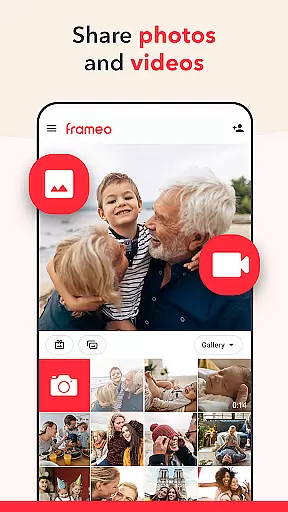
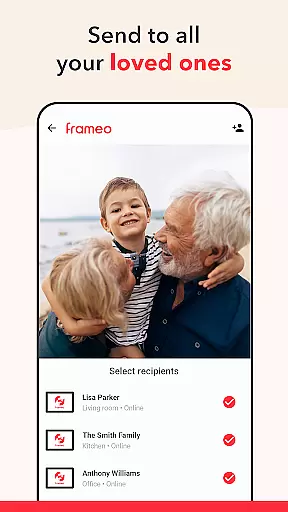



Frameo is a dedicated photography app that allows users to seamlessly share photos and videos with WiFi digital photo frames. This app bridges the gap between your smartphone and Frameo's connected digital frames, making it easy to instantly send media to loved ones anywhere in the world. With support for sending multiple photos and short video clips, adding captions, and applying graphical themes for special occasions, Frameo ensures your cherished moments are shared securely and stylishly.
The app also offers advanced features through its subscription service, Frameo+, which includes benefits like cloud backup, remote photo management, and the ability to send up to 100 photos or 2-minute videos at once. Whether you're sharing vacation memories or enabling grandparents to witness family milestones, Frameo provides a thoughtful way to stay connected through visual storytelling.
Frameo stands out with its specialized focus on enhancing digital frame interactions. The app supports sending up to 10 photos or 15-second videos at once, complete with captions and customizable graphical themes for occasions like birthdays or holidays. Its intuitive interface lets users connect multiple frames and instantly receive notifications when their shared content is liked by the frame owner.
For power users, Frameo+ unlocks additional capabilities such as viewing and managing frame photos directly from the app, backing up media with client-side encryption, and casting photos to a TV via Google Cast. These features ensure a seamless blend of convenience, security, and versatility, making Frameo an ideal choice for those looking to enrich their digital frame experience while maintaining privacy and creative control.
Real-time capture and preview functionality is essential for ensuring that users can instantly see the results of their photography efforts. Frameo excels in this area by allowing users to send photos and videos directly from their smartphones to connected digital photo frames with just a few taps.
The app ensures that media appears on the frame within seconds, providing an immediate and gratifying preview experience. This real-time feature enables users to share moments as they happen, making it perfect for keeping loved ones updated during vacations or special events.
With the ability to add captions and greetings with graphical themes, users can enhance their shared content, making each photo or video not only a visual treat but also a storytelling medium. The instant feedback notification when frame owners like the photos adds another layer of engagement and interaction.
AI beauty and enhancement features are increasingly important in photography apps, offering users the ability to refine and perfect their images before sharing. Frameo incorporates advanced AI technology to ensure that all enhancements appear natural and true to life.
While primarily focused on seamless sharing, Frameo+ offers extended functionalities such as cloud backup with client-side encryption, which preserves the original quality of photos and videos. This ensures that memories remain vivid and unaltered over time.
Additionally, the app's capability to send longer video clips and larger batches of photos speaks to its sophisticated handling of media formats, optimizing them for display without compromising on quality. These features collectively contribute to a more refined and naturally enhanced viewing experience for friends and family enjoying the shared content on Frameo WiFi frames.
User-friendly interface
Secure end-to-end encryption
Instant global sharing
Customizable themes
Google Cast integration
Limited to Frameo frames
Premium features require subscription
No offline functionality
Video length restrictions
Dependent on WiFi connectivity

Gallery show photo, video, slideshow, is perfect 3D effect private photo albums.
 4.80
4.80
Long exposure camera with computational photography
2.60
Search, tag and rate your way to an organized image gallery
4.40
Application for remote controlling DSLR
3.00
Pet Camera
3.70
Create AI photos & videos with Enhancer; restore, fix, beautify, enhance photos
4.50
Luminar: Photo Editor - easy picture editing with AI
4.20
Easily create custom gifts, cards, photo books & more on the Shutterfly app!
4.60
A light meter for true photographers.
4.20
Photo editor: AI filters, photo enhancer, pic collage maker, AI art generator.
4.80
Easily view, share, delete photos with Gallery.
4.70
Safe & smart flight with Go Fly drone controller for 40+ drone camera, zone map
4.50
Movie camera, supports pro recording settings for filming. Try it and be amazed!
4.50
Create AI Photos, Improve and restore quality of blurry, old or damaged pics.
4.20
All-in-One Editor & AI Photo Enhancer, Collage, Cartoonify, Funny Stickers & BGS
4.10
Photobooth mini FULL app will allow you to add more fun to your parties
4.00
Perfect photos with body shaping, BG changer and object remover.
3.70
Superimpose one photo on top of another using the original Superimpose app!
3.20
Over 800 film simulation recipes for Fujifilm. Black Friday Offer!
4.2


User Reviews