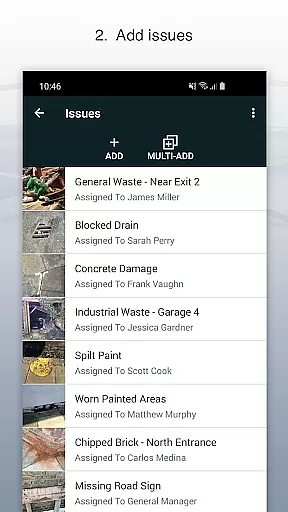
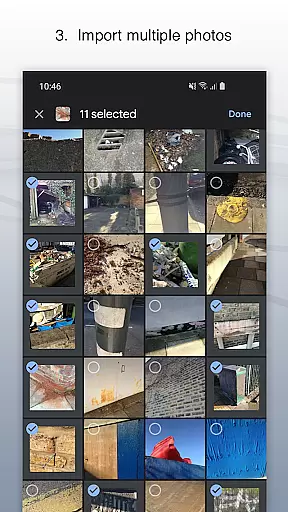
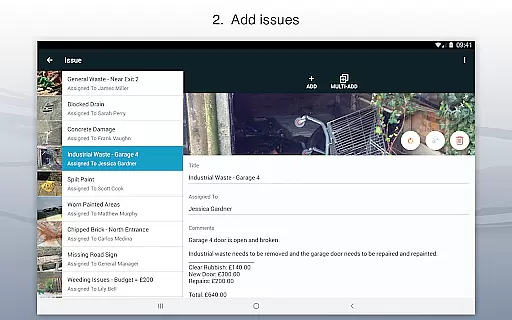
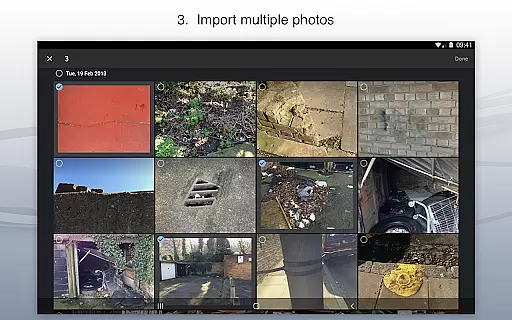
Site Audit Pro is a powerful productivity tool designed to simplify the auditing process for businesses across various industries. This mobile application allows users to efficiently record issues by capturing photos, adding descriptive titles, assigning tasks to specific individuals, and including relevant comments. The app's intuitive interface makes it easy to annotate images, highlighting critical information directly on the photo.
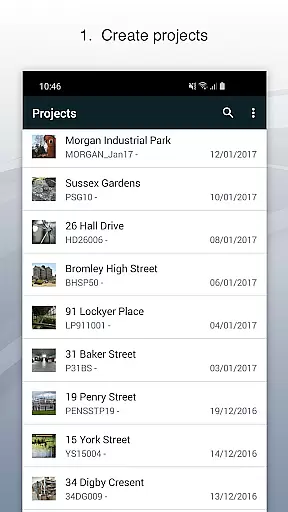
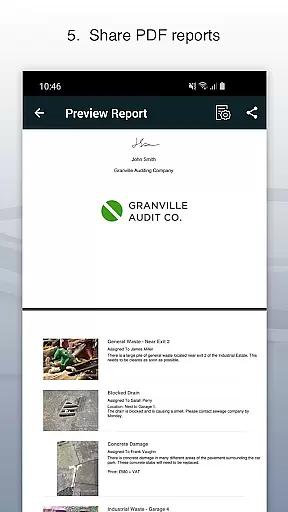
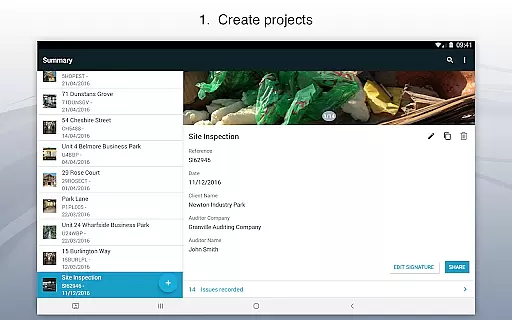
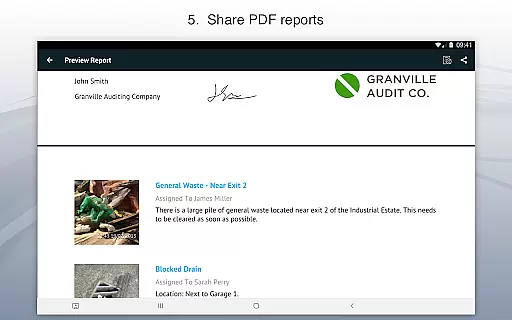
One of Site Audit Pro's standout features is its ability to organize identified issues into distinct projects, incorporating detailed site and client information unique to each audit. This ensures that all data remains well-structured and easily accessible. Additionally, users can instantly generate and share professional audit reports in PDF format via email or cloud services like Dropbox, eliminating the need to return to the office for report creation.
The app is particularly beneficial for professionals conducting safety inspections, creating punch lists, performing snagging tasks, or providing quotations. With customizable reporting options, including company branding and tailored content, Site Audit Pro adds a personal and professional touch to every audit report, enhancing overall business productivity.
Site Audit Pro offers an extensive range of features that cater to the diverse needs of auditing professionals. One of its primary capabilities is the ability to capture and document issues through photos, accompanied by detailed annotations that emphasize crucial details. Users can assign tasks to team members directly within the app, streamlining communication and accountability during the auditing process.
The app provides robust project management tools, enabling users to categorize issues into separate projects while incorporating specific site and client information. This functionality ensures that all audit-related data is systematically organized and readily available for future reference. Furthermore, Site Audit Pro supports instant sharing of customized audit reports in multiple formats, facilitating seamless collaboration with clients and stakeholders.
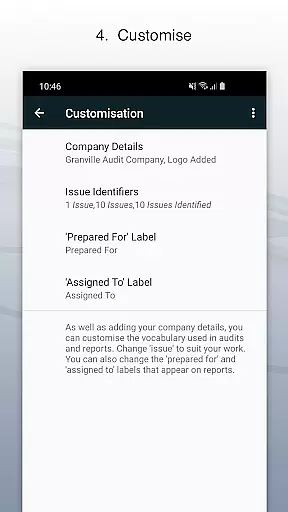
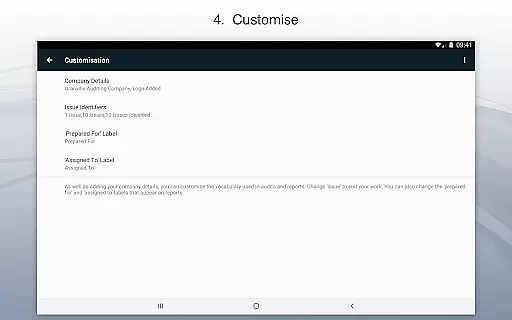
Customization is at the heart of Site Audit Pro's design. Users can personalize their reports by including company logos, auditor names, and signatures, thereby enhancing the professionalism of each document. The app also allows modification of report language and presentation styles, adapting to various industry-specific terminologies and preferences. With eight professionally designed report templates to choose from, Site Audit Pro empowers businesses to present their findings in a manner that best reflects their brand identity.
Effective task management is essential for productivity-focused applications like Site Audit Pro. This app streamlines the process of recording issues, assigning tasks, and managing projects on the go.
Site Audit Pro allows users to record issues with accompanying photos, assign tasks to specific individuals, and add relevant comments. This ensures that every task is well-documented and communicated clearly to all stakeholders involved in a project.
Users benefit from an organized workflow where tasks are categorized into projects, complete with site and client details. This structured approach not only enhances clarity but also significantly reduces the time needed to manage complex audits or inspections.
By integrating these comprehensive task management features, Site Audit Pro empowers businesses to improve their operational efficiency, making it an invaluable tool for teams looking to optimize their auditing processes.
Cross-device synchronization is crucial for ensuring that data captured in one place can be accessed and updated across multiple devices seamlessly. Site Audit Pro excels in providing reliable synchronization capabilities that support dynamic work environments.
The app enables real-time sharing of audit reports without the need to return to the office. Whether you're using a smartphone or tablet, your data remains consistent and up-to-date across all devices, allowing for uninterrupted productivity.
With options to share reports as PDFs via email, Dropbox, and other platforms, Site Audit Pro ensures that all team members have access to the latest information. This feature supports collaboration and decision-making, regardless of location.
Ultimately, Site Audit Pro's robust cross-device synchronization provides peace of mind, knowing that critical data is always synchronized and accessible, thus enhancing overall project management and team coordination.
User-friendly interface
Comprehensive reporting tools
Customizable report templates
Efficient task assignment
Offline functionality
Limited free version features
Occasional syncing issues
Subscription costs may be high
Steep learning curve for beginners
Some advanced features require technical knowledge

Secure, fast, open-source, VNC and SSH Remote Desktop for Windows, Linux and Mac
 4.70
4.70
Seamlessly integrate data and reports to build your presentation to impress
4.80
Total remote control for your Android device, PC and cloud services (IFTTT)!
4.20
Make your handwriting beautiful, even more than pen on paper.
3.60
IP Camera Viewer - Android TV : RTSP Surveillance camera viewer for Android TV
4.3
All in One PDF Reader: Manage, Read and Edit your Documents
4.20
Multilingual translator for text, voice, and image translation!
4.90
Lightweight PDF, Word, Excel reader.
4.60
AI Chatbot and AI writing assistant powered by ChatGPT.
4.60
8 custom complications. Custom Time Fonts. Beautiful color schemes. A++ Design.
5.00
The long-awaited modern gallery app for your Nextcloud server
4.70
aCalendar+ makes your day, week and month
4.70
All document reader, all in one file viewer read PDF, DOCX, XLS, PPT, TXT files.
4.60
CalenGoo is a very flexible and feature-rich calendar app
4.40
Professional calendar app for Google Calendar, MS Outlook & Exchange
4.20
Font maker keyboard with your own handwriting
4.10
Experience real multitasking on your Android!
4.00
All in one sketching tool. Technical and General drawing. Online Maps support.
3.70
Auto-shutoff Alarm with Sunrise, Sunset & Fixed Options.
3.50


User Reviews