
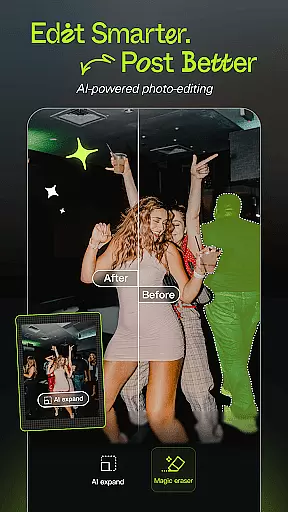

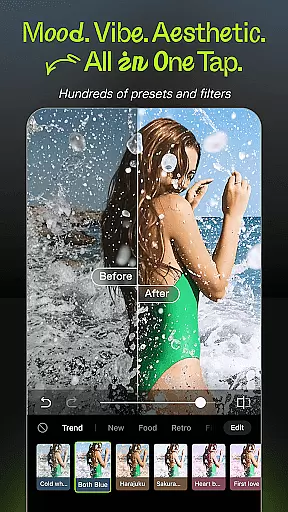
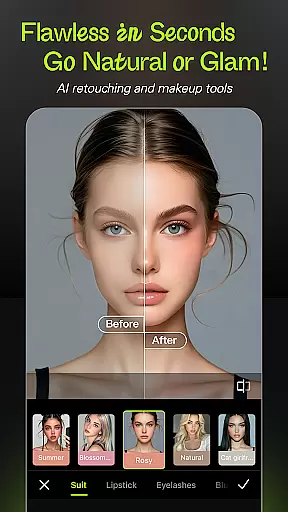

Hypic is an advanced AI-powered photo editing application designed to transform ordinary photos into stunning works of art. With its cutting-edge features, the app allows users to effortlessly enhance image quality, apply stylish filters, and create professional-grade visuals.
The app's standout capabilities include instant background removal, avatar generation, and aesthetic template options that cater to various creative needs. Whether you're a casual editor or a digital creator, Hypic offers intuitive tools for crafting visually appealing content tailored for platforms like Instagram, TikTok, and Pinterest.
Perfect for elevating your social media presence, Hypic makes photo editing accessible, fast, and enjoyable for everyone, regardless of skill level. Its batch editing and collage-making features further streamline the creative process, ensuring your vision comes to life beautifully and effortlessly.
Hypic stands out with its powerful AI-driven functionalities that simplify complex photo editing tasks. The app provides one-tap solutions for turning photos into artwork, removing backgrounds, and generating personalized avatars, all while maintaining professional-quality results.
Users can explore a wide array of stylish filters and effects, including retro film presets and soft glow options, allowing them to match their content with current trends or specific moods. Additionally, smart retouching tools offer precise control over facial features, enabling natural enhancements with ease.
Hypic also includes aesthetically pleasing templates designed for creating curated visuals such as photo dumps or daily vlogs. These ready-to-use designs save time while ensuring high-quality outputs, making it ideal for creators focused on Instagram, TikTok, and other visual platforms.
Real-time capture and preview functionality is essential for ensuring that users can see exactly what they are capturing before finalizing their photos. Hypic excels in this area by providing a seamless experience where every tap on the screen translates to immediate visual feedback.
The app leverages advanced AI technology to enhance the live viewfinder, allowing users to apply filters, effects, and adjustments instantly. This means you can witness your photo transforming into an artsy masterpiece or a polished portrait in real time, ensuring that the final image matches your creative vision.
For content creators and photographers, this feature significantly reduces the guesswork involved in photo editing. By previewing changes live, users can make informed decisions about composition, lighting, and style, leading to higher-quality images without the need for extensive post-processing.
Hypic's AI beauty and enhancement features focus on delivering natural-looking results while preserving the authenticity of the original image. The app employs sophisticated algorithms to smooth skin, reshape facial features, and enhance overall appearance with subtlety and precision.
Unlike traditional photo editors that often produce overly processed or artificial images, Hypic prioritizes maintaining the unique characteristics of each individual. This ensures that edited photos retain their genuine essence, making them suitable for professional portfolios as well as personal memories.
With customizable settings, users have full control over the intensity of enhancements, allowing for personalized adjustments tailored to specific preferences. Whether aiming for a subtle glow or more pronounced edits, Hypic empowers users to achieve stunning yet believable transformations effortlessly.
AI-powered editing
Stylish filter options
Smart retouching tools
User-friendly interface
Batch editing feature
Limited free features
Subscription required
Occasional bugs
High system requirements
Learning curve for new users

Remote control of the phone camera from your Wear OS smartwatch
 3.70
3.70
Gallery show photo, video, slideshow, is perfect 3D effect private photo albums.
4.80
Viewfinder, Light meter, Reciprocity failure time, DOF & Bellows Extension
4.60
Take videos and pictures with the popular TikTok TIME WARP SCAN filter.
4.60
Create Business Headshots, Polaroid Filter, Retake Photos,Profile Pics,AI Photos
4.50
AI photo enhancer with Sora 2! Enhance, descratch, and colorize your old photos.
4.50
Turn photos into cartoons & avatars! - Photo Editor, Cartoon Face!
3.90
Snap photos remotely using your Garmin watch as the camera trigger
4.0
The original Rarevision VHS look seen everywhere!
4.70
Perfect body tune & face app - photo retouch, makeup, slim body & beautify face.
4.80
Easily view, share, delete photos with Gallery.
4.70
Light-weight Media Gallery app for Android made with Jetpack Compose
4.60
Transform photos into videos! Create realistic or anime-style images easily!
4.50
AI portrait generator and polaroid AI selfie, fun AI generated AI photo creator!
4.30
Turn your phone into a professional camera - full DSLR manual photography
4.30
How would you look like with a differently shaped nose, chin or lips?
3.90
Be your best in every shot! Fix, edit and retouch your face in selfies & photos.
3.70
Long exposure camera with computational photography
2.60
Photo Album Watch Face shows your favorite pictures as a Watchface.
1.90


User Reviews