
Solocator is a professional GPS camera app designed for fieldwork and photo documentation across various industries. It allows users to overlay critical metadata such as location, direction, altitude, date, and time directly onto photos. With the optional Industry Pack, users can capture additional field notes like project names and descriptions, making it ideal for professionals who require detailed and organized photo records.
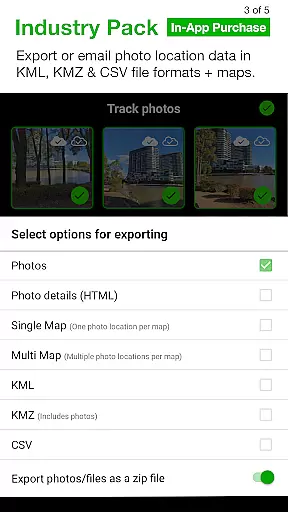
The app supports both front and back cameras, includes advanced features like UTM/MGRS coordinates, tilt and roll angles, and street address overlays. Solocator also offers cloud integration, batch editing, and multiple export options, including KML and CSV formats. Whether you're documenting construction progress or conducting field surveys, Solocator ensures every photo contains the necessary contextual information.
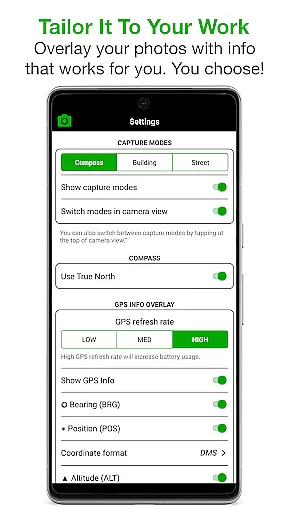
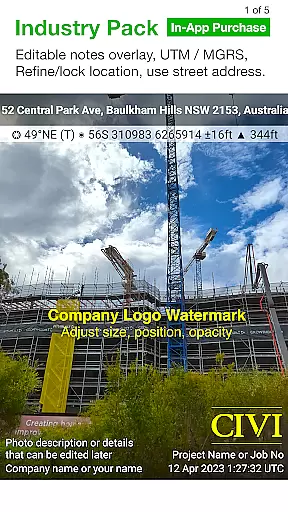
Solocator stands out with its extensive customization options for photo overlays. Users can select from a wide range of data points to stamp on images, including GPS coordinates in multiple formats, compass direction, altitude, and even tilt and roll angles. The Industry Pack enhances this further by adding street addresses, editable notes, and custom export filenames, which streamline workflows for professionals.
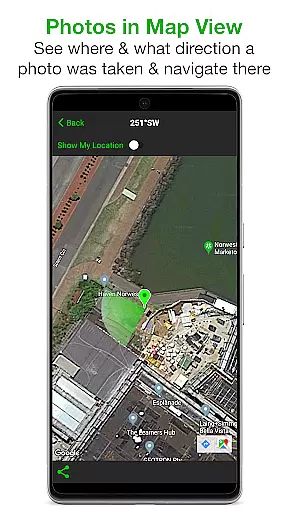
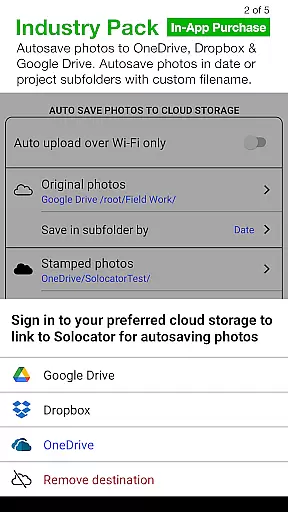
Additional features include autosaving photos to the camera roll with or without overlays, map-based sorting and navigation, and exporting photos with Exif metadata. The app also supports cloud storage services like Google Drive and Dropbox, ensuring seamless backups and easy sharing. With functionalities like refining GPS locations and locking asset positions, Solocator provides tools that cater to specific professional needs while maintaining ease of use.
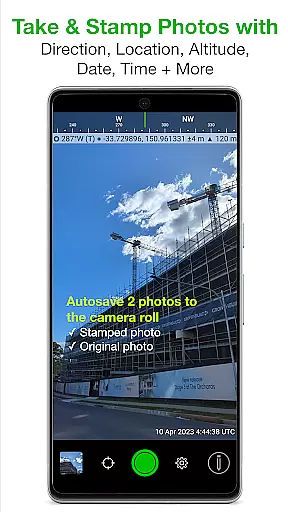
Solocator excels in real-time capture and preview, allowing users to overlay critical information directly onto photos as they are taken. This feature is particularly valuable for professionals who require accurate documentation in fields such as construction, surveying, and environmental monitoring.
The app provides a comprehensive set of data points that can be stamped on images, including GPS coordinates, compass direction, altitude, tilt and roll angles, and local time based on GPS location. With the optional Industry Pack, users gain access to additional formats like UTM/MGRS coordinates and street addresses, enhancing the precision and utility of each photo.
What sets Solocator apart is its ability to autosave two versions of each photo: one with the selected overlays and another original image without any modifications. This dual-saving feature ensures that users always have an unaltered copy for reference while maintaining a fully annotated version for official records or reports.
Furthermore, Solocator supports both front and back cameras with standard controls like pinch zoom, self-timer, flash, and exposure adjustments. These capabilities make it versatile for various use cases, whether you're capturing detailed field notes or simply need proof with embedded metadata. The result is a seamless experience that combines powerful functionality with user-friendly design.
While Solocator does not focus on traditional AI beauty enhancements, it offers advanced features that ensure the naturalness and authenticity of captured images. This approach is crucial for industries where image manipulation could compromise the credibility of photographic evidence.
The app's primary enhancement tools revolve around accurate data overlay and geolocation refinement. Users can lock GPS locations or adjust them manually when working near structures that might interfere with satellite signals. This feature guarantees that each photo accurately represents its shooting location without artificial alterations that could mislead viewers.
Solocator also includes several view modes that help maintain the integrity of captured scenes. For instance, the Compact View option displays only essential GPS information at the top of photos, avoiding unnecessary visual clutter while preserving the original composition. Similarly, the Building mode shows cardinal directions for architectural facades, providing context without distorting the actual appearance of structures.
For professionals who need to document reality exactly as it is, Solocator's commitment to natural enhancement means every photo serves as reliable evidence. By focusing on factual accuracy rather than aesthetic modifications, the app delivers trustworthy documentation suitable for legal, scientific, and professional purposes.
User-friendly interface
Comprehensive metadata options
Cloud storage integration
Batch editing capabilities
Customizable export formats
Paid Industry Pack required
Limited compass functionality
Advanced features may overwhelm casual users
Occasional GPS inaccuracies
Higher learning curve for beginners

How would you look like with a differently shaped nose, chin or lips?
 3.90
3.90
An interval timer to automate photo taking process for timelapse
2.90
Create amazing frames with up to five photos. Rounded corners, effects and more!
3.60
Fit multiple photos on one post. Create carousels & scroll layouts for Instagram
4.50
Transform Photos: Edit, Beautify and Craft Memories & Make Collages!
4.10
PhotoSync Bundle Add-On License. Enables all features and services in PhotoSync.
4.60
The original Rarevision VHS look seen everywhere!
4.70
Remote control the phone camera shutter from your smartwatch and take a picture
1.60
Welcome to ProShot, the most powerful camera app on Android.
4.20
Photo prints, cards, & gifts at Walgreens. Easy ordering & fast local pickup !
4.80
AI Photo Editor with 100+ Filters, Effects! Remove BG, Retouch & Photo Enhancer.
4.80
Android Native system HD camera app. Never been so simple and faster.
4.70
1M influencer's special filter
4.60
Transform photos into videos! Create realistic or anime-style images easily!
4.50
Photo editor & gallery. Crop pictures & edit photos offline, no wifi!
4.50
Search, tag and rate your way to an organized image gallery
4.40
The #1 app for B&W film developing featuring an advanced darkroom timer.
4.10
Perfect photos with body shaping, BG changer and object remover.
3.70
Photo Album Watch Face shows your favorite pictures as a Watchface.
1.90


User Reviews