

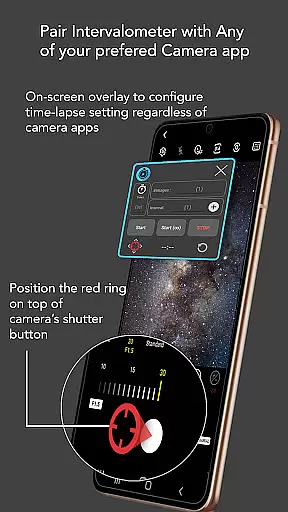
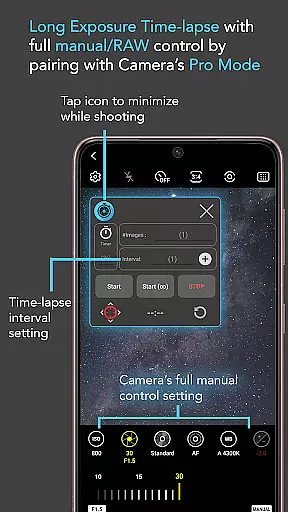
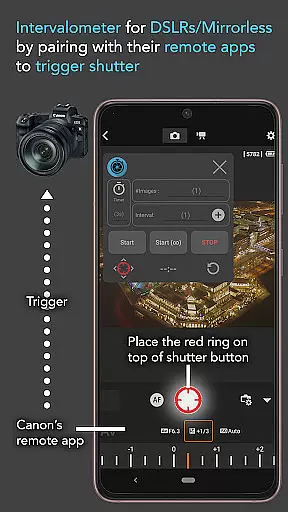
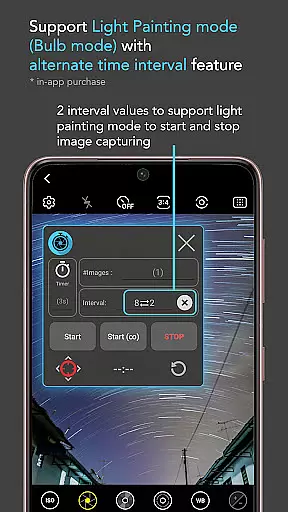
Intervalometer for TimeLapse is a powerful photography tool designed to automate the process of capturing time-lapse sequences. This app allows photographers to configure specific time intervals between shots, enabling precise control over exposure settings and camera modes that are typically unavailable in standard smartphone time-lapse functions.
The application works seamlessly with any camera app on Android 7 and above, utilizing AccessibilityService API to trigger the camera shutter automatically. It supports various advanced shooting modes such as HDR, night mode, manual adjustments, and even dedicated camera remote apps from brands like Canon, Sony, and Nikon. With its flexible configuration options, users can create stunning low light, long exposure, and star trail time-lapses among others.
Whether you're an amateur photographer looking to experiment with creative techniques or a professional needing consistent results, Intervalometer for TimeLapse provides the reliability and versatility required for high-quality time-lapse photography.
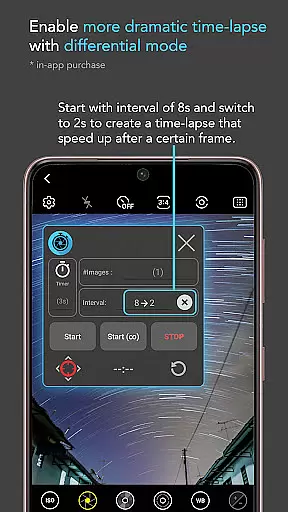
One of the standout features of Intervalometer for TimeLapse is its comprehensive control over time-lapse settings. Users can customize delay timers, interval times, and the number of shots, allowing for tailored shooting experiences that cater to different photographic needs.
In addition to basic configurations, the app offers advanced modes such as Infinite Mode and Bulb Mode, which are essential for specialized photography techniques like light painting and star trails. The ability to work with any camera app ensures compatibility across devices and camera setups, while the reconfigurable shutter button position accommodates varying user interfaces.
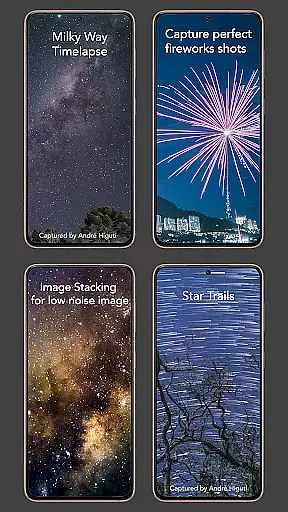
For those interested in post-processing, Intervalometer facilitates capturing frames for image stacking, resulting in higher quality images through techniques such as lightning stacking and star trail creation. This makes it not only a tool for capturing time-lapses but also an invaluable asset for enhancing final outputs through meticulous planning and execution.
Real-time capture and preview functionality is essential for photographers who need to ensure their time-lapse sequences are executed flawlessly. Intervalometer for TimeLapse offers this by integrating seamlessly with any camera app, allowing users to configure and trigger the shutter at precise intervals.
This app leverages the AccessibilityService API to automate the photo-taking process across various camera modes, including manual, HDR, and night mode. This ensures that every shot is taken exactly as planned without requiring constant manual intervention.
Users benefit from the ability to execute complex time-lapse projects such as low light, long exposure, and even star trail sequences. The app's flexibility in working with dedicated camera remote apps further enhances its utility, making it an indispensable tool for both smartphone and traditional camera users.
While Intervalometer for TimeLapse does not focus on AI beauty enhancements, it excels in providing natural and authentic captures through precise control over time-lapse configurations. This app allows photographers to explore creative possibilities without artificial alterations.
The core feature set includes full control over delay timers, interval times, and the number of shots, ensuring that each image is captured in its true form. Whether shooting a Holy Grail time-lapse transitioning from day to night or capturing ultra-wide-angle scenes, the emphasis is on genuine representation.
Photographers can also utilize this app for post-processing techniques like image stacking and lightning stacking, enhancing final outputs while maintaining the integrity of original frames. This approach prioritizes authenticity, empowering creators to produce high-quality visuals naturally.
User-friendly interface
Wide device compatibility
Customizable settings
Supports advanced camera modes
Enables creative photography techniques
Requires Accessibility permissions
May not work on all devices
Limited to Android 7+
No built-in camera functionality
Potential battery drain during extended use

Effortlessly organize, view and share your photos & videos with Gallery app!
 4.40
4.40
Search, tag and rate your way to an organized image gallery
4.40
Trendy TikTok time warp scan funny filter app brings you unique photos & videos.
4.40
What celebrity do you look like? Celebs will find your celebrity match!
4.10
Create Business Headshots, Polaroid Filter, Retake Photos,Profile Pics,AI Photos
4.50
A must-have app for landscape photographers
4.60
Luminar: Photo Editor - easy picture editing with AI
4.20
Smart, light, and fast photo and video gallery
4.30
Pro version: AR sun/moon tracker for any date. Tool for photographers & planners
4.90
A collection of tools and reference tables for DPs, ACs, DITs and Operators.
4.70
Cartoon and artistic effects for your photos and videos
4.70
The original Rarevision VHS look seen everywhere!
4.70
Viewfinder, Light meter, Reciprocity failure time, DOF & Bellows Extension
4.60
Enhance, retouch & create your story - Share the moment with Photoshop Express.
4.60
AI photo enhancer with Sora 2! Enhance, descratch, and colorize your old photos.
4.50
Easily stitch panoramas from multiple photos or video.
4.40
A reflected light meter with spot metering and incident light metering.
4.40
Professional camera app that brings DSLR manual photography controls to Android.
4.20
Remote control of the phone camera from your Wear OS smartwatch
3.70


User Reviews