
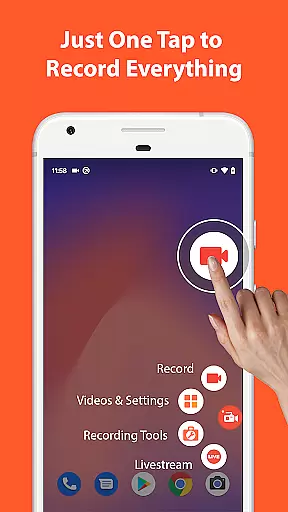

AZ Screen Recorder is a versatile screen recording application designed for Android users who need to capture high-quality screen videos with audio. The app stands out with its comprehensive feature set that includes not only screen recording but also video editing, live streaming, and screenshot capabilities.
One of the core functionalities is its ability to record screen activities with either microphone audio or internal system sounds, making it ideal for creating tutorials, gameplay videos, or recording video calls. Additionally, the facecam feature allows users to include their reactions in a floating window, adding a personal touch to the recordings.
Beyond basic recording, AZ Screen Recorder serves as a fully-featured video editor. Users can trim, merge, crop, rotate, and compress videos, as well as add subtitles and background music. The app also supports live streaming directly to platforms like YouTube and Facebook, offering various resolutions and customizable stream settings. With its intuitive interface and lack of watermarks or time limits, this app proves valuable for content creators, gamers, and professionals alike.
AZ Screen Recorder offers an impressive array of features that cater to diverse user needs. Its screen recording functionality is robust, allowing users to start, stop, and pause recordings effortlessly using on-screen controls. Advanced options such as recording in GIF format, drawing on the screen during capture, and transferring files via Wi-Fi enhance the overall usability.
The integrated video editor is another standout aspect, providing tools to refine recorded content. Users can trim unwanted sections, extract frames, adjust video orientation, and compress files to save storage space. Adding subtitles and background music further enriches the final output, while the ability to merge multiple clips into one seamless video streamlines post-production workflows.
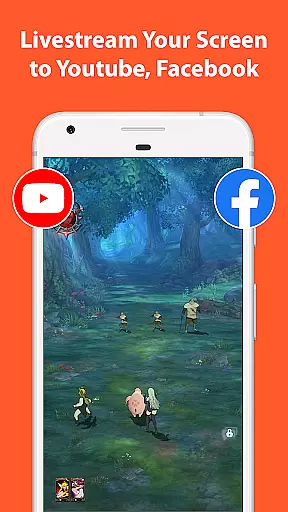
For those interested in live streaming, the app facilitates broadcasting the device screen to popular platforms like YouTube and Facebook. It supports both external audio from the mic and internal app sounds, ensuring high-quality streams. Optional features like showing the user's face during broadcasts and selecting different resolutions make it adaptable to various streaming scenarios. These capabilities, combined with its user-friendly design, position AZ Screen Recorder as a top choice for anyone seeking professional-grade screen recording and editing tools.
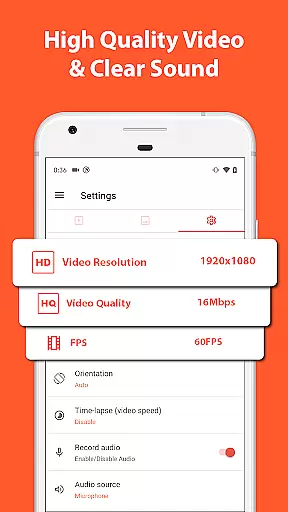
Video format compatibility is crucial for any video player or editor, and AZ Screen Recorder excels in this area. The app supports a wide range of video resolutions from HD, FullHD, 2K to 4K, making it adaptable to various user needs and device capabilities. This ensures that no matter the source quality, users can record and edit videos without worrying about format issues.
Apart from resolution support, the app also handles different frame rates including 24fps, 30fps, and 60fps. This flexibility allows content creators to choose the best settings for their specific projects, whether they are recording fast-paced gameplay or detailed tutorials. The ability to adjust these settings makes the app versatile and suitable for both casual and professional use.
The inclusion of internal audio recording since Android 10 further enhances its compatibility. Users can capture the original sound from games or apps, which is essential for creating high-quality content. This feature transforms the app into not just a screen recorder but also an effective tool for live streaming and recording video calls with clear audio.
By offering such comprehensive video format compatibility, AZ Screen Recorder empowers users to focus on their creativity rather than technical limitations. Whether you're a gamer wanting to share your best moments or a professional needing to document workflows, this app provides the necessary tools to produce polished and professional-grade videos.
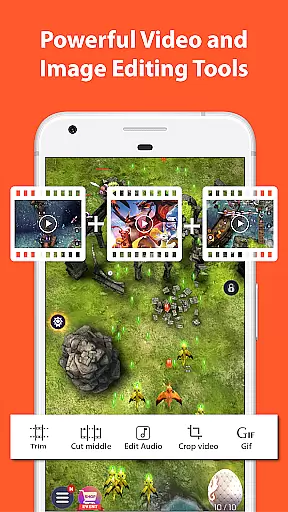
AZ Screen Recorder stands out with its AI-powered editing features that streamline the video editing process. One of the key functionalities is the ability to trim and remove middle parts of videos seamlessly. This allows users to cut out unnecessary segments and keep only the most engaging content, enhancing the overall quality of their videos.
In addition to trimming, the app offers advanced options like merging multiple videos, adding background music, and inserting subtitles. These features enable creators to produce more dynamic and captivating content by combining different clips into a cohesive narrative. The option to add subtitles is particularly useful for reaching wider audiences, including those who watch videos without sound.
The app also leverages AI for image editing tasks such as stitching images together, cropping unwanted parts, and blurring sensitive areas. Users can easily capture screenshots and enhance them using these intuitive tools. Furthermore, drawing directly on screenshots or adding text and emojis helps in creating informative and visually appealing content tailored to specific audiences.
With these AI-powered editing features, AZ Screen Recorder not only simplifies the editing process but also opens up new creative possibilities. Content creators can now produce professional-looking videos and images without needing extensive technical knowledge, making it an invaluable tool for anyone looking to share their digital experiences effectively.
User-friendly interface
High-quality recording
No watermark
No time limit
Versatile editing tools
Advanced features require Android 10+
Some features locked behind paywall
Occasional performance issues
Limited GIF export options
Ads in free version

Video player, file manager for all formats, 4K/HD media player supports subtitle
 4.30
4.30
Video Trimmer, Video to MP3 Converter. Extract music from video, Easy & Fast.
4.80
Create & edit videos with AI
4.30
Create photo video with music & template. AI video maker for stunning slideshow.
4.60
All in one multi protocols stream receiver for AirPlay, Cast and DLNA.
3.60
Watch IPTV on your Android device
4.60
This app is an emulator of some specific IPTV boxes
3.50
#1 Torrent App on Android ** No Ads Ever + Battery Saver **
4.80
Cast movies, tv shows and live streams to Chromecast, Roku, DLNA, Fire TV & more
4.60
Tik & Story Saver-Download ALL social media videos, photos & reels no watermark.
4.80
Play ALL formats in 4K & HD. Video downloader, MP3 player, Chromecast & more.
4.80
Search & download videos from net with all video downloader, auto-detect & safe.
4.60
Auto video maker with music & exclusive filters. Video editing made simple.
4.50
HD video maker with no watermark, no ads & vlog maker with music, PIP, text
4.50
Powerful video player with advanced hardware acceleration and subtitle supports
4.20
AI Video Editor:AI Music, Text to Video,Text to Speech,Auto Caption,Video Effect
4.00
Live TV, anywhere in your home
3.80
Kodi media center, a free and open source cross-platform entertainment hub
3.60
Save photos and videos from social apps in one tap.
3.60


User Reviews