
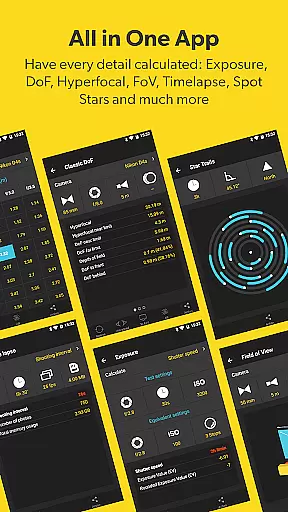



PhotoPills is an all-in-one photography planning application designed to unlock creative potential in capturing Sun, Moon, and Milky Way scenes. This powerful tool helps photographers turn imaginative concepts into reality by providing precise planning features. With advanced tools like 2D map-centric planners, augmented reality views, and photo plan management, it ensures every shot achieves legendary quality.
The app caters to diverse photography styles, including landscapes, nightscapes, weddings, and travel. It offers key functionalities such as alignment finders, celestial tracking, exposure calculators, and location scouting. Whether you're a professional or hobbyist, PhotoPills enhances your ability to explore artistic possibilities and capture visually compelling stories.
Endorsed by renowned photographers, PhotoPills stands out for its innovative approach to simplifying complex photographic planning. Its intuitive interface and comprehensive features make it indispensable for creating impactful imagery, ensuring users never miss an unmissable scene again.
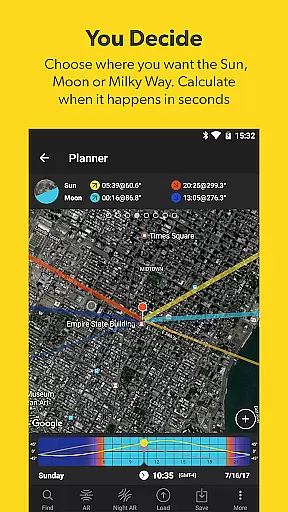
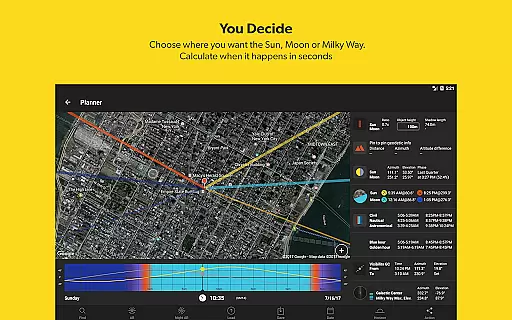
PhotoPills boasts a rich set of features tailored for photographers aiming to elevate their craft. One standout feature is the 2D Map-Centric Planner, which allows users to visualize Sun, Moon, and Milky Way positions on real maps. This functionality enables precise alignment predictions, empowering photographers to plan shoots with confidence.
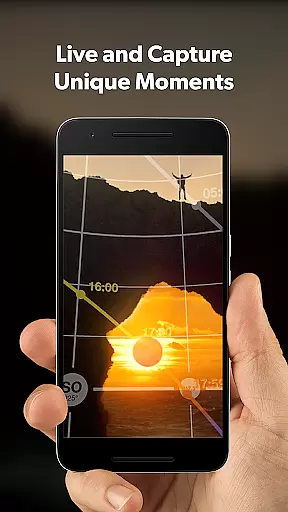
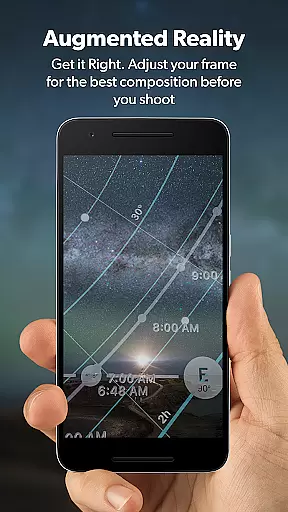
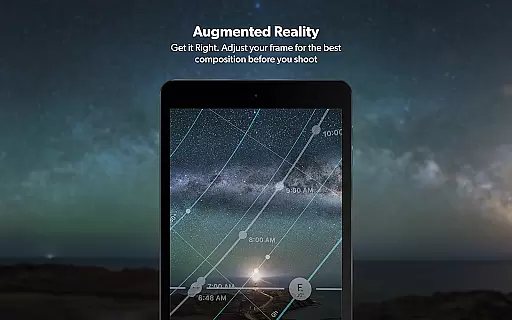
Another highlight is the 3D Augmented Reality (AR) mode, offering immersive views of celestial bodies, depth-of-field calculations, and field-of-view projections. These AR tools help photographers adjust framing and composition before capturing a shot, ensuring optimal results. Additionally, the app includes widgets that provide daily Sun, Moon, and Milky Way data at a glance, streamlining access to critical information.
Beyond these technical capabilities, PhotoPills fosters creativity through its Photo Plans Manager and Location Scouting Tool. Users can save planned shots, scout locations, and build a personal database of points of interest. The inclusion of tutorials and customer support further enhances usability, making PhotoPills not just an app but a complete photography companion.
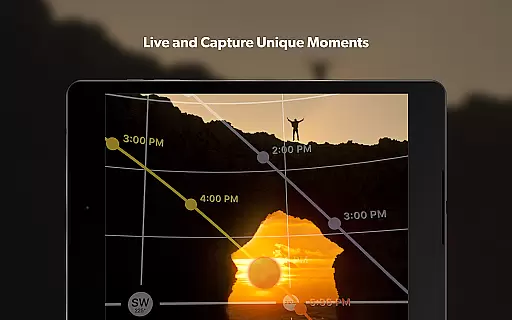
Real-time capture and preview functionality is essential for photographers who need to ensure their shots are perfectly composed before pressing the shutter. PhotoPills offers this feature through its advanced 3D Augmented Reality views, allowing users to visualize exactly where the Sun, Moon, and Milky Way will appear in their frame.
This innovative tool helps photographers adjust their composition with precision, ensuring that celestial bodies align perfectly with the chosen landscape. By providing an accurate preview of the scene, PhotoPills enables users to plan their shots down to the last detail, eliminating guesswork and enhancing creative control.
The benefits of this feature extend beyond just composition. Photographers can explore different shooting locations and times, knowing precisely when the lighting and celestial conditions will be ideal. This saves valuable time and effort, making each shoot more efficient and productive.
Ultimately, the real-time capture and preview capabilities of PhotoPills empower photographers to turn their creative visions into reality, capturing truly legendary photos every time they pick up the camera. Whether you're a landscape photographer, an astrophotography enthusiast, or a wedding photographer, this feature ensures you never miss an unmissable scene again.
While PhotoPills does not focus on AI beauty enhancements typical in portrait photography apps, it excels in natural scene enhancement through precise planning and augmented reality tools. The app's core strength lies in its ability to help photographers capture scenes with perfect natural lighting and composition, which enhances the inherent beauty of landscapes and night skies.
PhotoPills provides comprehensive tools such as the Sunrise/set, Golden Hour, and Blue Hour information, ensuring that photographers can plan shoots during optimal lighting conditions. These features contribute to the natural enhancement of photos by leveraging the best possible ambient light, thus reducing the need for artificial adjustments.
Additionally, the app's augmented reality features allow users to visualize complex scenes involving celestial bodies, ensuring that the final image captures the intended natural beauty without relying on post-processing. This approach maintains the authenticity of the captured moment while maximizing its visual impact.
By focusing on natural enhancement through meticulous planning and real-time previews, PhotoPills ensures that each photograph reflects the true essence of the scene. This method stands out in the photography world, offering a unique blend of technology and artistry that results in breathtakingly natural images.
User-friendly interface
Innovative AR tools
Comprehensive planning features
Endorsed by photography experts
Regular updates and support
Premium pricing model
Steep learning curve
Limited free version
Device compatibility issues
Resource-intensive performance

Photo editor: face & body editor, beauty cam, filters and quality enhancer.
 4.00
4.00
How would you look like with a differently shaped nose, chin or lips?
3.90
Trendy TikTok time warp scan funny filter app brings you unique photos & videos.
4.40
Find time and duration of different sunlight phases at any location
4.90
HD Photo gallery and photo manager to edit, hide private photos, videos & albums
4.3
Photobooth mini FULL app will allow you to add more fun to your parties
4.00
AI Photo Editor with 100+ Filters, Effects! Remove BG, Retouch & Photo Enhancer.
4.80
RAW video capture with advanced controls
4.40
Unlock the full potential of your DJI drone with Litchi
4.50
Effortlessly organize, view and share your photos & videos with Gallery app!
4.40
Future baby face generator: AI kids generator, kid face! What my baby look like?
4.40
Turn your phone into a professional camera - full DSLR manual photography
4.30
Virtual makeup, hair filters & body tuner—edit from face to full body!
4.20
Create AI Photos, Improve and restore quality of blurry, old or damaged pics.
4.20
Professional photography on your mobile phone
4.20
Transform Photos: Edit, Beautify and Craft Memories & Make Collages!
4.10
Remote control of the phone camera from your Wear OS smartwatch
3.70
Be your best in every shot! Fix, edit and retouch your face in selfies & photos.
3.70
Snap photos remotely using your Garmin watch as the camera trigger
4.0


User Reviews