
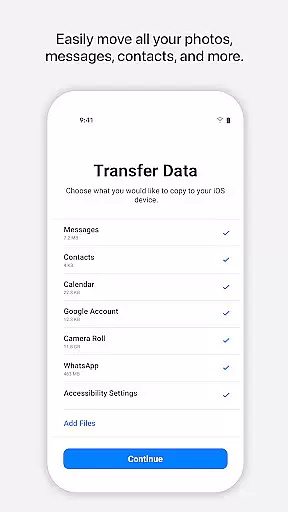
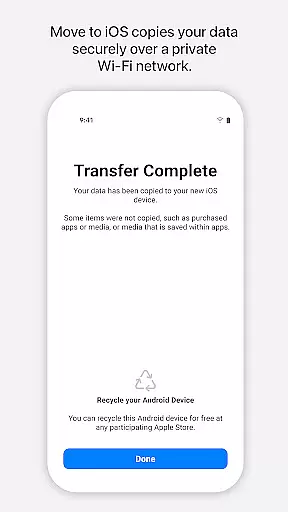
Move to iOS is a powerful migration tool designed to simplify the process of switching from Android to iPhone or iPad. This application enables users to transfer various types of content seamlessly and securely, including contacts, message history, photos, videos, web bookmarks, mail accounts, calendars, and even WhatsApp data. The app creates a private Wi-Fi network between devices, ensuring a direct and secure connection without the need for third-party services or additional storage solutions.
One of the standout features of Move to iOS is its user-friendly design. With minimal setup required, users can complete the migration process in just a few steps. By entering a unique security code, the app establishes a secure connection between the Android device and the new Apple device, allowing for automatic content transfer. This makes it an ideal solution for individuals upgrading to iOS who want to retain their digital content without hassle.
The true value of Move to iOS lies in its ability to provide a seamless transition experience. Whether you're moving personal media collections, work-related documents, or social app data, this tool ensures that all your important information is accurately transferred. Its compatibility with multiple data types and focus on security make it an essential utility for anyone looking to switch to iOS while maintaining their digital continuity.
Move to iOS offers a comprehensive set of features tailored to streamline the device-switching process. One of its key functionalities is the automatic detection and pairing of Android and iOS devices through a private Wi-Fi network. This eliminates the need for cables or external storage devices, providing a wireless and hassle-free migration experience. Additionally, the app supports a wide range of data types, including contacts, photos, videos, message histories, and even app data from platforms like WhatsApp.
Another notable feature is the app's emphasis on security and privacy. During the migration process, users are required to enter a unique security code to establish a trusted connection between devices. This ensures that only authorized devices can access the transferred data. Furthermore, Move to iOS operates independently of cloud services, meaning all content is transferred directly between devices without being stored on external servers.
The app also provides flexibility in terms of optional permissions. While certain permissions such as SMS, photos, and contacts are required for specific data transfers, users can choose which types of content they wish to migrate. This customizable approach allows individuals to tailor the migration process to their needs. Overall, Move to iOS stands out for its ease of use, robust security measures, and ability to handle diverse data types efficiently.
Move to iOS offers a seamless and secure way to transfer content from an Android device to a new iPhone or iPad. The app's core functionality lies in its ability to migrate various types of data, including contacts, message history, photos, videos, mail accounts, calendars, and even WhatsApp content.
The effectiveness of Move to iOS is evident in its straightforward process. By creating a private Wi-Fi network between devices, the app facilitates a direct and secure transfer without the need for third-party storage solutions. This ensures that all personal information remains protected during the migration process.
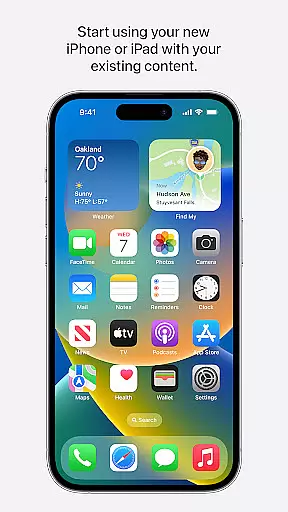
Users benefit from the app's comprehensive approach to data migration. With just a few steps, they can transfer their digital lives effortlessly, allowing them to start using their new iOS device immediately. This streamlined transition enhances user experience by minimizing downtime and maximizing convenience.
The interface of Move to iOS is designed with simplicity and ease-of-use in mind. Upon launching the app, users are greeted with clear instructions that guide them through each step of the data migration process. This intuitive design ensures that even those who may not be tech-savvy can navigate the app with confidence.
Throughout the migration process, the app provides visual cues and prompts that help maintain a connection between the Android device and the new iOS device. By requiring only a security code input, it simplifies what could otherwise be a complex procedure into a manageable task for any user.
This focus on an intuitive interface significantly reduces the learning curve associated with switching operating systems. As a result, users can enjoy a stress-free transition to iOS, knowing that their data is being handled securely and efficiently, allowing them to quickly adapt to their new device.
User-friendly interface
Secure data transfer
Wide data compatibility
Wireless migration
Private Wi-Fi connection
Limited to iOS migration
Requires both devices
Optional permissions needed
No cloud backup option
Dependent on Wi-Fi stability

 4.10
4.10
pdf merge, word to pdf, jpg to pdf, edit pdf, convert to pdf and much more!
4.20
FV File Manager Pro, Fast and powerful file manager for Android
4.60
MS-DOS in your pocket. Play old DOS games anywhere you are ;)
4.10
Monitor car performance in real time and troubleshoot malfunctions.
4.80
WiFi Signal Strength Meter help you detect WiFi Signal Strength in real time.
4.80
Screen recorder with audio to record high-quality videos and take screenshots.
4.40
Your personal health butler
3.60
Enhance your Beats
3.70
Navigate with Ease and Style
4.90
HD Camera captures every special moment.
4.60
Play your X-Box games remotely in 1080p with any controller and zero latency
4.60
eXtended Permission Manager - a small app to manage permissions and AppOps
4.50
Screen Mirroring with sound for Samsung TV, LG TV, Sony TV, Smart TV and Browser
4.20
This app unlocks the Pro features of the Central for DayZ app
3.60
A non-root local ADB shell client. READ BELOW!
3.40
Undelete and recover your lost or deleted files with DiskDigger!
3.40
Unlock your Essential Key. Create custom shortcuts to your favorite apps!
4.1
Save any video in HD - paste the link, download fast and watch offline.
4.5


User Reviews