
The Everything Key is a powerful utility app that unlocks the hidden potential of your device's hardware button. Designed specifically for select Nothing and CMF Phone models, this tool allows users to remap their device's physical button to perform custom actions, significantly enhancing productivity and personalization.
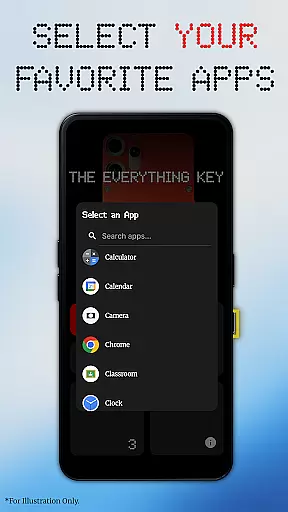
With an intuitive interface inspired by the Nothing aesthetic, the app enables quick access to frequently used apps through simple double or triple presses. The app requires no root access and works seamlessly using standard Android features, making it accessible to all users. Whether you need instant access to your camera or favorite messaging app, The Everything Key puts control right at your fingertips.
This application is particularly useful for power users who want to maximize their device's functionality while maintaining privacy and security. The app's commitment to user privacy ensures that only hardware key presses are detected without accessing any personal information.
The Everything Key offers a comprehensive set of features designed to enhance device functionality. The app's powerful remapping capability allows users to assign specific apps to both double-press and triple-press actions, providing unprecedented customization options.
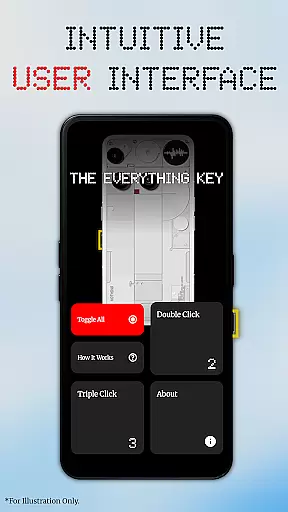
A standout feature is its beautiful, minimalist user interface that integrates seamlessly with the device's design language. Users can easily view and manage their app mappings through clear visual indicators. Advanced control options include quick enable/disable toggles for each mapped action and a convenient 'Toggle All' feature for managing multiple mappings simultaneously.
The app also includes thoughtful touches like personalized device integration, where users can select their specific model and color for a customized background. Its implementation of Android's Accessibility Service is carefully designed to detect only hardware key presses while maintaining strict privacy standards, ensuring user data remains completely secure.
The Everything Key excels in providing precise and effective core functionality by allowing users to remap their device's hardware button. This feature transforms a typically underutilized button into a powerful productivity tool, enabling instant access to frequently used apps through customizable double or triple presses.
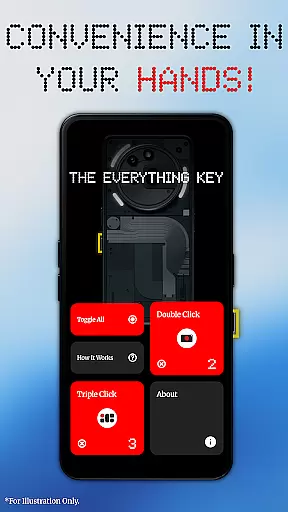
With an intuitive user interface inspired by minimalist design principles, the app ensures that users can easily understand and manage their button mappings. The app provides clear visual indicators for active mappings and allows quick toggling of actions directly from the main screen, ensuring users have immediate control over their customizations.
This remapping capability is executed seamlessly without requiring root access or complex setup procedures like ADB commands. By leveraging standard Android features, the app delivers a smooth experience right out of the box, making advanced customization accessible even to non-technical users.
The Everything Key offers a beautifully simple and intuitive interface that enhances user experience. Upon launching the app, users are greeted with a clean layout that prominently displays mapped applications and their respective actions, ensuring clarity and ease of use.
A key aspect of its intuitive design is the ability to enable or disable actions with just a tap on the corresponding card. Additionally, removing an app mapping is as straightforward as tapping the 'X' icon, streamlining the management process and keeping the interface clutter-free.
Further enhancing its user-friendly approach, the app includes a 'Toggle All' feature, allowing users to activate or deactivate all mappings simultaneously. This thoughtful design prioritizes user convenience, ensuring that even those new to customization tools can navigate and utilize the app effectively.
Intuitive UI design
No root required
Quick app access
Privacy-focused
Easy setup process
Limited device support
Single button focus
Basic customization
No widget support
Premium version needed

Just swipe the edge to do something!
 4.40
4.40
Smart and comfortable browsing experience.
3.80
Detect hidden spy camera with advanced scanning {{ Premium version }}
4.00
The one-and-only remote control for PC, Mac, and Linux
4.70
The ultimate tool for network analysis, wifi scanning and problem detection.
4.90
Introducing Smart Printer, your ultimate destination for printing solutions!
4.00
Clean up your phone, find files, play media, and share files offline
4.50
Screen recorder with audio to record high-quality videos and take screenshots.
4.40
Your personal health butler
3.60
Small and simple app to Verify Root Access and BusyBox Install!
4.70
eXtended Permission Manager - a small app to manage permissions and AppOps
4.50 4.50
4.50
Pro Emulator is an easy to use game console emulator for a range of consoles.
4.40
Just one-tap to easy translate in any language after calls within seconds.
4.20
Carry a FTP server in your pocket and avoid USB cables for file transfer
4.20
A simple app to back up and restore SMS & MMS messages and call logs.
4.10
Family Locator, Share location, StayConnect with your family in real time
3.90
Safely recover deleted photos, videos, and files with a single easy tap.
3.70
PDF Reader - Document Viewer: Read, Manage & Organize Your Documents
3.10


User Reviews