
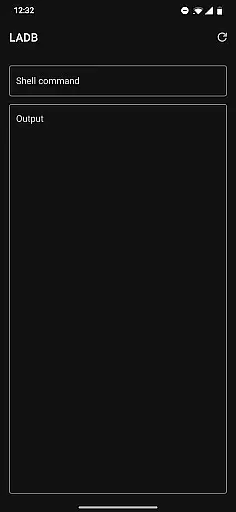
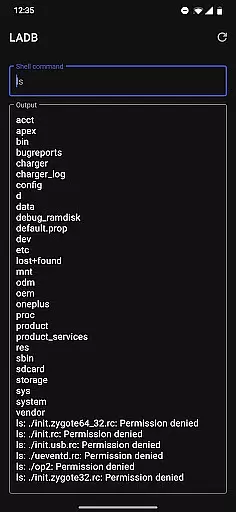
LADB is a powerful local ADB shell tool designed for Android developers and power users. The app bundles an ADB server within its libraries, enabling wireless debugging without requiring a USB connection. By leveraging Android's Wireless ADB Debugging feature, LADB allows seamless communication between the server and client on the same device.
One of the key functionalities of LADB is its ability to simplify the pairing process through both assisted and manual modes. Users can easily set up wireless debugging by copying pairing codes and ports directly into the app. This makes it an essential tool for managing and debugging Android devices locally.
This application is particularly useful for developers who need to troubleshoot apps or system issues directly on their devices. With its reliable connectivity and open-source nature, LADB provides significant value to those working in Android development environments.
LADB offers several notable features that enhance the local debugging experience. First, it includes an integrated ADB server, which eliminates the need for external tools or USB connections. This built-in functionality streamlines the debugging process and ensures consistent performance.
The app supports both assisted and manual pairing modes, providing flexibility for different use cases. Assisted Pairing simplifies the initial setup by guiding users through the necessary steps, while manual pairing offers a reliable alternative when automatic methods fail. Additionally, LADB maintains compatibility with standard Wireless ADB Debugging protocols.
Another important feature is its split-screen capability, allowing users to manage settings and pairing information simultaneously. This prevents common issues where pairing information becomes invalid during setup. The app also includes troubleshooting options such as data clearing and reboot recommendations for resolving common connection problems.
For a tool like LADB, core function accuracy and effectiveness are paramount. This app bundles an ADB server within its libraries to facilitate local device connections typically requiring active USB. With Android's Wireless ADB Debugging feature, it enables communication between the server and client locally, which is crucial for developers and power users who need reliable access to their devices.
LADB provides detailed setup instructions, including using split-screen mode or pop-out windows with Settings to maintain the pairing information validity. By guiding users through adding a Wireless Debugging connection and inputting the pairing code and port into LADB, it ensures that both novice and experienced users can establish a stable connection without dismissing critical dialogs accidentally.
The troubleshooting section further enhances its effectiveness by addressing common issues. Most errors can be resolved by clearing app data, removing all Wireless Debugging connections, and rebooting, ensuring minimal downtime and consistent performance. This focus on precision and problem-solving underscores LADB's commitment to delivering a dependable tool for local ADB operations.
A streamlined interface significantly boosts user experience, especially in technical tools like LADB. The app simplifies complex processes such as initial setup and troubleshooting through clear, step-by-step guidance, making it accessible even to those new to ADB debugging.
By recommending practical solutions like using split-screen mode or maintaining open dialog boxes during pairing, LADB reduces potential confusion and errors. These intuitive steps ensure users can efficiently manage their Wireless Debugging connections without needing deep technical expertise.
Moreover, LADB addresses compatibility issues upfront, clearly stating its incompatibility with other apps like Shizuku and providing straightforward fixes. This transparency and the inclusion of a detailed privacy policy and support options make the overall user journey smooth and hassle-free, enhancing the app's intuitiveness and reliability.
Integrated ADB server
Wireless debugging support
Assisted pairing mode
Manual pairing option
Open-source license
Incompatible with Shizuku
Requires careful setup
Occasional pairing issues
No official user builds
Complex for beginners

Just one-tap to easy translate in any language after calls within seconds.
 4.20
4.20
Complete kernel toolbox with features to manage and tweak your rooted device
4.30
HD Video player and downloader for all formats, fast & smooth 4K video playback.
4.60
eXtended Permission Manager - a small app to manage permissions and AppOps
4.50
An open-source APK explorer for Android!
4.10
Create your own custom widget with endless possibilities
3.90
Screen Mirroring with sound for Samsung TV, LG TV, Sony TV, Smart TV and Browser
4.20
NFC Tools can read and write NFC tags.
4.70
fast and easy mp3 music downloader
4.80
ADB support Android 4.X-Android 13(Support wireless pair mode).No root required!
4.70
Fast Video Downloader, Movie Downloader, Torrent Downloader & Adblock Browser
4.70
Play your X-Box games remotely in 1080p with any controller and zero latency
4.60
Game Booster, GFX Tool is now compatible with newer game update
4.50
Forza Tuning Calculator App for Forza Horizon 5, Motorsport and Earlier Titles
4.40
A simple app to back up and restore SMS & MMS messages and call logs.
4.10
A convenient photo, video, and file recovery tool.
4.00
1-Click close all background apps on Android TV
3.90
Safely recover deleted photos, videos, and files with a single easy tap.
3.70
Download any file easily and quickly with Downloader
4.0


User Reviews