
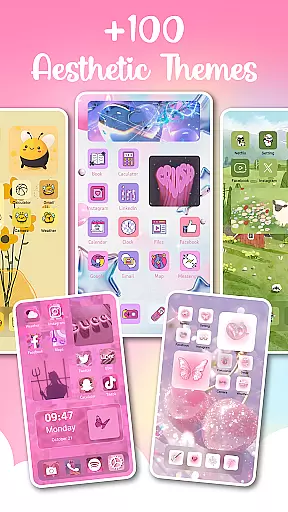
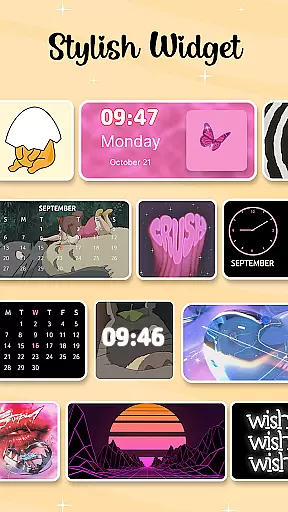
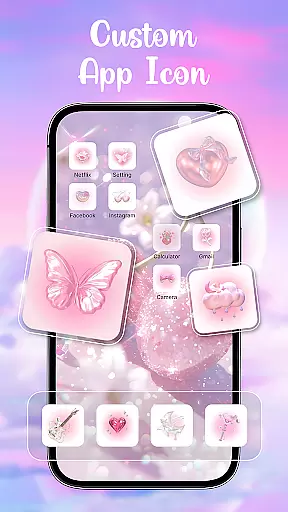
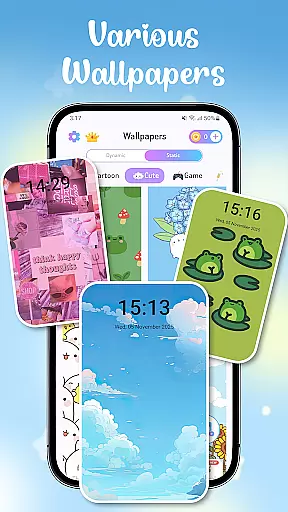
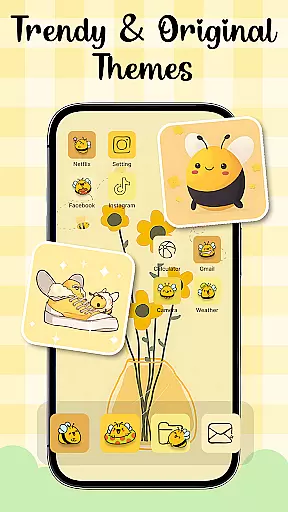
Themes - Widgets, Icon Changer is a comprehensive personalization app that allows users to transform their phone's interface into a unique and stylish work of art. With an extensive collection of wallpapers, themes, widgets, and icon packs, the app caters to diverse aesthetic preferences, from minimalist designs to vibrant art styles.
The app offers over 100 customizable widgets and various trendy themes such as anime, cute, aesthetic, and Kpop themes. Users can personalize their home screen with ease, selecting from countless combinations of themes, widgets, and wallpapers. The intuitive design ensures that even daily wallpaper refreshes are possible with just one click.
Whether you're looking to customize social media icons or create a personalized lock screen, Themes - Widgets, Icon Changer provides all the tools necessary for crafting a truly unique mobile experience. Its constant updates and easy-to-use features make it an indispensable app for those who value aesthetics and personal expression.
One of the standout features of Themes - Widgets, Icon Changer is its vast array of customization options. The app includes hundreds of wallpapers and themes, ranging from anime to holiday-themed designs, allowing users to tailor their device's appearance to match their mood or preferences.
In addition to wallpapers, the app offers customizable widgets and icon packs. Users can choose from over 100 widgets that change the traditional screen appearance and select new icons from various personalized icon packs. This feature extends to social media apps like Facebook, Whatsapp, Messenger, and Instagram, providing a cohesive look across all applications.
The app also emphasizes user convenience with its one-click replacement functionality and accessibility service permissions. These allow users to adjust settings like volume and do-not-disturb mode directly from the Control Center overlay without navigating through system menus. Furthermore, regular updates ensure that the content remains fresh and engaging for the user community.
Customization options variety refers to the range and diversity of personalization features available within an application. For Themes - Widgets, Icon Changer, this aspect is central to its appeal and functionality. The app offers a vast array of themes including anime, cute, aesthetic, and Kpop styles, allowing users to tailor their phone's appearance to match their mood or preferences.
The app provides over 100 widgets that transform the conventional look of your screen. These widgets are not just functional but also serve as a medium for personal expression. Users can customize widgets by selecting images from their gallery, thus infusing their personal style into every corner of their device's interface.
With Themes - Widgets, Icon Changer, users can mix and match themes, widgets, wallpapers, and app icons to create unique combinations. This level of customization extends to social media icons like Facebook, Whatsapp, Messenger, and Instagram, ensuring that every visual element on the phone reflects the user's individuality.
This extensive customization empowers users to make their devices truly their own, enhancing both aesthetics and usability. By offering such a broad spectrum of options, the app ensures that personalization is not only possible but also enjoyable and intuitive.
Theme compatibility in an app like Themes - Widgets, Icon Changer means how well different themes integrate with various device models and operating systems without compromising performance or visual quality. Ensuring theme compatibility is crucial for providing a seamless user experience across diverse devices.
Themes - Widgets, Icon Changer excels in this area by constantly updating its offerings to keep pace with new device releases and OS updates. This commitment guarantees that regardless of the smartphone model or Android version, users will enjoy a consistent and high-quality theming experience.
In addition to regular updates, the app employs permissions such as FOREGROUND_SERVICE_SPECIAL_USE and FOREGROUND_SERVICE_MEDIA_PROJECTION responsibly. These permissions ensure that themes and widgets function smoothly, maintaining the integrity of the user interface while respecting user privacy and system resources.
By prioritizing theme compatibility, Themes - Widgets, Icon Changer ensures that all customizations look great and work efficiently. Users benefit from knowing that their personalized settings will remain intact and visually appealing, no matter what device they use or how often they update their system.
User-friendly interface
Extensive customization options
Regular content updates
Vibrant community engagement
Comprehensive widget library
Requires multiple permissions
Some features may feel overwhelming
Premium content not always included
Occasional performance lags
Limited offline functionality

Customizable Glass widgets. Over 360+ stunning widgets and more!
 4.70
4.70
Ultra realistic gold analog watch face with lots of customization options.
4.50
Beautiful realistic hybrid watch face with numerous customization options.
4.50
Fingerprint Lock Screen & Live Animations with 4K Wallpapers as Live Wallpaper
4.40
App Icon Changer & Shortcut Creator. Customize your icons without any watermarks
4.30 4.50
4.50
Design your screen with unique, vibrant clocks
3.80
Emoji Maker app - Design custom emojis and effortlessly blend them with Mixer
3.80
Fast SMS & group chat - use GIFs and emojis from your home screen launcher.
4.50
Unique Android Launcher
4.60
Over 28,000 high quality icons to bring color & homogeneity to your phone.
4.60
Ultimate Gallery Lock App - Hide Pictures, Videos and Lock Apps Instantly!
4.60
300+ widgets inspired by Material You and Material 3 expressive design.
4.60
3D, live, and moving wallpapers & themes in 4K and HD for your device.
4.50
Try creating your own keyboard with "Keyboard theme for android" app now!
4.50
Yandex Browser — stylish and secure, with voice search and data compression
4.40
A light in the dark, a unique style and an andless cutomization!
4.30
Ultimate widget creator. Design custom widgets for a truly unique home screen!
3.90
⭐ OneUI inspired Fluffy Icon Pack – Soft. Stylish. Standout. ⭐
4.3


User Reviews