

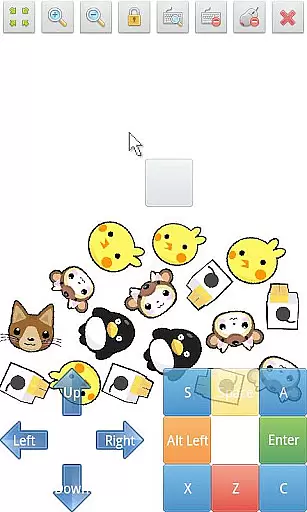
SWF Player Pro is a specialized video player designed for users who need to play SWF format files on their Android devices. The app supports playback through both Android AIR and Ruffle engines, ensuring compatibility with various SWF files. With features like zoom in/out, play/stop controls, and fullscreen support, it provides a comprehensive solution for viewing Flash content.
In addition to basic playback, the app offers advanced functionalities such as multi-touch virtual keypad, virtual mouse, and file browser. Users can customize their experience with advanced settings that include options for wmode, background color, wake-lock, rotation, quality, and scale. Whether you're a student reviewing educational Flash content or a professional needing to view legacy animations, SWF Player Pro delivers a reliable and feature-rich solution.
SWF Player Pro stands out with its robust feature set tailored for SWF file playback. The app supports two powerful SWF engines - Android AIR and Ruffle - providing users with flexibility and reliability when playing different types of Flash content. Its intuitive interface includes essential controls like zoom in/out, play/stop buttons, and fullscreen mode, making it easy to manage your viewing experience.
Beyond basic playback, the app incorporates advanced tools such as multi-touch virtual keypad and virtual mouse, which are particularly useful for interactive SWF applications. The built-in file browser allows quick access to your SWF files, while the advanced settings menu lets you fine-tune parameters including wmode, background color, wake-lock, rotation, quality, and scale. These features make SWF Player Pro an indispensable tool for anyone working with Flash content on Android devices.
SWF Player Pro offers robust support for SWF format files, ensuring users can enjoy a wide range of multimedia content. The player leverages two powerful SWF engines - Android AIR and Ruffle - to deliver optimal performance across different devices.
The application's advanced settings allow users to customize their playback experience through various parameters such as wmode, background color, and quality. This flexibility ensures that SWF files render accurately regardless of their original specifications or complexity.
With features like zoom in/out functionality and multi-touch virtual keypad support, the app provides precise control over video playback. Users can easily navigate and interact with SWF content while maintaining visual clarity at any scale.
Furthermore, the player's comprehensive file browser enables quick access to SWF files stored anywhere on the device. This seamless integration with the device's storage system makes it simple for users to locate and play their preferred video files without hassle.
While primarily a video player, SWF Player Pro incorporates several intelligent features that enhance the viewing experience. The app's support for wake-lock and rotation settings demonstrates its ability to adapt playback based on user behavior and device orientation.
The inclusion of virtual mouse functionality represents an innovative approach to interacting with SWF content. This feature allows users to precisely control interactive elements within SWF files, making the player suitable for both entertainment and educational purposes.
Advanced scaling options and quality adjustment settings work together to optimize video presentation. These AI-powered features automatically adjust parameters to ensure smooth playback while maintaining visual fidelity across different screen sizes and resolutions.
Additionally, the player's fullscreen support and play/stop controller provide a traditional yet enhanced video viewing experience. These features are intelligently designed to offer users maximum control over their content consumption while minimizing interface clutter.
User-friendly interface
Comprehensive SWF support
Advanced customization options
Multi-touch functionality
Reliable playback performance
Limited to SWF format
No iOS version available
Occasional compatibility issues
Requires technical knowledge for advanced settings
Subscription fees may apply

Video player, file manager for all formats, 4K/HD media player supports subtitle
 4.30
4.30
Fast video downloader & private browser. Save HD clips to watch offline.
4.40
LumaFusion: The Ultimate Storytelling Experience for Video Editing
4.10
#1 Torrent App on Android ** No Ads Ever + Battery Saver **
4.80
Web Browser for LG TV to stream webvideos, online movies and livestreams in HD
4.20
Cast movies, tv shows and live streams to Chromecast, Roku, DLNA, Fire TV & more
4.60
Fast & Private HD Video Downloader with Built-in Proxy Browser and Video Player.
4.50
VLC for Android is the best open source video and music player, fast and easy!
4.10
Make videos you’re proud to share with Edits, a video editor for creators.
4.70
Download videos and play them offline
4.70
Fast & easy HD video downloader for all formats, support 4K playback & download.
4.60
Video Downloader, Multiple Resolution Options, Video Player
4.50
Movie maker & video editing app with AI effects and green screen
4.30
Video player with 4K & 1080P support, popup play, background play and subtitle.
4.20
Your media, on your terms.
4.10
Livestream, news, & gaming content. Watch, chat, and upload. Join Rumble today!
3.80
Watch full episodes of your favorite Cartoon Network and Cartoonito shows!
3.50
Video player with powerful streaming playback and various convenient features.
2.10
Play and download HD videos from all sources — fast, simple, and all-in-one.
4.4


User Reviews