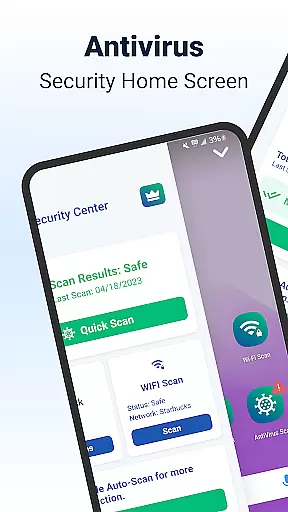
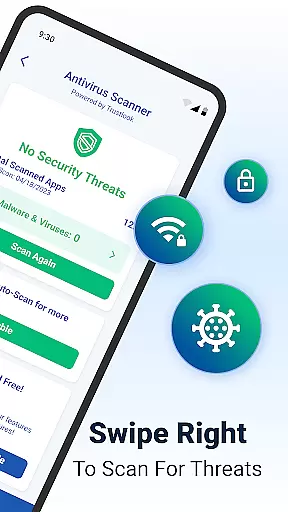
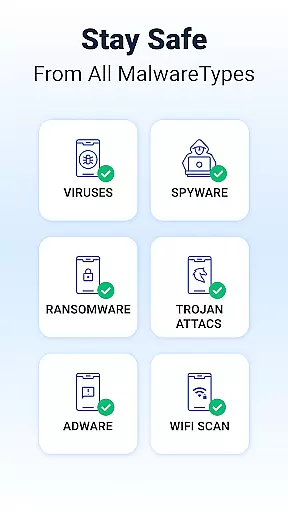
Shield Antivirus Home Screen is a comprehensive security solution designed specifically for Android devices. This free application provides robust protection against viruses, malware, and various cyber threats while enhancing user privacy through advanced features like secure WiFi scanning. With its AI-driven antivirus scanner boasting a 99% detection rate and less than 0.1% false positives, Shield ensures your device remains safe from malicious software in real-time.
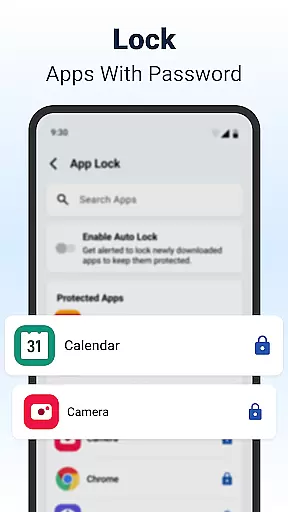
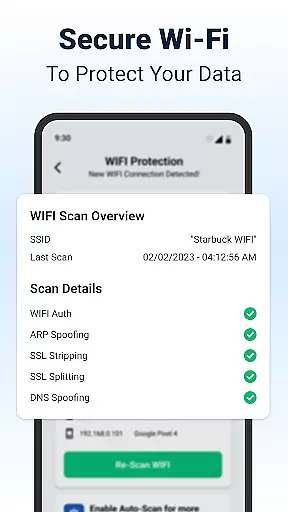
In addition to its core antivirus capabilities, Shield offers unique personalization options that allow users to customize their lock screens and app settings. The AppLock feature lets you secure sensitive applications with either a password or fingerprint, ensuring that private information stays protected even when using public networks. Furthermore, the integrated WiFi Scanner detects potential network-based attacks such as ARP spoofing and DNS spoofing, providing an extra layer of security for your data.
One of the standout features of Shield Antivirus Home Screen is its advanced AI-driven antivirus scanner. This technology provides high-accuracy scanning with a detection rate of 99%, actively identifying and neutralizing threats like malware and spyware. Users can perform quick scans of their apps within seconds, receiving instant feedback on their device's security status. The low false-positive rate of less than 0.1% ensures reliable results without unnecessary alerts.
Shield also includes powerful privacy tools such as AppLock and customizable home screen options. The AppLock feature enables users to protect sensitive applications with either a password or fingerprint authentication. Additionally, the home screen transformation offers intuitive privacy controls and personalized settings, allowing users to tailor their Android experience while maintaining top-notch security. These features collectively create a seamless blend of protection and customization that enhances both safety and user experience.
Customization is at the heart of Shield Antivirus Home Screen, offering users a versatile way to personalize their Android devices. This feature allows you to tailor your home screen with intuitive privacy controls and custom settings that cater to your specific needs.
The app provides extensive customization options, including personalized lock screens and app settings. With these tools, you can make your Android device truly yours without compromising on style or security. Whether it's adjusting the layout or choosing which privacy features to enable, Shield ensures that personalization is both comprehensive and user-friendly.
By integrating security features with customizable elements, Shield allows users to enjoy peace of mind while expressing their individuality. The ability to customize not only enhances the visual appeal but also empowers users to prioritize their most-used features, ensuring a seamless and secure experience.
Shield Antivirus Home Screen excels in theme compatibility, ensuring that all visual customizations are consistent and visually appealing across different themes. This means that whether you prefer a light or dark mode, every element of your customized interface will look harmonious and professional.
The app supports various themes, allowing users to switch between them effortlessly while maintaining the integrity of their personalized settings. This flexibility ensures that your chosen theme complements the security features without any loss in functionality or aesthetic quality.
With Shield's robust theme compatibility, users can enjoy a cohesive and stylish interface that aligns with their preferences. This attention to detail in design ensures that every customization option contributes to an enhanced user experience, making security both effective and enjoyable.
Powerful antivirus protection
User-friendly interface
Advanced AI technology
Customizable security settings
Comprehensive WiFi security
Limited iOS compatibility
Occasional performance lag
Basic version has ads
Pro version requires subscription
Some features need manual setup

Ultra realistic high quality analog watch face for Wear OS.
 4.60
4.60
Bring adorable pets to life on your screen. Playful, interactive and full of fun
4.60
Add cute Shimeji pets to screen, interact with them and relax with cute motions
4.60
Turn your lock screen into fun with smile live wallpapers & animated wallpapers!
2.50
Ultimate Gallery Lock App - Hide Pictures, Videos and Lock Apps Instantly!
4.60
Yandex Browser — stylish and secure, with voice search and data compression
4.40
300+ widgets inspired by Material You and Material 3 expressive design.
4.60
Magic fluids wallpaper 4D: Relax with stunning fluid simulation wallpaper app
4.20
Amazing letter fonts in your messages and social statuses
4.70
Only for Wear OS devices!
4.90
Enjoy a variety of amazing live wallpapers and colorful EDGE lighting borders!
4.80
Personalize your phone with stunning HD and 4K wallpapers!
4.70
Classic analogue watch face. For wear os devices.
4.60
Over 28,000 high quality icons to bring color & homogeneity to your phone.
4.60
Customize your home screen with stunning themes, blur, widgets & icons.
4.60
Embrace the Night. Unleash the power of darkness with Raven Dark Icon Pack
4.60 4.50
4.50
A light in the dark, a unique style and an andless cutomization!
4.30
Adult video chat, dating, making friends, random matching
4.20


User Reviews