
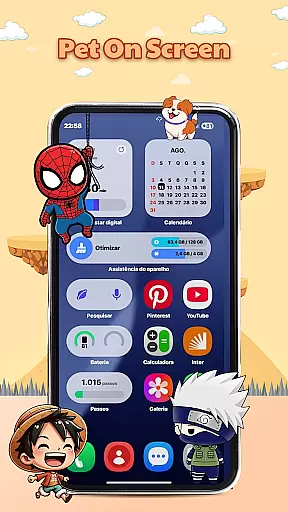
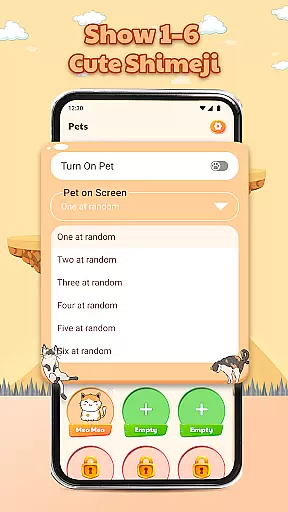
Pet On Screen - Shimeji Kawaii is a delightful personalization app that brings your phone to life with adorable animated characters. These cute, anime-style pets walk, climb, and play on your screen, creating an interactive and lively experience.
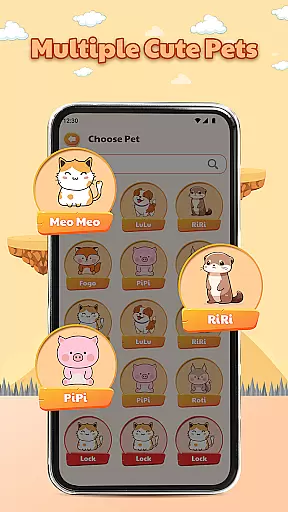
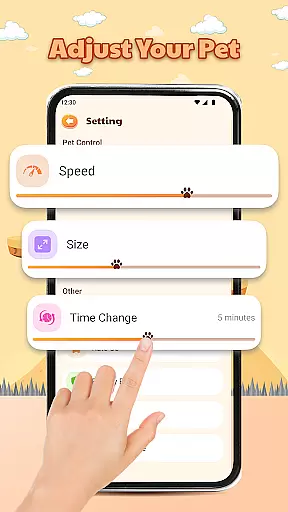
With a wide selection of charming characters to choose from, including chibi and cartoon styles, this app allows you to customize your device's appearance to match your unique style. The playful interactions and advanced customization options make it easy to adjust the pets' size, speed, and behavior, ensuring a personalized and stress-relieving experience every time you use your phone.
This app stands out with its collection of live mini characters that move naturally across your screen, providing endless entertainment and relaxation. Each character has been carefully designed to be visually appealing and fun, offering users a variety of cute pets to choose from.
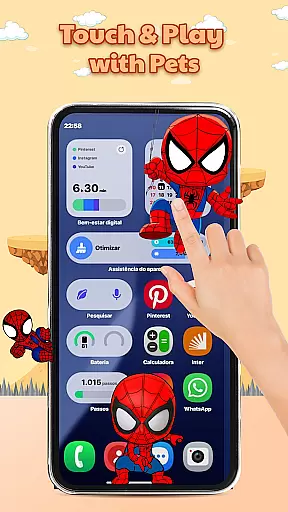
The playful interactions are another highlight, allowing you to tap and hold the characters to see their charming reactions. With advanced customization features, you can easily modify the pets' settings to suit your preferences, making your phone not only more adorable but also uniquely yours.
Whether you're looking for a fun companion or a way to personalize your device, Pet On Screen - Shimeji Kawaii delivers both joy and functionality in one package.
Customization is at the heart of Pet On Screen - Shimeji Kawaii, allowing users to tailor their experience with a range of adorable characters. This app offers an extensive selection of cute pets in various styles including anime and chibi, which ensures that there's something for everyone's taste.
The level of personalization extends beyond just choosing a character. Users can interact with these virtual pets by tapping or holding them, prompting charming reactions that add another layer of engagement. These playful interactions make every session unique and enjoyable.
Moreover, the app provides advanced settings where you can adjust the size and movement speed of your chosen pet. This feature ensures that each animated companion fits perfectly on your screen without obstructing important content while maintaining its lively presence.
By offering such diverse customization options, Pet On Screen - Shimeji Kawaii enhances user satisfaction by creating a personalized environment that reflects individual preferences and brings joy to daily device usage.
Pet On Screen - Shimeji Kawaii excels in theme compatibility, ensuring that its delightful characters complement any smartphone aesthetic seamlessly. The app supports a wide array of themes, from cute and whimsical designs to more sophisticated looks, making it versatile for all users.
Each character within the app has been designed with visual harmony in mind. Whether you prefer bright colors or subtle tones, these animated pets will blend naturally into your chosen theme without clashing or overwhelming your interface design.
In addition to aesthetic considerations, this app maintains functional consistency across different themes. Regardless of how often you switch between themes, the interactive elements remain intuitive and responsive, providing uninterrupted enjoyment as you customize your digital space.
Ultimately, Pet On Screen - Shimeji Kawaii demonstrates exceptional attention to detail when it comes to integrating with various themes. By prioritizing both form and function, it guarantees an engaging yet cohesive user experience that elevates personalization possibilities on mobile devices.
Cute animated characters
Wide selection of pets
Interactive screen presence
Customizable settings
Stress-relieving experience
May drain battery faster
Limited free options
Can be distracting
Not suitable for all devices
Some features require payment

Glass style colourful icons with a One UI look and feel
 4.60
4.60
3D, live, and moving wallpapers & themes in 4K and HD for your device.
4.50
A launcher for Samsung Good Lock and Good Guardians modules without ads
4.70
Personalize your phone with stunning HD and 4K wallpapers!
4.70
The definitive Icon pack maker and editor
4.30 4.50
4.50
Yandex Browser — stylish and secure, with voice search and data compression
4.40
Handcrafted pixel art icons, widgets & wallpapers
4.60
Cool custom fonts & keyboard themes! Symbols & font changer for Instagram
4.50
Sparkle your screen with Glitter Wallpapers For Girls and Cute Backgrounds!
4.80
Wallpaper HD 4K Live - Thousands of high-quality Anime backgrounds for you.
4.80
300+ Stunning and well-designed widgets inspired by NOTHING.
4.70
Unique Android Launcher
4.60
Ninja Turtles Cowabunga SE watch face for Wear OS
4.50 4.50
4.50
Fingerprint Lock Screen & Live Animations with 4K Wallpapers as Live Wallpaper
4.40
Interactive Miniature Painting Catalogue
3.30
Adorable pets roam and play right on your phone screen!
3.30
Custom edge gestures for volume control, brightness, apps, and shortcuts.
4.4


User Reviews