
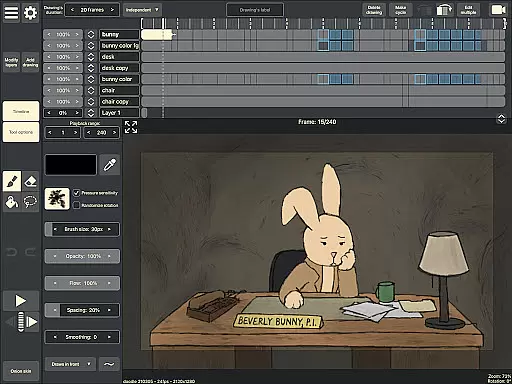
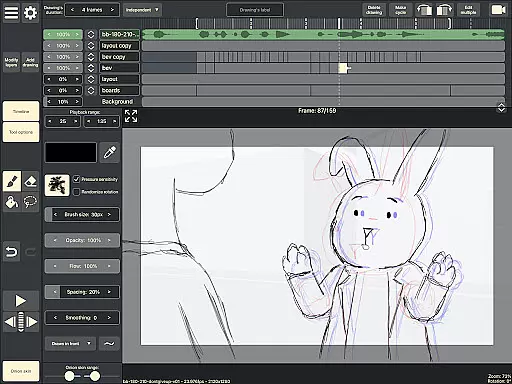
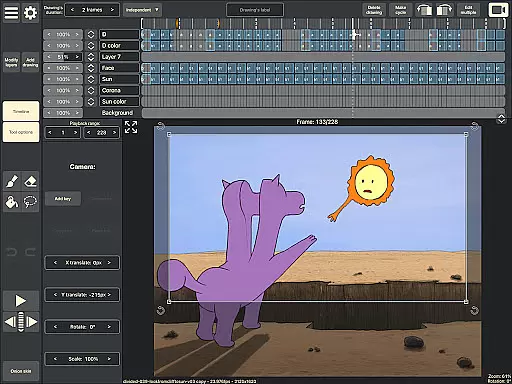
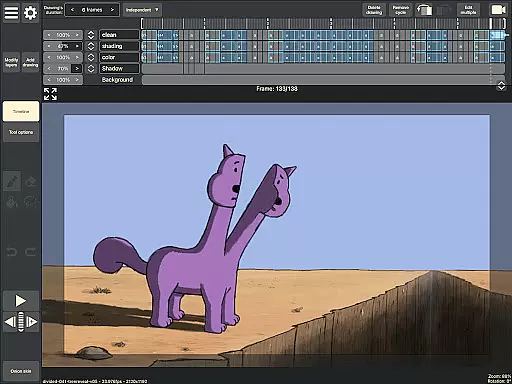
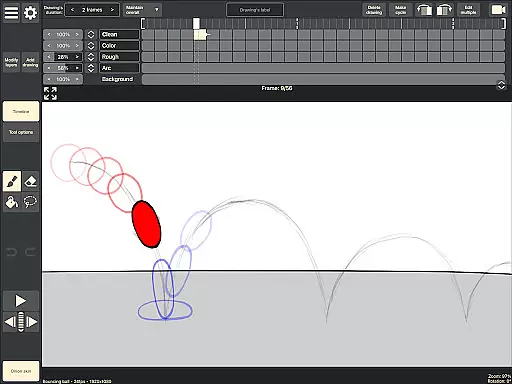
RoughAnimator is a professional-grade hand-drawn animation app designed for both Android and desktop platforms. This powerful tool provides animators with everything needed to create traditional frame-by-frame animations anywhere. With its robust feature set, the app caters to professional animators while remaining accessible to beginners.
Key features include an advanced timeline with unlimited layers, adjustable exposure settings, onion skinning, and playback preview functionality. The app also supports audio and video import for advanced animation techniques like lip-syncing and rotoscoping. Users can export their work in multiple formats including Quicktime video, GIFs, or image sequences.
Ideal for creative professionals on the go, RoughAnimator enables seamless project transfer to industry-standard software like Adobe Flash/Animate, After Effects, and Toon Boom Harmony, making it an essential tool for modern animators.
RoughAnimator distinguishes itself through its comprehensive set of animation tools. The app's timeline system supports unlimited layers and offers precise control over exposure length for individual drawings, enabling both pose-to-pose and straight-ahead animation techniques. Its onion skinning feature allows animators to see previous and next frames as they work, ensuring smooth transitions between frames.
The application provides advanced playback controls and scrubbing functionality along the timeline. It supports importing audio files for lip-sync animation and video files for rotoscoping purposes. Customizable brushes and native support for pressure-sensitive devices like Samsung S-Pen enhance the drawing experience. Animators can precisely control frame rates and resolution settings to optimize their workflow.
Export options are versatile, allowing users to save their animations as Quicktime videos, GIFs, or image sequences. The app maintains compatibility with major animation software packages, enabling seamless project integration with Adobe Flash/Animate, After Effects, and Toon Boom Harmony.
Creative tools are the backbone of any design and animation application, and RoughAnimator excels in this area. This app provides a comprehensive suite of features that cater to both professional animators and beginners alike.
With RoughAnimator, users have access to unlimited layers within a timeline, customizable brushes, and support for pressure-sensitive devices like the Samsung S-Pen. These tools allow for detailed and nuanced hand-drawn animations, replicating a traditional animation experience on a digital platform.
The app also supports importing audio and video, which is crucial for processes such as lip-syncing and rotoscoping. This ensures that animators can create fully realized animations with synchronized sound and motion-traced elements.
Furthermore, exporting options include Quicktime video, GIFs, or image sequences, making it versatile for various uses and compatible with industry-standard software like Adobe Flash/Animate, After Effects, and Toon Boom Harmony.
Flexibility in canvas and format options is essential for animators who need to adapt their work for different mediums and platforms. RoughAnimator understands this need and offers versatile solutions to its users.
Animators can control the framerate and resolution of their animations, ensuring that the final product meets the specific requirements of their projects. Whether it's for web, film, or broadcast, having these adjustable parameters allows for greater creative freedom and precision.
RoughAnimator projects can be imported into other professional animation environments, providing an uninterrupted workflow. This interoperability is vital for animators who use multiple software tools in their pipeline.
Additionally, the availability of RoughAnimator on both mobile and desktop platforms means that creators are not limited by their hardware choices. They can start a project on one device and continue working on another, maintaining consistent quality and format across all their work.
Professional-grade tools
Beginner-friendly interface
Cross-platform compatibility
Industry-standard integration
Versatile export options
Steep learning curve
Resource-intensive operation
Limited free features
Requires hardware investment
Occasional performance issues

Image/ Text to Video Generator
 4.40
4.40
Digital illustration drawing & painting pad app to paint Anime and Manga art
4.50
Remove Background, Magic Eraser, Photo Enhancer, Story Templates, Collage Maker
4.30
Draw Trace image sketch by, AR art projector app, Easy to trace any image.
4.50
Novices can also easily complete diamond painting masters
4.70
Create Logos, Tattoos, AI Art & more with our AI Photo Generator & Design Editor
4.20
Create amazing pictures and unleash your creative genius with AR Drawing Sketch
4.40
Explore future self face age filter & remove background image for a unique look.
3.50
All-in-One art, logo & collage maker. Design photos and edit video backgrounds
4.80
Create stunning art with AI.
4.80
Kling AI is an image and video generation and editing studio powered by AI.
4.50
800+ Drawing, Painting Lessons App to Practice, Sketch & Paint Art.
4.30
Custom Character Creator & PFP Maker!
4.20
AR Anime Drawing: How to draw anime with AR drawing & sketching apps!
4.00
Paint with oils and sketch with natural tools on a realistic virtual canvas.
3.80
Resize photos and print photos in exact size with our powerful photo printer!
3.80
Your homescreen as an elegant glass with customized blur, lighting, and visuals.
3.70
Create cute cat emojis & PFPs! Fun, custom avatars for cat lovers.
3.70
A luxurious gold watch face for an elegant and refined look.
4.4


User Reviews