
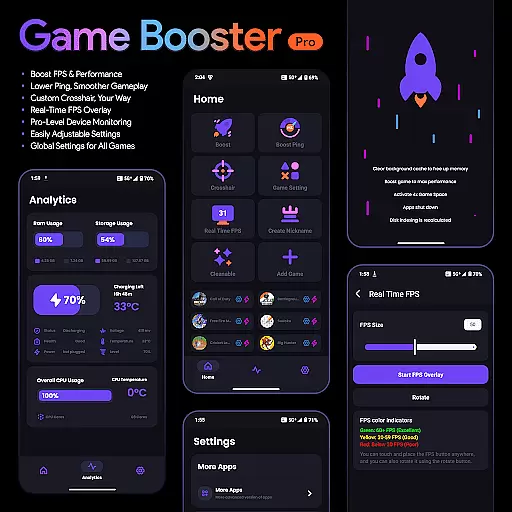
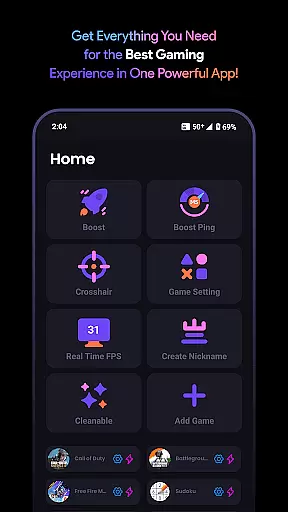
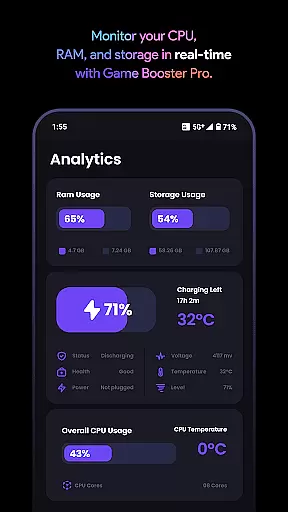
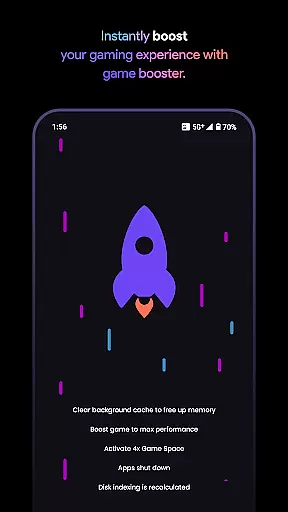
Game Booster Pro is a powerful tool designed to enhance your mobile gaming experience. The app focuses on optimizing device performance, boosting FPS, and reducing lag for smoother gameplay. With its advanced features like real-time FPS overlay and customizable crosshair options, it caters specifically to gamers who demand precision and high performance.
In addition to performance optimization, the app provides pro-level device monitoring, allowing users to track their device's stats while gaming. Its intuitive interface ensures that even beginners can easily adjust settings to suit their preferences. Whether you're playing graphics-intensive games or competitive shooters, Game Booster Pro helps elevate your gaming sessions by prioritizing network traffic and improving overall efficiency.
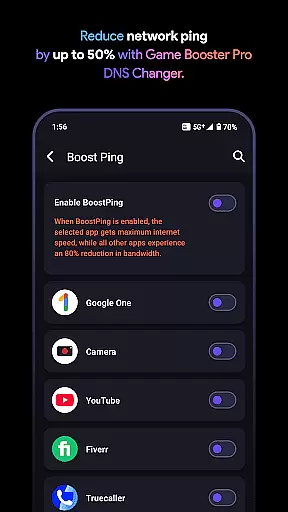
Game Booster Pro offers an impressive range of features tailored for gamers. One standout feature is its ability to boost FPS and lower lag, ensuring a seamless online gaming experience. By leveraging VpnService, the app optimizes network traffic for selected games, creating a local-only VPN connection that reduces ping without compromising privacy.
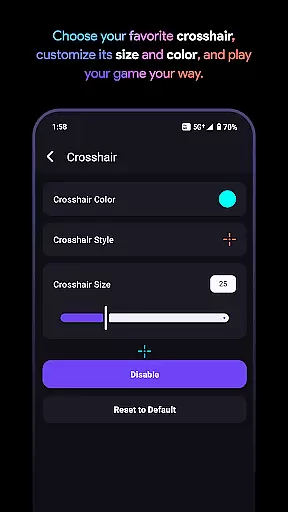
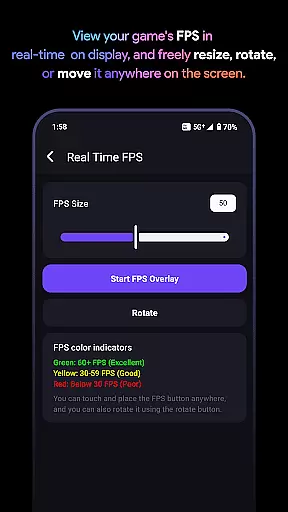
The app also includes tools such as a customizable crosshair, which allows players to fine-tune their aiming mechanics in FPS games. Additionally, the real-time FPS overlay lets users monitor frame rates directly within their game interface. With global settings that apply preferences across all games and easy-to-adjust controls, this app combines functionality with user convenience, making it an essential utility for serious gamers.
Game Booster Pro is designed to deliver precision and effectiveness in enhancing gaming performance. The app optimizes frame rates (FPS) and reduces lag, ensuring that gamers experience smoother gameplay without interruptions. By leveraging advanced settings tailored specifically for gaming, the app guarantees a noticeable improvement in both visual fluidity and network responsiveness.
The core functionality extends beyond simple performance boosts. With its real-time FPS overlay, users can monitor their device's frame rate directly within games, eliminating the need to exit the app. Additionally, the VpnService feature prioritizes network traffic for selected games, reducing ping and background bandwidth usage. This ensures that critical gaming data packets are delivered faster, resulting in reduced latency during online matches.
For gamers who demand customization, Game Booster Pro offers adjustable crosshair settings and global preferences applicable across multiple games. These features allow users to tailor their gaming environment to their exact specifications, further enhancing their competitive edge. The intuitive interface makes these adjustments easy to implement, even for less tech-savvy users.
Ultimately, the app's effectiveness lies in its ability to consolidate all these tools into one platform, providing a seamless experience that caters to both casual and professional gamers. By focusing on accuracy in optimization and ease of use, Game Booster Pro establishes itself as an essential tool for elevating gaming performance.
Achieving simplicity and intuitiveness in user interfaces is crucial for any application, and Game Booster Pro excels in this area. The app provides a clean, straightforward layout that allows users to access its powerful features with minimal effort. Whether adjusting performance settings or monitoring device stats, every function is designed to be easily navigable, ensuring that users can focus more on their gaming and less on configuration.
One standout feature is the appu2019s easily adjustable settings, which require just a few taps to customize. From boosting FPS to lowering lag, each option is presented in a clear, logical manner. Even the crosshair customization tool is intuitive, enabling users to create their ideal crosshair for any game without needing extensive technical knowledge. This simplicity ensures that gamers of all skill levels can utilize the app effectively.
Another key aspect is the global settings functionality, which applies user preferences across all games. This eliminates the need to configure settings individually for each title, saving time and effort. Furthermore, the real-time performance monitoring overlay is seamlessly integrated, displaying critical information without cluttering the screen or disrupting gameplay.
By combining powerful features with an accessible interface, Game Booster Pro demonstrates how simplicity and intuitiveness can enhance user satisfaction. Its design philosophy ensures that even beginners can harness the full potential of the app while offering enough depth to satisfy advanced users.
Boosts FPS effectively
Reduces lag significantly
User-friendly interface
Customizable crosshair
Real-time performance tracking
Premium version required
Limited free features
Network optimization varies
Device compatibility issues
No offline support

Use your phone as a webcam on your computer over WiFi or USB.
 4.40
4.40
Universal TV remote control all TVs, Roku, LG, Samsung, Fire, Vizio, Sony, TCL.
4.40
Unleash gamepad precision for ultimate mobile gaming dominance.
3.90
Support Fossify apps with a warm thank you!
5.00
Connect wirelessly to your computer to watch movies, browse the web, play games
5.00
The Ultimate Flex Drivers Utility App - Convenient Tapping & Block Filters
4.70
Game Booster, GFX Tool is now compatible with newer game update
4.50
Pro Emulator is an easy to use game console emulator for a range of consoles.
4.40
The ideal app to be the digital eye of your family
3.40
Best leveling tool for your Android device. Hang paintings like a pro.
4.90
Extremely fast, secure, and protects your privacy
4.80
Excellent scientific calculator with symbolic algebra, integrals, derivatives
4.80
Protect your device with antivirus, storage cleanup, and system monitoring
4.70
FV File Manager Pro, Fast and powerful file manager for Android
4.60
Play your X-Box games remotely in 1080p with any controller and zero latency
4.60
Just one-tap to easy translate in any language after calls within seconds.
4.20
A simple app to back up and restore SMS & MMS messages and call logs.
4.10
PDF Reader - Document Viewer: Read, Manage & Organize Your Documents
3.10
Unlock your Essential Key. Create custom shortcuts to your favorite apps!
4.4


User Reviews