
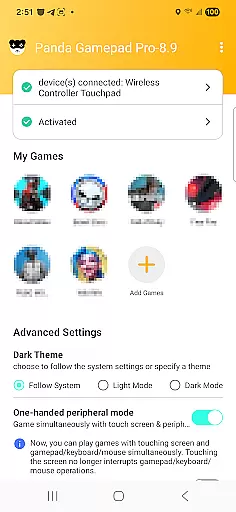
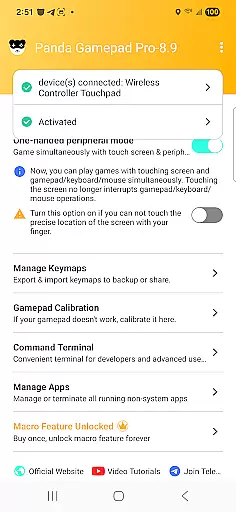
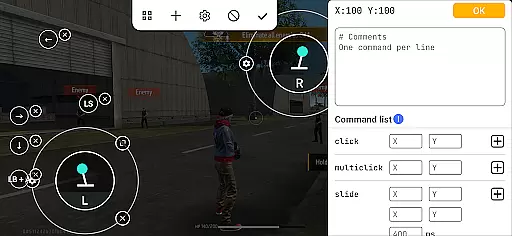
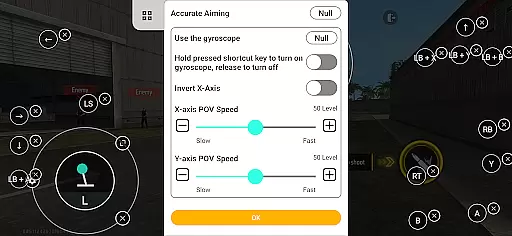
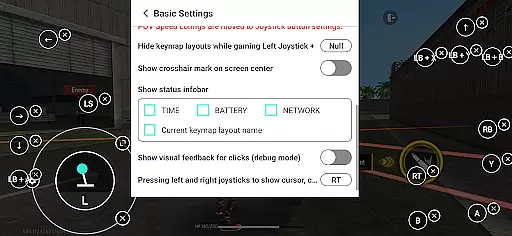
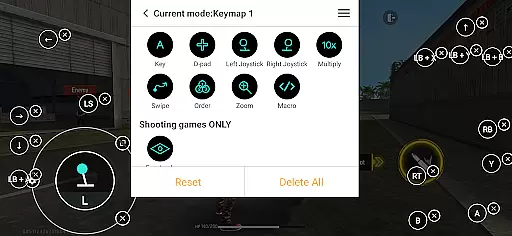
Panda Gamepad Pro is a powerful tool designed to enhance mobile gaming experiences by enabling gamepad controls. This app allows gamers to enjoy precise and comfortable control in their favorite mobile games, eliminating the frustration of touch controls. Supporting nearly all gamepad brands, it offers universal compatibility for an optimal gaming experience.
The app stands out with its direct game launch feature, ban-proof technology, and extensive game support covering various genres like shooting games, MOBAs, and sports games. Whether you're using the latest controllers or older models, Panda Gamepad Pro ensures seamless integration and superior performance across different devices.
Panda Gamepad Pro boasts several innovative features that set it apart from other gaming tools. The direct game launch functionality lets users jump straight into gameplay without the need for cloning. Its secure Google Play login system provides peace of mind while playing.
Ban-proof gaming technology ensures players can enjoy their favorite titles without fear of account suspension due to duplication restrictions. With universal compatibility, this app supports almost any gamepad brand, making it versatile for all types of gamers. Additionally, extensive game support means enhanced control in numerous mobile games, elevating the overall gaming experience.
Panda Gamepad Pro excels in delivering precise and effective control for mobile gaming. The app is designed to maximize the functionality of your gamepad, ensuring every button press and joystick movement translates accurately into in-game actions.
The tool supports a wide range of gamepad brands, making it versatile for gamers with different devices. Whether you're using the latest controller models or older ones, Panda Gamepad Pro ensures that all inputs are registered correctly, providing an optimal gaming experience across various mobile games.
With features like Direct Game Launch and Ban-Proof Gaming technology, users can enjoy seamless gameplay without interruptions. These functions not only enhance performance but also provide peace of mind by avoiding potential bans associated with other gamepad solutions.
The interface of Panda Gamepad Pro is crafted to offer simplicity and intuitiveness, allowing gamers to focus on what truly mattersu2014their gaming experience. Upon launching the app, users are greeted with a straightforward setup process that gets them ready to play quickly.
For Android 11+ users, activation is as simple as enabling it directly on their device. Meanwhile, those on Android 10 and below can activate through a PC or Mac effortlessly. Rooted devices benefit from automatic activation, streamlining the entire process further.
This intuitive design extends beyond just activation; navigating through settings and customizing controls remains hassle-free. Such thoughtful design ensures players spend less time configuring and more time dominating their favorite games with precision and comfort.
Enhanced precision
Universal compatibility
Ban-proof technology
Direct game launch
Secure login
Activation required
Limited free version
Device compatibility issues
Learning curve for setup
Subscription cost

 4.50
4.50
Transfer Files, APK from Phone to Watch & Install.
4.0
A recovery soft,it features photo recovery, video recovery, file recovery.
3.40
PDF Reader - Document Viewer: Read, Manage & Organize Your Documents
3.10
Excellent scientific calculator with symbolic algebra, integrals, derivatives
4.80
Undelete and recover your lost or deleted files with DiskDigger!
3.40
Screen Mirroring for Roku Sticks, Roku TCL TV and Roku Hisense TV
4.50
Screen Mirroring with sound for Samsung TV, LG TV, Sony TV, Smart TV and Browser
4.20
Creation, Learning, Entertainment & More — The All-in-One AI Search Engine
4.70
Extremely fast, secure, and protects your privacy
4.80
Head tracking for PC sim games such as MSFS 2024 or Elite:Dangerous. No headset!
4.50
An easy-to-use calculator designed to save time calculating and bending conduit
4.30
PC precision for mobile gaming: dominate with keyboard and mouse!
4.30
Making emulation easy for everyone!
4.30
View detailed information about your Nissan Leaf the dealer never shows you.
4.10
Detect hidden spy camera with advanced scanning {{ Premium version }}
4.00
Amateur Radio app for APRS: Track friends, exchange messages, get tactical info.
3.90
Create your own live wallpaper or check out thousands already made presets
3.90
Download any file easily and quickly with Downloader
4.4


User Reviews