
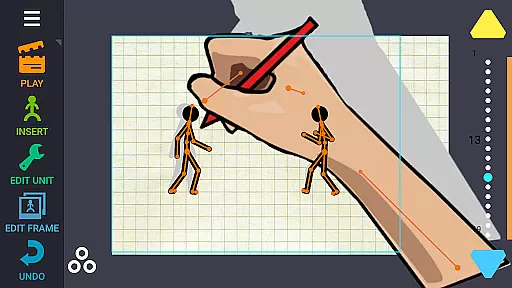
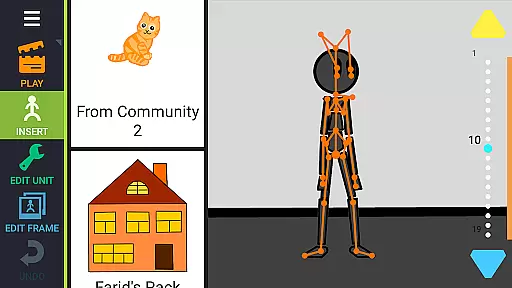
Draw Cartoons 2 PRO is a comprehensive 2D animation app designed for both beginners and advanced animators. The app simplifies the complex process of cartoon creation through innovative motion smoothing techniques, allowing users to set only the start and end positions of characters while the program generates smooth transitions automatically.
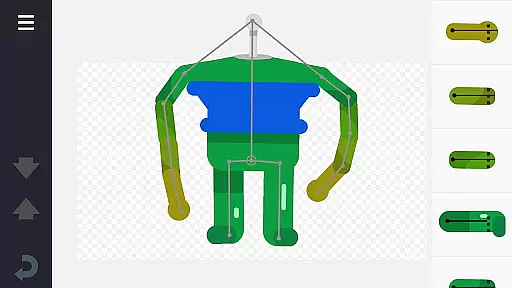
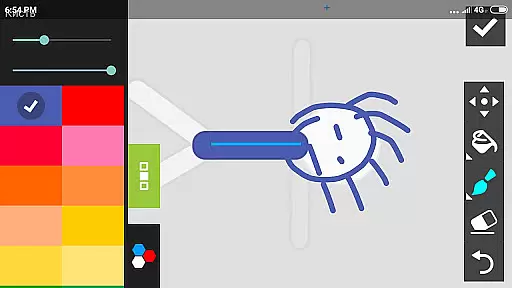
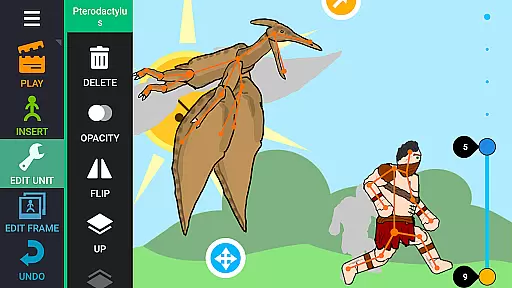
The app features an extensive library of pre-made characters and objects, including dragons, people, cars, and more. Additionally, it offers a character editor that enables users to create custom creatures and objects using 'bones.' Users can draw bones directly within the app or cut pictures from photos to build unique animations.
With advanced tools like dramatic camera close-ups, speed effects for slow-motion or fast-paced scenes, and the ability to add music or voiceovers, Draw Cartoons 2 PRO provides everything needed to produce professional-quality cartoons. Animations can be exported as MP4 videos or GIFs and shared on platforms like YouTube using the tag #drawingcartoons2.
Draw Cartoons 2 PRO stands out with its robust feature set tailored for diverse animation needs. One of its core features is the motion smoothing technique, which drastically reduces the complexity of animating by requiring users to define only key poses. This allows for seamless movement transitions without the need for frame-by-frame adjustments.
The app includes a vast library of characters and objects, providing users with ready-to-use assets for their projects. The built-in character editor empowers creators to design custom figures by assembling 'bones' into unique structures. Furthermore, users can import images and incorporate them into their animations, expanding creative possibilities.
Advanced animators will appreciate additional tools such as the virtual camera for dynamic shots, speed effects for altering playback tempo, and audio integration options. These features ensure that users can achieve sophisticated results while maintaining ease of use. With support for exporting animations in MP4 and GIF formats, sharing creations online is straightforward and efficient.
In Draw Cartoons 2 PRO, the comprehensive suite of creative tools empowers users to craft intricate 2D animations with ease. The application provides a library filled with diverse characters and objects, ranging from mythical dragons to everyday vehicles, all ready for animation.
Additionally, the built-in character editor allows animators to design unique creatures and objects by assembling 'bones', which form the skeleton of each animated figure. This feature enables creators to either draw directly within the app or import images to be transformed into animated components.
The inclusion of advanced features such as dramatic camera angles and speed effects further enhances the storytelling capabilities, allowing for professional-grade close-ups and slow-motion sequences that rival those seen in cinematic productions.
Draw Cartoons 2 PRO offers remarkable canvas and format flexibility, accommodating various creative needs. Animators can seamlessly integrate custom soundtracks or voiceovers, enriching their storytelling and giving life to their characters through synchronized audio.
Projects can be exported in multiple formats, including MP4 video and GIF, providing content creators with the versatility needed to share their work across different platforms like YouTube, using the tag #drawingcartoons2 to connect with fellow animators.
Moreover, the ability to save and share individual elements as separate files fosters a collaborative community where users can exchange assets, such as a superhero figurine, enhancing the collective creativity and enabling cross-project utilization.
User-friendly interface
Extensive asset library
Advanced animation tools
Customizable characters
Export flexibility
Steep learning curve
Subscription fees
Limited free content
Occasional bugs
High system requirements

Discover Cartoon Dream : Unleash Your Creativity with CuttingEdge AI
 4.50
4.50
Sketch, plan, take notes and illustrate on an infinite canvas.
4.20
Text to Image, Image to Video & AI Chat
4.20
Unleash Your Creativity with Draw Cartoon - AR Drawing App
4.10
Share the joy of painting with ibis Paint! Drawing anime and manga art.
4.50
Video AI: Revolutionize Your Content Creation with Advanced Video Generation
4.50
Just trace a projected picture on paper and color! Draw & Paint with AR drawing
4.40
How to draw anime step by step for beginner easily by AR drawing sketch & paint.
3.60
All-in-One art, logo & collage maker. Design photos and edit video backgrounds
4.80
Learn how to draw with step-by-step tutorials, fun lessons & multiplayer drawing
4.70
Logo Generator powered by AI: Create stunning logos effortlessly!
4.70
Photo stitcher for automatically screenshot stitching into a long screenshot
4.70
Image resizer to resize, crop, rotate, flip, change dpi photo or picture in bulk
4.60
Unleash your drawing and painting potential
4.50
Customizable Outlined Fonts. Watch Face Format. Battery friendly Digital Clock.
4.20
Paint with oils and sketch with natural tools on a realistic virtual canvas.
3.80
Sketch, trace and master AR drawing with awesome anime art!
3.30
Meet the magic aı 3d photo generator and smart AI video generator app.
3.20
Your Essential Color Theory Guide: Red, Yellow, Blue (RYB)
4.5


User Reviews