





XPlay Browser is a cutting-edge mobile application designed for users seeking a fast, private, and video-focused browsing experience. This browser stands out with its lightweight design, ensuring smooth performance even on older devices. It offers a clean user interface and instant navigation, making web browsing intuitive and efficient.
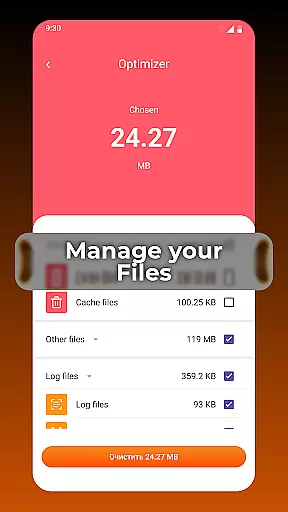
One of the standout features of XPlay Browser is its Private Browsing Mode, which ensures that your online activities remain confidential by not storing any history. Additionally, the app allows easy saving of videos from supported websites, enabling offline viewing without the need for additional applications. With smart file management tools, it helps keep your device organized and efficient.
Whether you're streaming videos, managing files, or simply browsing the web, XPlay Browser provides a seamless experience. Its battery-efficient design makes it perfect for users who need a reliable browser without compromising on speed or privacy.
XPlay Browser boasts an array of features tailored to enhance your browsing experience. First and foremost, its fast and smooth browsing capability ensures that web pages load quickly, providing a comfortable and efficient navigation flow. The browser's lightweight nature means it runs flawlessly even on devices with limited resources.
Privacy is a top priority, and XPlay Browser delivers with its Private Browsing Mode. This feature ensures no history is stored, and only essential permissions are used, safeguarding your data during secure sessions. For those who enjoy consuming multimedia content, the app offers easy video downloads from supported sites, allowing users to save and watch videos offline at their convenience.
In addition to these features, XPlay Browser includes smart file management tools. These tools help users review, sort, and maintain files efficiently, highlighting unnecessary items to keep the device clutter-free. The combination of speed, privacy, and multimedia support makes XPlay Browser a versatile tool for modern mobile users.
Video format compatibility is a crucial feature for any video player, ensuring that users can enjoy content in various formats without interruptions or the need for additional software. XPlay Browser excels in this area by supporting a wide range of video formats, making it versatile and user-friendly.
The app's advanced decoding capabilities allow seamless playback of popular formats such as MP4, AVI, and MKV, among others. This ensures that whether you're streaming online or playing local files, your videos will run smoothly without the hassle of conversion or missing codecs.
For users, this means unparalleled convenience and flexibility. You can download videos from supported websites and watch them offline without worrying about format issues. The browser's intelligent system recognizes and adapts to different formats automatically, providing a hassle-free experience.
Ultimately, XPlay Browser's robust video format compatibility enhances the overall user experience by offering reliable performance and broad format support, catering to diverse multimedia needs within a single, efficient application.
AI-powered editing features represent the cutting-edge integration of artificial intelligence into video editing, allowing users to enhance their content effortlessly. XPlay Browser incorporates these innovative tools to provide an intuitive and powerful editing suite directly within the app.
With AI-driven functionalities, users can apply smart filters, automatic color correction, and scene detection with minimal effort. These features are designed to simplify complex editing tasks, enabling even beginners to produce professional-quality videos. The AI analyzes video content and suggests optimizations based on context, improving visual appeal and coherence.
This technological advancement benefits users by drastically reducing editing time and enhancing creativity. Whether you're adjusting lighting for a better aesthetic or trimming clips for concise storytelling, AI assistance streamlines the process, making video editing more accessible than ever.
In summary, XPlay Browser's AI-powered editing features empower users to transform raw footage into polished productions efficiently, setting a new standard for integrated video player and editor applications.
Fast page loading
Private browsing
Easy video download
Smart file management
Battery efficient
Limited video sites
No desktop mode
Few customization options
Occasional bugs
Ads in free version

Auto video maker with music & exclusive filters. Video editing made simple.
 4.50
4.50
Your media, on your terms.
4.10
Create & edit videos with AI
4.30
VLC Remote lets you control your VLC Media Player on Mac, PC or Linux.
4.60
Live TV, anywhere in your home
3.80
Download videos easily & play them all in one smart, powerful video manager.
3.40
IPTV Loader, loads your own Playlist. DOES NOT CONTAIN ANY LIST OR CHANNELS
4.60
Browser for Fire TV to stream webvideos, online movies, livestreams in HD
4.40
Viddo: Generate Action Figure, AI Anime, AI kiss, AI hug Video from image & text
4.40
High-Quality USB Camera Viewer & HDMI Display
4.70
Cast Videos from Web Browser, IPTV to Roku, Chromecast, DLNA, Smart TV +more
4.60
Seamlessly connect and control your smart devices, anytime, anywhere with ease.
4.60
HD video maker with no watermark, no ads & vlog maker with music, PIP, text
4.50
This app was created to edit the metadata of music files.
4.20
Turn your phone into a wireless camera!
4.20
LumaFusion: The Ultimate Storytelling Experience for Video Editing
4.10
Kodi media center, a free and open source cross-platform entertainment hub
3.60
Connect EasyCap or UVC devices for recording and broadcast video/audio stream
3.60
Client application for NextPVR software
3.00


User Reviews