
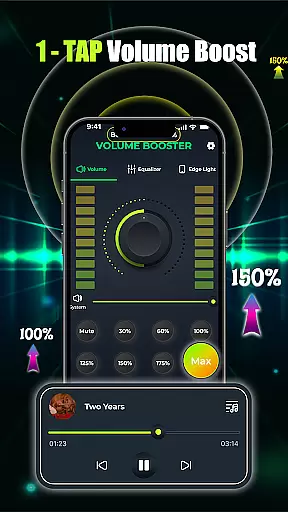
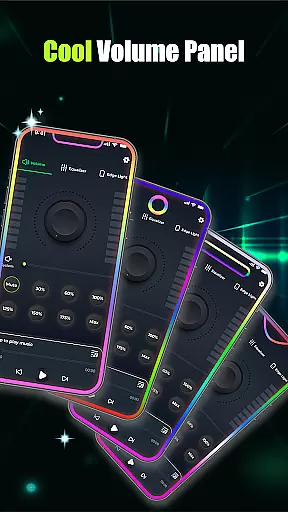
Volume Booster - Music & Sound is a powerful audio enhancement application designed to elevate your listening experience across all devices. This app allows users to amplify volume levels instantly with just one tap, delivering louder and clearer sound without distortion. Whether you're enjoying music through Bluetooth headphones or watching movies on speakers, the app ensures an immersive audio experience.
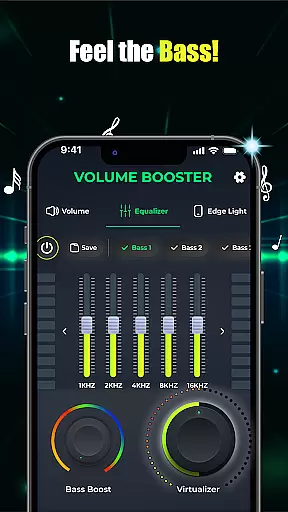
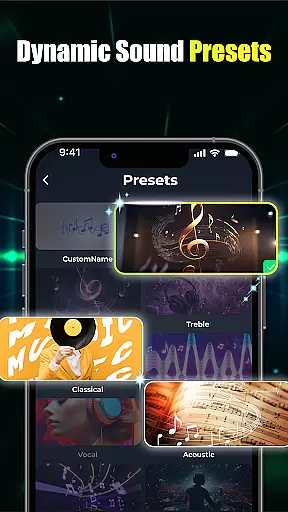
The app features advanced equalizer controls, customizable presets, and bass boost options that let you tailor sound to your preferences. With its intuitive interface, users can easily adjust settings such as flat equalizers, band equalizers, and 3D virtualization for studio-quality output. Additionally, the built-in music player supports multiple audio playback applications, making it versatile for various use cases like parties, casual listening, or professional audio setups.
Perfect for personal use, this app enhances every aspect of your audio journey, from boosting volume during conversations to creating dynamic soundscapes for entertainment. Its seamless integration with device operating systems and clean design make it an essential tool for anyone seeking superior sound quality.
Volume Booster - Music & Sound offers a comprehensive suite of features that cater to both casual listeners and audio enthusiasts. One of its standout capabilities is the one-tap volume boost function, which includes a slider volume control and equalizer adjustments for precise sound management. Users can customize their audio experience using flat equalizer presets or create unique sound profiles tailored to specific genres or moods.
In addition to volume control, the app provides advanced bass boost options that deepen the audio impact, allowing users to feel the beat in their music. The crystal-clear custom sound presets with 3D virtualization deliver studio-quality sound, enhancing every note and frequency. Furthermore, the built-in music player consolidates multiple audio playback apps into one screen, streamlining the user experience by enabling quick switching between different applications based on individual needs.
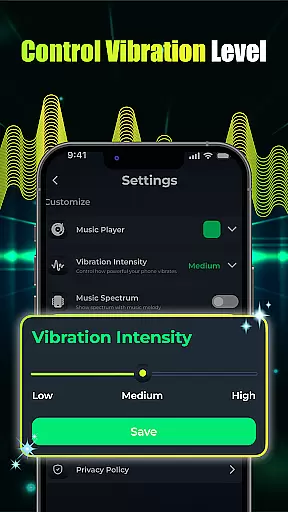
This app also supports edge light visual effects customization, giving users the ability to personalize their interface with preferred colors, speeds, and radii. Designed for seamless integration with phone operating systems, it ensures smooth interaction and uninterrupted playback. These innovative features collectively provide a rich, immersive audio environment suitable for diverse scenarios, from private listening sessions to lively social gatherings.
When it comes to music and audio applications, the size and authenticity of the music library are crucial factors. Volume Booster - Music & Sound offers an extensive collection of songs and soundtracks, ensuring users have access to a wide variety of audio content. The app partners with legitimate music providers to ensure all tracks are properly licensed and copyrighted.
The application's vast music library is regularly updated with new releases and popular hits, catering to diverse musical tastes. Whether you're into classical symphonies or the latest pop sensations, this app has something for everyone. Its comprehensive database ensures that users can find their favorite tracks without worrying about copyright infringement issues.
Moreover, the app provides high-quality audio streams for each track in its library, enhancing the listening experience. Users can enjoy crystal-clear sound whether they're using Bluetooth headphones or loudspeakers. This commitment to quality and legality makes Volume Booster a reliable choice for audiophiles who demand both variety and authenticity in their music sources.
Audio quality is paramount when selecting a music and audio app, and Volume Booster - Music & Sound excels in providing top-notch audio quality options. The app supports various audio formats and bitrates, allowing users to choose the best quality that suits their devices and preferences. Whether you're an audiophile seeking lossless audio or a casual listener who prioritizes convenience, this app caters to all needs.
One of the standout features of this app is its advanced equalizer settings, which include customizable flat equalizer and band equalizer presets. These tools enable users to fine-tune their audio experience, adjusting bass, treble, and other sound frequencies to perfection. Additionally, the app offers 3D virtualization effects that simulate a live concert or studio environment, providing an immersive listening experience.
Volume Booster also includes a powerful bass booster feature, enhancing low-frequency sounds for a deeper, more impactful audio experience. With these comprehensive audio quality options, users can tailor their sound output precisely as they desire, making every listening session a delightful auditory journey.
Instant volume boost
Customizable equalizer
Advanced bass enhancement
Intuitive user interface
Multi-app music player
May drain battery faster
Limited free features
Occasional glitches
Not compatible with all devices
Ads in free version

The Music Journey in Your Hands
 4.30
4.30
JBL PartyBox APP works with 110/310/710/120/320/520/Encore/Encore 2/Encore Ess 2
4.80
Powerful beat maker & DJ mixer to remix tracks, make music, & perform DJ mix
3.70
Enhance the sound quality of your devices, listen to what you want
4.50
Brian Eno and Peter Chilvers’ acclaimed music app Bloom, radically reinvented.
4.80
The only true audiophile music player with Hi-Fi audio rendering and DSP engine
3.90
Responsive piano with great sounds, graphics, and songs
4.80
Reverse your voice & songs instantly! Fun singing challenge with cool effects.
4.60
Listen to offline music and sounds from all categories
4.70
Full-featured, High-Quality Groovebox Workstation, perfect for Live Performance!
4.80
Super Sound Editor, Song Maker & Mixer, Vocal Remover, Voice Recorder & Changer!
4.60
AI Music Maker: Generate And Compose AI Tunes & AI Songs & AI Music & AI Melody!
4.60
Ringtone Maker is free app create ringtone from music files or your recording.
4.40
Advanced 10-Band Audio Graphic Equalizer Sound Booster Pro
4.30
Enjoy singing any song, no matter how high or low it is
4.30
Smart piano keyboard, Classical to Pop, Real-time multiplayer connection!
4.20
Slow music down without changing pitch.
3.70
Control your MIDI USB or Bluetooth devices in app and avoid some trampling
3.30
The Minimalistic Premium Music Player. Handmade with passion for music
2.20


User Reviews