
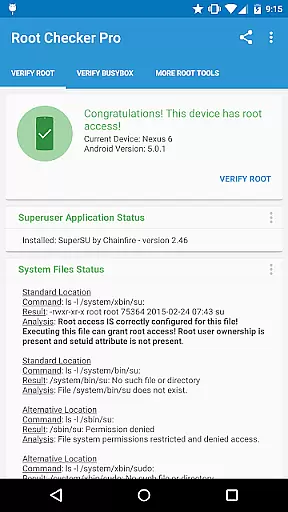
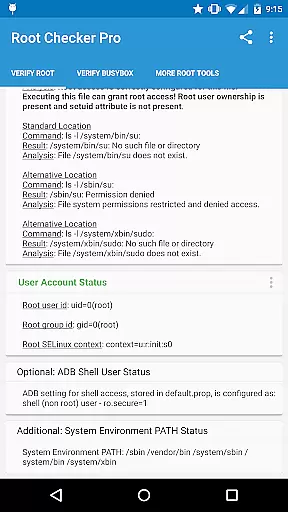
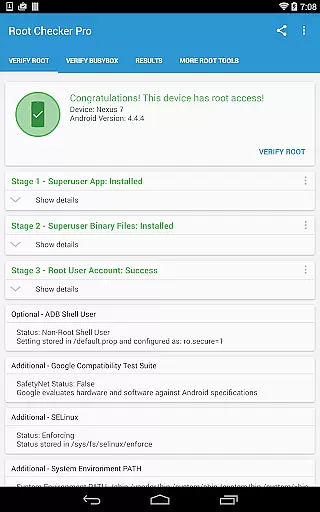
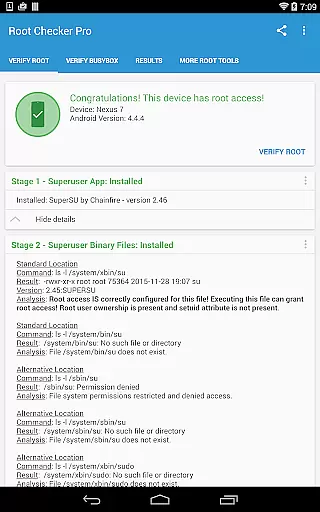
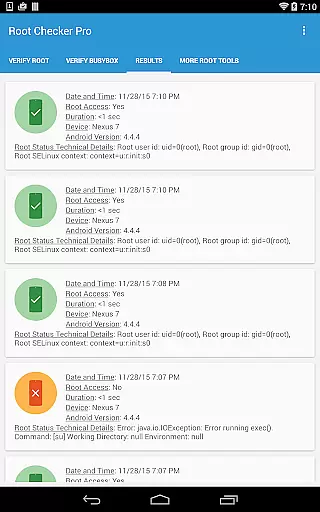
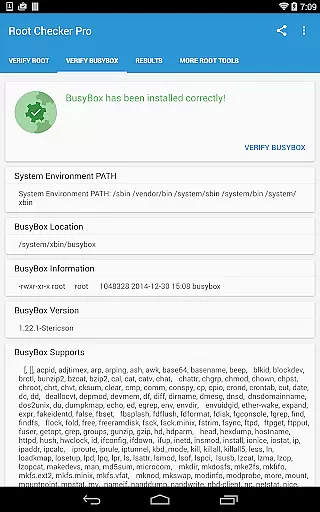
Root Checker Pro is a powerful Android tool designed to verify root access on your device. The app checks for proper root (superuser) permissions and BusyBox installation, providing detailed diagnostic information that helps users troubleshoot any related issues. It examines critical system components such as the su binary location, file permissions, SELinux status, and Superuser app versions.
In addition to its core functionality, the app offers advanced features tailored for both novice and experienced users. For beginners, it provides a simple interface to confirm root access, while power users can dive into technical details like uid/gID results and ADB shell settings. With an intuitive widget feature, users can monitor their root status in real-time, ensuring continuous verification without manual checks.
This application proves especially useful when setting up or modifying rooted devices. By exporting detailed reports via email or social media, users can easily collaborate with developers or seek troubleshooting assistance. Root Checker Pro simplifies the process of maintaining a healthy rooted environment, making it an essential utility for anyone managing rooted Android devices.
Root Checker Pro stands out with its comprehensive suite of diagnostic tools tailored for rooted Android devices. One key feature is its ability to check standard su binary locations and permissions, which are crucial indicators of proper root access. The app also evaluates SELinux contexts, Superuser installations, and ADB shell default modes, offering a complete picture of the device's root health.
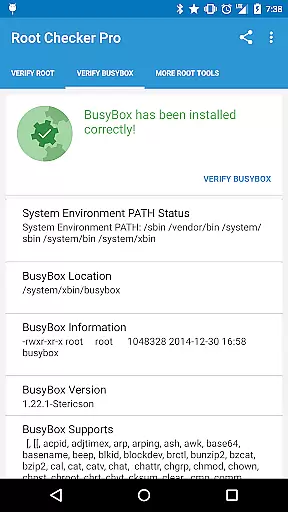
For advanced users, the app provides granular details about the root environment, including BusyBox installation status and version information. These insights help identify potential configuration issues quickly. Additionally, the built-in export function allows users to share diagnostic outputs effortlessly through email or social media platforms, facilitating collaboration with other tech-savvy individuals or support teams.
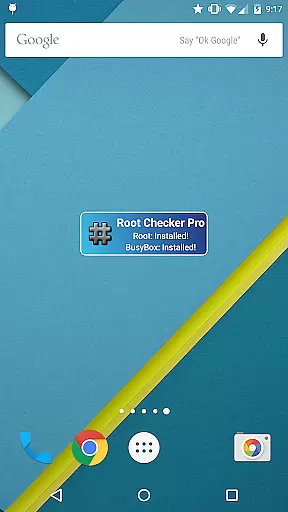
The inclusion of a customizable widget further enhances the user experience by enabling automated, timed checks for root and BusyBox statuses. This ensures that users remain constantly informed about their device’s operational state without needing to manually open the app each time. Overall, these robust features make Root Checker Pro an indispensable tool for maintaining optimal root access on Android devices.
Root Checker Pro excels in delivering accurate and effective core functionality for Android users. The application's primary purpose is to verify root access on Android devices, ensuring that the superuser permissions are correctly installed and operational.
The app meticulously checks standard su binary locations, file permissions, root uid/gid, SELinux contexts, and Superuser app installations. This detailed analysis provides even novice users with clear insights into their device's root status while offering advanced users the technical details needed for troubleshooting.
By presenting all necessary information such as su binary location, permissions, and SELinux status, the application enables users to quickly diagnose and resolve any root-related issues. This comprehensive approach to root verification makes the process accessible to both new and experienced Android users.
The true value lies in its reliability and speed - providing a simple yet thorough method to confirm root access. Users can trust the results and make informed decisions about their device's configuration and potential modifications.
Root Checker Pro demonstrates exceptional interface simplicity while maintaining powerful functionality. The application's design focuses on providing an intuitive user experience that requires minimal learning curve, even for non-technical users.
All crucial root-checking functions are accessible through a straightforward interface that presents complex technical data in an easily digestible format. The main Root Check mode displays essential information in a clear, organized manner, allowing users to quickly understand their device's root status.
The application includes convenient features like one-touch exporting of detailed results via email or social media applications. This functionality simplifies collaboration and troubleshooting by enabling easy sharing of technical information with support teams or online communities.
Additionally, the included widget enhances usability by providing constant monitoring of root and BusyBox status. Users can set custom intervals for status checks and receive notifications directly on their home screen, making root status monitoring both convenient and efficient.
Easy-to-use interface
Comprehensive diagnostic reports
Real-time monitoring via widget
Detailed BusyBox analysis
Quick export options for sharing
No iOS compatibility
Advanced features may overwhelm beginners
Limited functionality on non-rooted devices
Requires basic technical knowledge
Occasional update delays

 4.50
4.50
Learn the vast amount of system information about device and monitor it's state
4.70
Fluid navigation gestures for all of us!
4.30
Amateur Radio app for APRS: Track friends, exchange messages, get tactical info.
3.90
ADB support Android 4.X-Android 13(Support wireless pair mode).No root required!
4.70
Excellent scientific calculator with symbolic algebra, integrals, derivatives
4.80
Monitor car performance in real time and troubleshoot malfunctions.
4.80
Creation, Learning, Entertainment & More — The All-in-One AI Search Engine
4.70
fast and easy mp3 music downloader
4.80
WiFi Signal Strength Meter help you detect WiFi Signal Strength in real time.
4.80
Unit and currency converter with easy and simple UI.
4.80
Remote Play with FSR upscaling, low latency & full controller support
4.80
Mirror your screen to Chromecast and Android TV - Super fast and simple
4.60 4.50
4.50
Quickly check the frequency of the Earth
4.30
Introducing Smart Printer, your ultimate destination for printing solutions!
4.00
Family Locator, Share location, StayConnect with your family in real time
3.90
A non-root local ADB shell client. READ BELOW!
3.40
Transfer Files, APK from Phone to Watch & Install.
4.0


User Reviews