
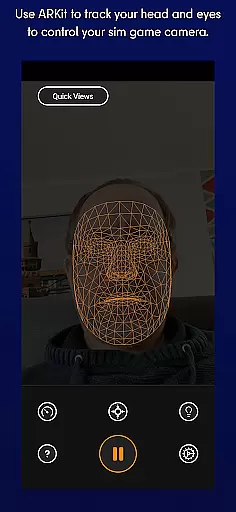
SmoothTrack is an innovative tool that revolutionizes the way you interact with simulation games by providing precise 3D head tracking. Using your device's AR capabilities, it allows for intuitive camera control in any game compatible with TrackIR. This app transforms your mobile device into a powerful motion controller, enabling a more immersive gaming experience without the need for additional hardware.
The magic of SmoothTrack lies in its ability to translate slight head movements into dynamic in-game perspective shifts. Whether you're flying a plane in Microsoft Flight Simulator or navigating through Elite: Dangerous, this app enhances realism and control. With support for both FreeTrack and TrackIR protocols, SmoothTrack works seamlessly with numerous popular simulation titles, making it an essential tool for serious gamers.
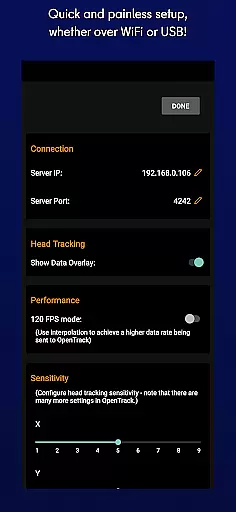
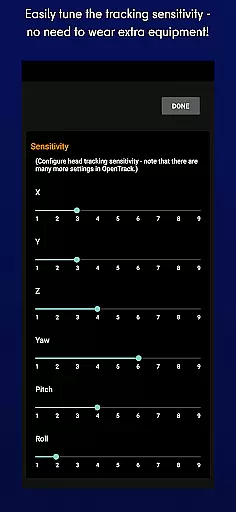
Ideal for flight simulators and driving games, SmoothTrack offers customizable settings including dark mode for battery savings and bright mode for optimal visibility in different lighting conditions. The app's sophisticated algorithms ensure smooth and responsive tracking, while its simple setup process makes it accessible to users of all technical levels.
SmoothTrack stands out with its advanced AR-based head tracking technology that supports any device capable of installing Google AR services. The app's core feature is its ability to precisely track head movements and translate them into in-game camera controls, offering unprecedented immersion in simulation games. Its compatibility with both FreeTrack and TrackIR protocols makes it versatile across various gaming platforms.
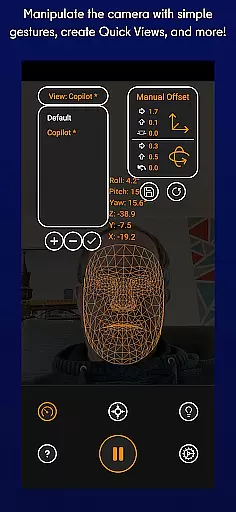
One of SmoothTrack's key innovations is its gesture-based control system that requires no additional hardware. Users can simply position their device to capture their face, and the app handles the rest. The exaggerated movement response is carefully calibrated to provide natural-feeling camera control with minimal physical movement. Additionally, the app includes thoughtful features like dual display modes - dark mode for OLED screen protection and power saving, plus bright mode for enhanced visibility in low-light environments.
The application also boasts comprehensive customer support through Discord and email channels, ensuring users can quickly resolve issues or suggest new features. Its wide compatibility extends to numerous popular simulation games including Microsoft Flight Simulator, Elite: Dangerous, and Euro Truck Simulator 2, making it an invaluable tool for simulation enthusiasts seeking enhanced realism and control in their gaming experience.
SmoothTrack delivers precise 3D head tracking functionality, revolutionizing how users interact with simulation games. The app leverages the AR capabilities of your device to ensure accurate detection and translation of head movements into in-game camera perspectives.
The effectiveness of SmoothTrack is evident in its ability to support a wide range of games that work with TrackIR and FreeTrack protocols. Whether you're flying a plane in Microsoft Flight Simulator or navigating through Elite: Dangerous, the app ensures that even slight head movements are captured and reflected in the game environment.
Users benefit from an intuitive control system that requires no additional equipment. By simply adjusting their head position, players can change their viewpoint within the game, enhancing immersion and providing a competitive edge. This seamless interaction significantly improves the overall gaming experience.
SmoothTrack features a user-friendly interface that makes setup and operation straightforward. Upon launching the app, users are greeted with clear instructions on positioning their device to capture head movements effectively.
The app includes thoughtful design elements like dark mode to conserve battery life and protect OLED screens, as well as a bright mode for optimal visibility in low-light conditions. These options demonstrate the attention to detail in creating an intuitive user experience.
With simple camera gestures and minimal required movement, SmoothTrack ensures that users can quickly adapt to this innovative control method. The learning curve is minimal, allowing both newcomers and experienced gamers to enhance their simulation gameplay effortlessly.
Intuitive controls
Wide game support
No extra hardware
Customizable modes
Responsive tracking
Requires AR support
Device positioning
Lighting dependent
Game compatibility
Battery consumption

Easily install aab(Android App Bundle) files on your Android device with our app
 4.80
4.80
A powerful, easy-to-use flight computer on your phone or tablet!
3.80
1-Click close all background apps on Android TV
3.90
Mirror your screen to Chromecast and Android TV - Super fast and simple
4.60
Bedrock Together: Join any bedrock server on Xbox/PS
4.80
The Ultimate Flex Drivers Utility App - Convenient Tapping & Block Filters
4.70
Create your own custom widget with endless possibilities
3.90
Automate everything from settings to photos, SMS to speech. ADC2 prize winner.
4.10
Protect your device with antivirus, storage cleanup, and system monitoring
4.70
Navigate with Ease and Style
4.90
Just swipe the edge to do something!
4.40
Making emulation easy for everyone!
4.30
Remote for Roku, Fire TV, Samsung TV, LG TV, Android TV, Chromecast and VIZIO TV
4.20
Quickly & easily calculate the spacing of handrail balusters
4.20
Effortlessly run ADB commands directly on your device without a PC.
4.20
MS-DOS in your pocket. Play old DOS games anywhere you are ;)
4.10
A convenient photo, video, and file recovery tool.
4.00
A non-root local ADB shell client. READ BELOW!
3.40
Save any video in HD - paste the link, download fast and watch offline.
4.0


User Reviews