
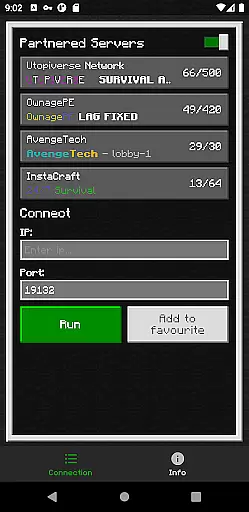
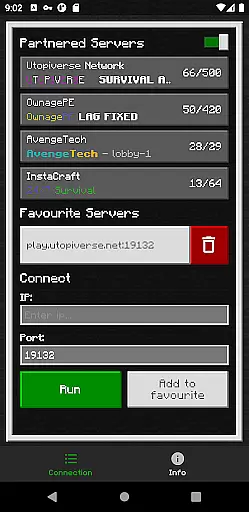
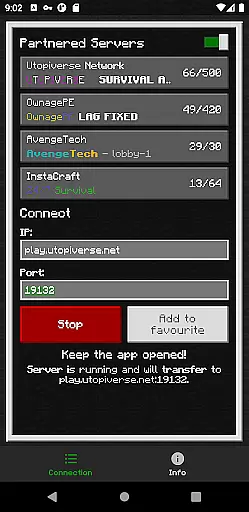
BedrockTogether (Pro) is an innovative networking tool designed to simplify server connections for Minecraft Bedrock Edition players. This ad-free version allows any Bedrock Edition server to appear as a LAN server on Xbox or PlayStation clients, enabling seamless connections without DNS rerouting. While Realms and Nintendo Switch compatibility aren't supported, the app provides a straightforward solution for cross-platform LAN gaming.
The application's core functionality lies in its ability to bridge network limitations between different devices on the same local area network (LAN). By simply entering your server IP and port, then activating the 'Run' feature, users can effortlessly connect their gaming consoles to desired servers through the Minecraft Friends tab. This professional-grade tool is particularly valuable for Minecraft enthusiasts seeking enhanced multiplayer experiences across various platforms.
BedrockTogether (Pro) distinguishes itself through several key features that enhance user experience. The application's primary capability is its unique server bridging technology, which eliminates the need for complex DNS configurations while maintaining stable connections. Its intuitive interface allows users to establish connections with just three simple steps: entering server details, activating the connection, and accessing the server through Minecraft's LAN tab.
Additional notable features include automatic network detection within the same LAN environment and comprehensive troubleshooting guidelines. The app also provides direct support channels through Discord and Telegram, ensuring users can quickly resolve any technical issues. These features collectively create a robust solution for Minecraft players who want to expand their multiplayer capabilities while maintaining optimal performance and reliability across supported platforms.
BedrockTogether (Pro) delivers exceptional core functionality by enabling Bedrock Edition servers to appear as LAN servers on Xbox or PlayStation clients. This seamless integration simplifies the connection process without requiring DNS rerouting, ensuring a smooth and reliable user experience.
The app's primary feature allows users to input their desired server IP and port, then click the 'Run' button to establish a connection. By navigating to the 'Friends' tab in Minecraft Bedrock Edition, players can effortlessly connect through the LAN tab, showcasing the app's commitment to accuracy and effectiveness.
With clear troubleshooting steps provided, users can ensure their gaming console and mobile device are on the same LAN network, further enhancing the app's reliability. This attention to detail demonstrates BedrockTogether (Pro)'s dedication to delivering precise and effective functionality.
BedrockTogether (Pro) excels in providing an intuitive and straightforward interface that enhances user interaction. The app's design focuses on simplicity, allowing users to quickly enter server details and initiate connections with minimal effort.
By streamlining the connection process into just a few stepsu2014entering server information, clicking 'Run,' and navigating to the 'Friends' tab in-gameu2014the app ensures that even novice users can easily understand and utilize its features. This approach significantly reduces the learning curve associated with using third-party applications for Minecraft connectivity.
Additionally, the inclusion of a dedicated support system via Discord and Telegram channels highlights the app's commitment to maintaining an accessible and user-friendly environment. These resources empower users to report bugs and seek assistance, reinforcing the overall intuitive nature of BedrockTogether (Pro).
Seamless LAN connection
User-friendly interface
Ad-free experience
Multi-platform support
Active community support
No Nintendo Switch support
Limited to LAN networks
Requires manual setup
No official Minecraft endorsement
Premium version only

PDF Reader - Document Viewer: Read, Manage & Organize Your Documents
 3.10
3.10
FV File Manager Pro, Fast and powerful file manager for Android
4.60
App to pay for FUTO Keyboard
4.60
VESC Tool can monitor and configure VESC-compatible devices over BLE and Wifi
4.20
Effortlessly run ADB commands directly on your device without a PC.
4.20
The one-and-only remote control for PC, Mac, and Linux
4.70
The Ultimate Bluetooth Keyboard & Mouse. Securely control your PC, Mac, and more
4.50
Connect wirelessly to your computer to watch movies, browse the web, play games
5.00
The Ultimate Flex Drivers Utility App - Convenient Tapping & Block Filters
4.70
Support Fossify apps with a warm thank you!
5.00
Remote Play with FSR upscaling, low latency & full controller support
4.80
Learn the vast amount of system information about device and monitor it's state
4.70
Small and simple app to Verify Root Access and BusyBox Install!
4.70
NFC Tools can read and write NFC tags.
4.70
Protect your device with antivirus, storage cleanup, and system monitoring
4.70
Canon PRINT is a companion app for your Canon printer.
4.60 4.50
4.50
eXtended Permission Manager - a small app to manage permissions and AppOps
4.50
Download any file easily and quickly with Downloader
4.1


User Reviews