
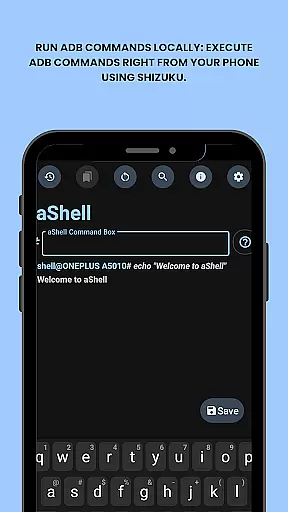
aShell is a specialized ADB shell tool designed for Android devices operating within a Shizuku environment. This lightweight, open-source application allows users to execute ADB commands directly from their smartphones, eliminating the need for a separate computer. It's particularly beneficial for developers and power users who require full control over their device's system internals.
The app comes equipped with essential features such as preloaded command examples, live command output support, and the ability to save outputs to files. Its intuitive interface supports both dark and light modes, adapting seamlessly to user preferences. With functionality that extends to bookmarking frequently used commands, aShell streamlines complex operations into an accessible mobile format.
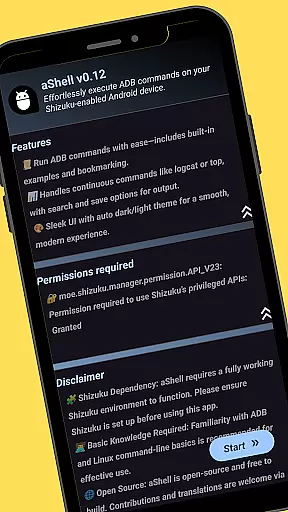
While aShell offers advanced capabilities, it does require a basic understanding of ADB/Linux command-line operations. The app is ideal for tech-savvy individuals looking to enhance their device management experience through direct, on-device command execution.
aShell distinguishes itself through a robust set of features tailored for efficient device management. One of its core functionalities is the ability to run ADB commands locally on an Android device using the Shizuku framework. This eliminates the traditional dependency on a PC for executing such commands, offering unparalleled convenience for power users.
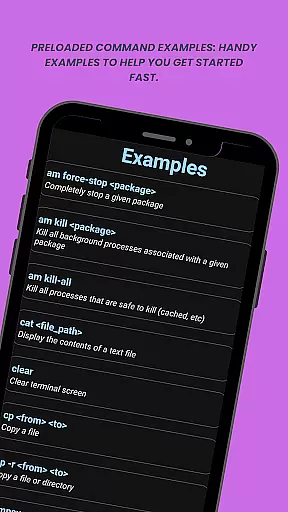
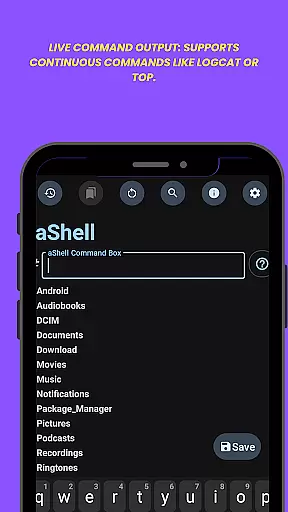
The app provides practical tools like preloaded command examples which assist users in quickly getting started with common operations. Its live command output feature supports continuous monitoring of processes such as logcat or top, ensuring real-time insights. Additionally, users can search within command results and export outputs to text files for documentation or sharing purposes.
Usability enhancements include automatic dark/light mode adaptation based on system settings and a command bookmarking system for storing frequently used instructions. These features collectively create a comprehensive toolkit for managing Android devices efficiently while maintaining ease of use.
aShell delivers exceptional accuracy and effectiveness in executing ADB commands directly on Android devices. The app leverages a fully functional Shizuku environment to ensure that all operations are performed reliably and without errors.
With preloaded command examples and live command output support, users can execute complex tasks such as logcat or top with precision. This eliminates the need for external devices like PCs, making it an essential tool for developers and power users who require full control over their device's internals.
The ability to search within command output and save results to text files further enhances its utility. These features not only streamline workflows but also provide a comprehensive solution for managing and troubleshooting Android systems efficiently.
aShell offers a simple and intuitive interface designed to enhance user experience while executing ADB commands. Despite its powerful capabilities, the app maintains an accessible design suitable for both beginners and experienced users.
Its dark/light mode support ensures optimal visibility and comfort, adapting seamlessly to your system theme. Users can easily navigate through various functions thanks to well-organized menus and clear instructions provided by preloaded command examples.
Additionally, features like bookmarking frequently used commands add another layer of convenience. By prioritizing usability without compromising functionality, aShell provides an efficient and enjoyable way to manage Android devices directly from your phone.
Lightweight design
Open-source flexibility
Live command output
Dark mode support
Bookmark functionality
Requires Shizuku
ADB knowledge needed
Limited target audience
No standalone use
Potential complexity

Transfer Files, APK from Phone to Watch & Install.
 4.1
4.1
Connect instantly to a fast, encrypted VPN with one tap
4.60
HD Video player and downloader for all formats, fast & smooth 4K video playback.
4.60
card-reader app
2.20
Screen Mirroring for Roku Sticks, Roku TCL TV and Roku Hisense TV
4.50
The Ultimate Flex Drivers Utility App - Convenient Tapping & Block Filters
4.70
Screen Mirroring with sound for Samsung TV, LG TV, Sony TV, Smart TV and Browser
4.20
NFC Tools can read and write NFC tags.
4.70
The ideal app to be the digital eye of your family
3.40
ADB support Android 4.X-Android 13(Support wireless pair mode).No root required!
4.70
Planner and Tracker for Stardew Valley
4.60
Just swipe the edge to do something!
4.40
Forza Tuning Calculator App for Forza Horizon 5, Motorsport and Earlier Titles
4.40
View detailed information about your Nissan Leaf the dealer never shows you.
4.10
A simple app to back up and restore SMS & MMS messages and call logs.
4.10
Automate everything from settings to photos, SMS to speech. ADC2 prize winner.
4.10
Introducing Smart Printer, your ultimate destination for printing solutions!
4.00
Family Locator, Share location, StayConnect with your family in real time
3.90
Clean the junk files on your device
3.40


User Reviews