
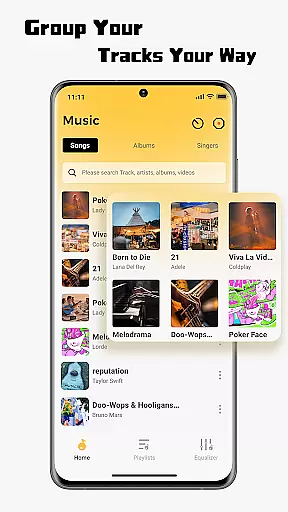
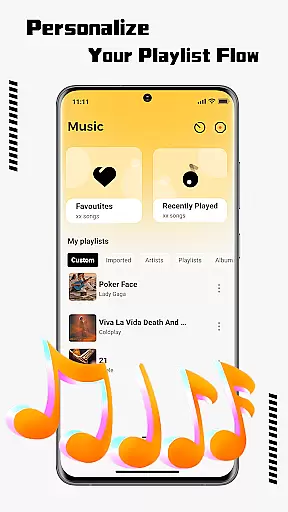
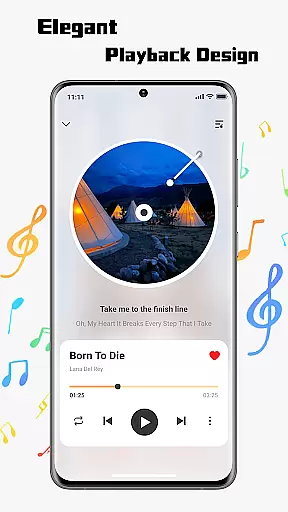
SonicNest is a premium music player app designed to enhance your audio experience through advanced features and intuitive design. The app allows seamless import of local music files, making it easy to consolidate your entire music library in one place. With smart management tools, users can organize tracks by albums, artists, or custom playlists tailored to specific moods or activities.
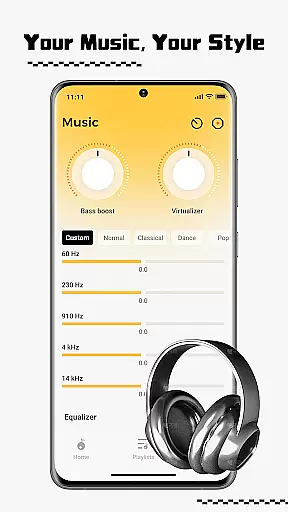
One standout feature is the built-in equalizer, which offers precision sound customization. Whether you're looking to boost bass for workouts or fine-tune vocals for focused listening, SonicNest provides both presets and manual controls to suit every preference. This makes it an ideal choice for audiophiles and casual listeners alike who want rich, immersive sound quality.
The app's sleek interface ensures effortless navigation while delivering a modern aesthetic that complements its powerful functionality. By combining robust organizational tools with customizable audio settings, SonicNest transforms how users interact with their music libraries, offering a personalized and high-quality listening experience.
SonicNest stands out with its comprehensive suite of features tailored for music enthusiasts. A key highlight is its seamless local music import capability, allowing users to browse device storage and add tracks directly into the app. This eliminates the need to switch between multiple apps, centralizing all music in one accessible location.
The app also excels in local music management, providing powerful tools to keep libraries organized. Users can edit track details, sort by various criteria such as album or artist, and create custom folders. These features ensure that whether you're curating high-energy workout playlists or serene acoustic collections, your library remains neatly categorized and easily accessible.
Another defining feature is the advanced equalizer, which lets users fine-tune audio output. With options to boost bass, enhance vocals, or choose from expertly crafted presets, SonicNest caters to both casual listeners and audiophiles. Manual customization further allows for precise sound adjustments, ensuring an optimal listening experience tailored to individual preferences.
When it comes to music applications, the size and authenticity of the music library are crucial factors. SonicNest offers a seamless local music import feature that allows users to effortlessly bring their personal music collection into the app. This ensures that all tracks are authentic and legally owned by the user, eliminating concerns about copyright infringement.
The app supports an extensive range of file formats, making it compatible with virtually any music file you may have. Whether your library consists of thousands of tracks or just a few cherished albums, SonicNest provides a centralized platform where your entire collection can be easily managed and accessed.
By focusing on local music management, SonicNest ensures that users retain full control over their music library. The ability to browse, select, and add tracks directly from your device's storage means that your library remains personal, secure, and free from any external copyright issues.
Audio quality is paramount for any music enthusiast, and SonicNest excels in delivering a superior listening experience through its advanced features. At the heart of this experience is the built-in equalizer, which allows users to fine-tune every track to perfection. Whether you prefer deep bass for energetic workout sessions or enhanced vocals for acoustic relaxation, SonicNest caters to all preferences.
The equalizer includes a variety of expertly crafted presets designed to suit different genres and moods. For those who crave precision, manual customization options provide granular control over sound profiles. This flexibility ensures that every note and beat aligns with your personal audio preferences.
SonicNestu2019s commitment to high-quality audio extends beyond just the equalizer. The app supports high-resolution audio playback, preserving the integrity of your original files. This dedication to audio excellence makes SonicNest the ideal choice for audiophiles seeking an immersive and rich listening experience.
Intuitive user interface
Advanced equalizer settings
Seamless music import
Smart library organization
Customizable sound profiles
Limited streaming options
No cloud sync feature
Heavy on system resources
Few social sharing capabilities
Occasional bugs reported

Equalizer, Bass Booster and Volume Booster (Eq & Bass) improve sound quality
 4.30
4.30
The Cubase remote control app
3.60
Taal player that lets you sing any Indian & Western song with Tabla & Tanpura
4.60
USB audio recording and playback finally possible on Android 3.1 or higher!
3.90
Play your hearts out on TouchTunes jukeboxes & connect with fellow music lovers.
4.80
Turn your Android phone into a professional audio analyser with up to 120 bands.
4.00
Manage your Sonos system directly from your home-screen!
4.40
Responsive piano with great sounds, graphics, and songs
4.80
Full featured mp3 and audio player with Chromecast and Android Auto support.
4.40
Voice recorder - Audio recorder. Best recorder for recording
4.90
Gorgeous UI, Powerful music Search and Equalizer, the great choice for you!
4.70
Bass Booster & Volume Equalizer Pro improves your music and video sound quality
4.60
Guzheng Master supports many playing techniques as an acoustic Guzheng
4.50
Formerly known as Spotistats! View your top tracks, artists, albums and more!
4.40
DJ Music Mixer Pro is a real DJ controllers and DJ Music Studio to remix DJ.
4.40
The alternative folder based music player.
4.20
Turn your phone into a musical instrument from the future!
3.90
The ultimate media player for Android devices
3.90
Slow music down without changing pitch.
3.70


User Reviews