
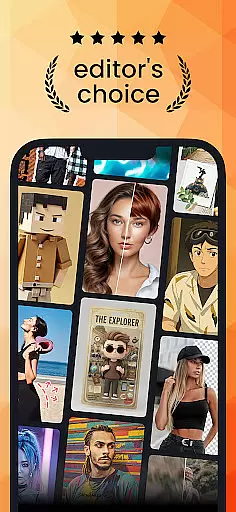
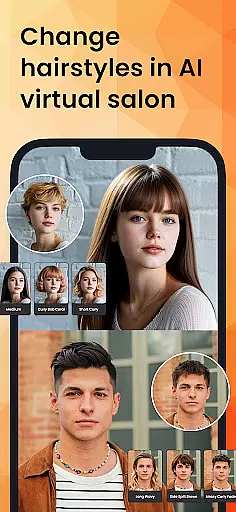
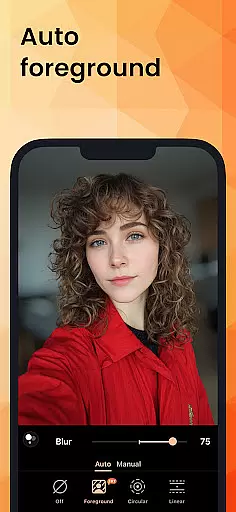
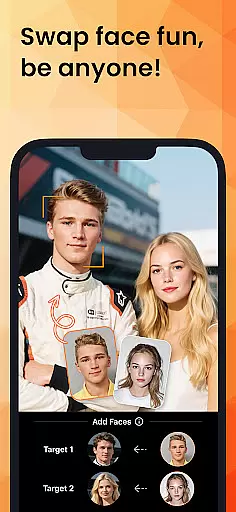
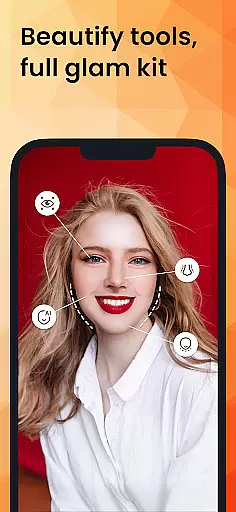
PhotoDirector is an advanced AI-powered photo editing application designed to help users create and enhance stunning images effortlessly. With a comprehensive suite of tools, including hundreds of styles, effects, templates, and powerful AI features, the app caters to both amateur photographers and professionals. The AI capabilities allow users to transform photos into artwork, replace unwanted elements, adjust hairstyles, and even change outfits virtually.
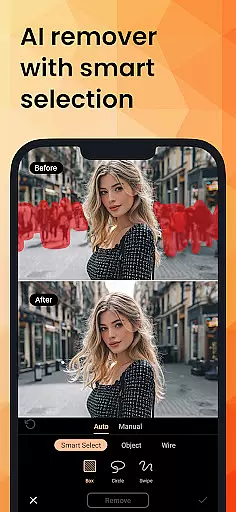
The app's standout features include AI Art for turning images into various artistic styles, AI Removal for erasing unwanted objects, and AI Expand for adjusting aspect ratios seamlessly. Additionally, PhotoDirector offers creative options like Image to Video, AI Face Swap, and AI Hairstyle, enabling users to explore endless possibilities in image manipulation. Whether you're looking to enhance portraits or experiment with creative edits, this app provides all the necessary tools to bring your vision to life.
Available on mobile platforms, PhotoDirector is perfect for anyone who wants to elevate their photography game. Its intuitive interface and robust feature set make it an invaluable tool for unleashing creativity and producing professional-quality images.
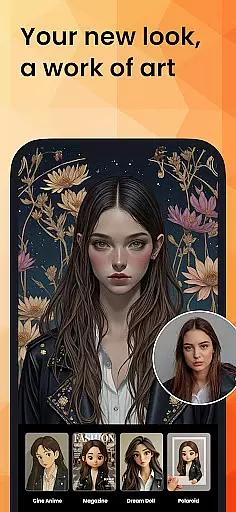
PhotoDirector stands out with its extensive range of AI-powered features that simplify complex editing tasks. One of the key highlights is AI Art, which allows users to convert their photos into well-known artistic styles, sketches, or cartoon formats with just a few taps. This feature is particularly useful for those looking to add a unique touch to their images without spending hours on manual adjustments.
In addition to artistic transformations, the app includes practical tools such as AI Removal and AI Replace, which enable users to erase unwanted objects or wires and replace parts of an image seamlessly. The AI Expand feature lets users change close-up shots into wide-angle views, while AI Background helps in replacing plain backgrounds with more visually appealing options. These functionalities ensure that users can achieve professional-grade edits quickly and efficiently.
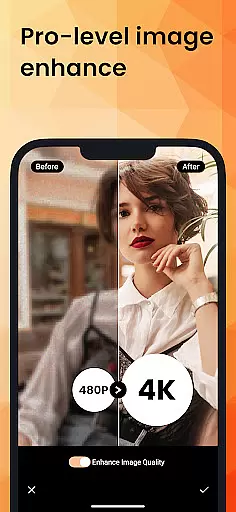
For those seeking to enhance their social media presence, PhotoDirector offers features like Body Reshape, Makeup, and Camera AR Effects, along with thousands of stickers, text styles, frames, and effects. The premium version unlocks unlimited content packs, Ultra HD 4K resolution saving, and a distraction-free editing experience, making it a top choice for serious photo enthusiasts.
Real-time capture and preview functionality is essential for ensuring that every photo taken meets the user's expectations without delay. PhotoDirector excels in this area by providing an intuitive interface where users can see adjustments and effects applied instantly as they edit.
The app leverages advanced AI technologies to offer features like AI Art, AI Hairstyle, and AI Outfit, which allow users to transform their images into various artistic styles or try out different looks virtually. This immediate feedback loop enhances the creative process, making it more interactive and engaging.
Users benefit from the ability to visualize changes on the fly, thus refining their edits with precision. Whether itu2019s turning a simple portrait into a cartoonized artwork or experimenting with new hairstyles, the real-time preview ensures that the final output aligns perfectly with the user's vision.
This feature not only saves time but also elevates the overall user experience by providing tools that are both powerful and easy to use, catering to both amateur photographers and seasoned professionals alike.
AI Beauty and Enhancement Naturalness refers to the app's capability to enhance photos while maintaining a realistic and authentic look. PhotoDirector achieves this through sophisticated AI algorithms that intelligently adjust facial features, skin tones, and other elements without over-processing.
Features such as AI Face Swap, Body Reshape, and Makeup enable users to modify portraits seamlessly. These tools ensure that enhancements appear natural, preserving the original character and essence of the subject. For instance, AI Hairstyle allows users to experiment with different haircuts and colors within a virtual salon setting.
The advantage for users lies in the balance between enhancement and realism. By avoiding exaggerated effects, PhotoDirector helps maintain credibility in social media posts and professional portfolios. The result is visually appealing images that still look genuine and unaltered.
Ultimately, these AI-driven enhancements empower users to express creativity confidently, knowing that their edited photos will retain a lifelike quality that resonates well with viewers.
User-friendly interface
Extensive AI features
Variety of artistic styles
Efficient object removal
Premium content unlocked
Some features require subscription
Occasional performance lags
Learning curve for beginners
Limited free content
High system requirements

Viewfinder, Light meter, Reciprocity failure time, DOF & Bellows Extension
 4.60
4.60
Natural Beauty, Selfie Retouch
4.30
Create Business Headshots, Polaroid Filter, Retake Photos,Profile Pics,AI Photos
4.50
Turn your phone into a professional camera - full DSLR manual photography
4.30
Light-weight Media Gallery app for Android made with Jetpack Compose
4.60
Amazing Photo Effects - The most fun you can have with your photos!
4.70
Astrophotography with your smartphone, photo live stacking and much more!
3.90
The original Rarevision VHS look seen everywhere!
4.70
Welcome to ProShot, the most powerful camera app on Android.
4.20
Create funny photos and videos with the popular Time Warp Scan filter.
4.90
Gallery show photo, video, slideshow, is perfect 3D effect private photo albums.
4.80
Your personal guide to the sun and moon. Plan ahead, visualize and predict!
4.70
Take videos and pictures with the popular TikTok TIME WARP SCAN filter.
4.60
A must-have app for landscape photographers
4.60
Photo Exif Editor allows to view, add and modify EXIF data of multiple photos
4.50
Professional photography on your mobile phone
4.20
AI-powered video creator by MiniMax - Where ideas meet cinema
4.20
Professional quality photo edits with the new Snapseed.
4.00
Remote control the phone camera shutter from your smartwatch and take a picture
1.60


User Reviews