
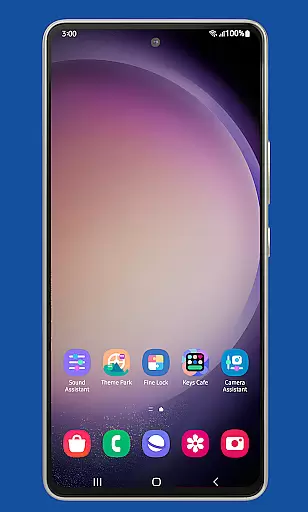
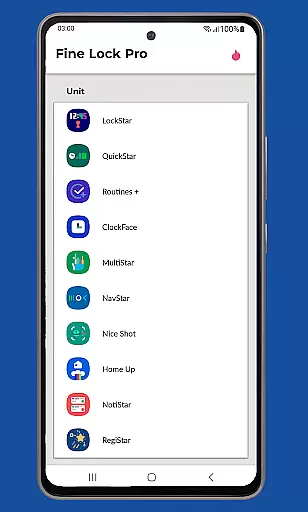
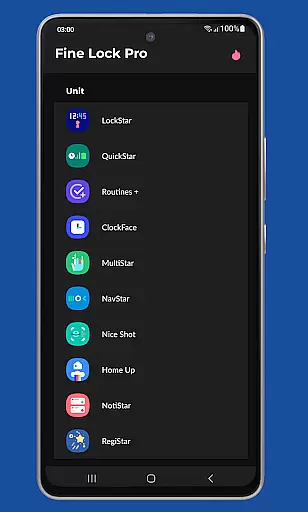
Fine Lock is a specialized launcher designed exclusively for Samsung devices running official One UI, enabling users to access and manage Good Lock and Galaxy Labs modules. This app solves the regional limitation issue of these customization tools by providing a centralized interface for launching and organizing various modules.
The application offers unique PRO features such as module shortcuts on the home screen, background update checks, and dynamic wallpapers that adapt to the device's Dark/Night modes. These features enhance both functionality and personalization options for power users seeking deeper control over their Samsung device's interface and performance.
While Fine Lock does not support AOSP-based ROMs like LineageOS, it serves as an essential tool for Samsung enthusiasts who want to maximize their device's potential through advanced customization options available in official Samsung modules.
Fine Lock distinguishes itself through its specialized functionality as a module launcher for Samsung's official customization tools. The app provides essential features including module management, update notifications, and visual enhancements like dynamic wallpapers that respond to system themes.
Among its notable capabilities are home screen shortcuts for quick access to installed modules, automatic hiding of non-installed modules for cleaner interface, and scheduled background checks for updates. These features collectively create a more organized and efficient way to handle multiple customization modules without cluttering the device.
The PRO version extends these capabilities with additional conveniences such as persistent module shortcuts and enhanced wallpaper customization. The app's strict compatibility requirements ensure optimal performance while maintaining focus on official Samsung software ecosystem.
Fine Lock offers a diverse range of customization options tailored specifically for Samsung devices running official One UI. This app acts as a launcher for Good Lock and Galaxy Labs modules, which are powerful tools for personalizing the Android experience.
With Fine Lock, users can access features such as module app shortcuts on the home screen, providing quick entry to their favorite customization settings. The app also supports dynamic wallpapers that adapt to the device's Dark or Night modes, ensuring a seamless visual experience across different lighting conditions.
The ability to hide uninstalled modules helps maintain a clutter-free interface, allowing users to focus only on the features they need. These customization options empower users to tailor their Samsung devices to match their unique preferences and workflow requirements.
Theme compatibility is a crucial aspect of Fine Lock's functionality, ensuring that all applied themes work seamlessly with the device's One UI environment. This app guarantees that themes will not cause conflicts or crashes, offering a stable and visually appealing user experience.
Users can enjoy a consistent look and feel across their Samsung devices, thanks to Fine Lock's robust theme management system. The app verifies that each theme is fully compatible with the device's software version, preventing potential issues that could arise from incompatible designs.
By focusing on compatibility, Fine Lock allows users to experiment with various themes confidently, knowing that their device's performance and aesthetics will remain intact. This assurance enhances the overall personalization experience, making it easier for users to express their individuality through their device's appearance.
Enhances Samsung customization
Dynamic wallpaper feature
Background update checks
Module shortcut creation
Clean interface management
Samsung devices only
No module downloading
PRO features cost
Limited to One UI
Regional restrictions

Realistic animated snow on your wrist, with 10 images landscapes to choose from
 4.00
4.00
Themes - Widget & Wallpaper: Customize home screen, icon changer w unique themes
4.30
Art & Emoji Keyboard with Cool Fonts, Cute Themes and Custom Designs.
4.40
Customize your home screen with stunning themes, blur, widgets & icons.
4.60
Yandex Browser — stylish and secure, with voice search and data compression
4.40
Create unique, fun emojis with Funny Emoji Maker! Unlimited creativity!
4.00
Transform your phone with stunning video wallpapers and a unique, personal touch
3.80
Amazing letter fonts in your messages and social statuses
4.70
Transform your phone with stylish zipper lock themes and 4D live wallpaper
4.10
Gun Chase - Let the chase begin.
4.80
Nothing Icon pack with more than 3750+ highly crafted icons.
4.70
Unique Android Launcher
4.60
Ultimate Gallery Lock App - Hide Pictures, Videos and Lock Apps Instantly!
4.60
Embrace the Night. Unleash the power of darkness with Raven Dark Icon Pack
4.60
Adult video chat, dating, making friends, random matching
4.20
Unique Fonts, typefaces and stylish text. Fonts for Instagram, Whatsapp & others
4.20
Run multiple accounts of the same app on a single device
4.10
Emoji Maker app - Design custom emojis and effortlessly blend them with Mixer
3.80
HappyLighting is a Bluetooth lamp control software.
3.40


User Reviews