
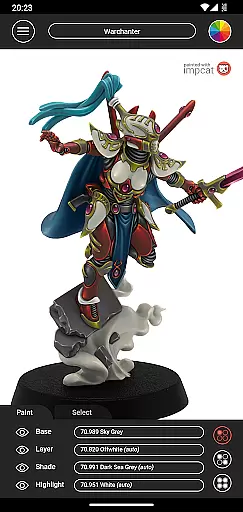
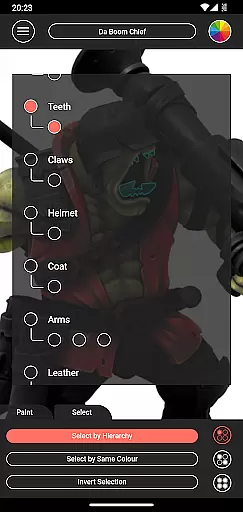
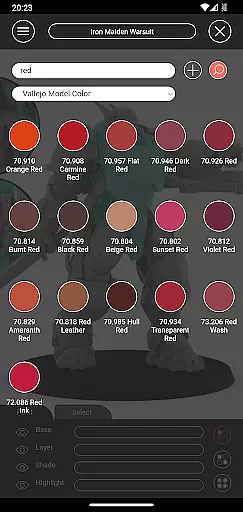
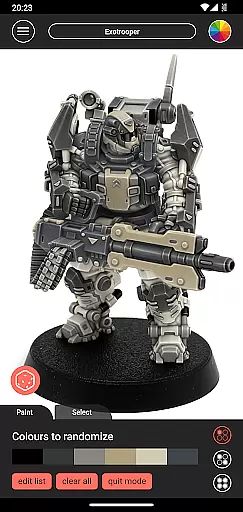
Impcat, short for Interactive Miniature Painting Catalogue, is a sophisticated simulator designed to deliver photorealistic painting results on gaming and tabletop miniatures. This app provides users with a diverse selection of miniature images that can be painted using colors from predefined palettes, which are curated by manufacturers. Impcat simulates a four-step painting process including base coloring, layering, shading, and highlighting, ensuring high-quality outcomes.
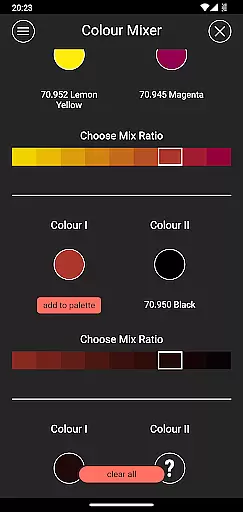
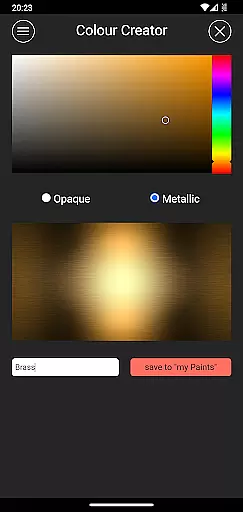
One of the key features of Impcat is its compatibility with various color palettes such as Vallejo Model Color and Vallejo Game Color, offering a total of 308 colors. Additionally, it supports access to free DLCs for miniature templates and color palettes, which are updated automatically. The app also includes innovative tools like complement recommendation mode, a photorealistic paint simulation, a shopping list generator, a color mixer tool, a color creator tool, and a randomizer tool for distributing colors across models.
Impcat is ideal for hobbyists and professionals who wish to visualize their miniature painting projects before committing to physical work. By providing realistic previews and practical tools, this app enhances creativity and efficiency in the painting process.
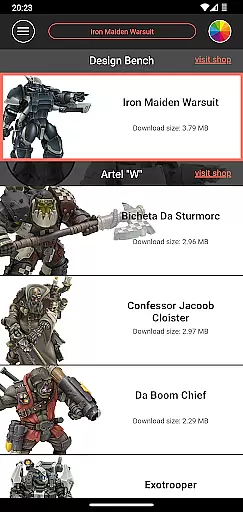
Impcat stands out due to its comprehensive suite of features tailored for miniature painting enthusiasts. The app offers six built-in miniatures provided by Artel "W", alongside extensive color palettes featuring Vallejo Model Color and Vallejo Game Color, totaling 308 distinct colors. Users can access free DLCs for additional content, which are seamlessly updated upon new releases.
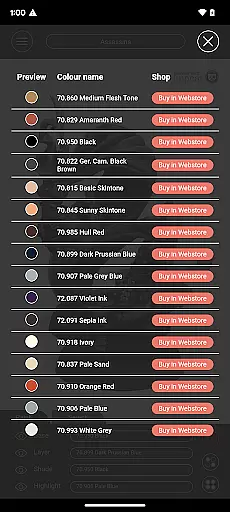
A notable feature is the complement recommendation mode, allowing users to select a base color and receive harmonizing suggestions for layering, shading, and highlighting. These recommendations can be customized freely. Furthermore, Impcat boasts a photorealistic paint simulation, enabling users to see precise outcomes of their color choices. Practical utilities include a shopping list generator that compiles used colors and links to purchase them, a color mixer tool for blending predefined paints, a color creator tool for crafting custom hues, and a randomizer tool for spontaneous color distribution.
These features collectively empower users to experiment with different painting techniques and make informed decisions about their projects, enhancing both creativity and productivity.
Customization is at the heart of impcat, allowing users to explore a vast array of miniature painting possibilities. With six built-in miniatures and over 300 color options from Vallejo Model Color and Vallejo Game Color, the app provides an extensive palette for creativity.
In addition to the predefined colors, impcat offers tools like the color mixer and creator, enabling users to experiment with unique shades and tones. This flexibility ensures that whether you're a novice or a seasoned painter, you can tailor your experience to match your personal style and preferences.
The complement recommendation mode further enhances customization by suggesting harmonizing colors for layering, shading, and highlighting. Users can accept these suggestions or modify them, providing a personalized yet guided approach to painting. This feature not only simplifies the process but also inspires new ideas and techniques.
impcat excels in theme compatibility, ensuring that all visual elements align seamlessly with various artistic styles. The app supports multiple miniature templates and color palettes, which are regularly updated through DLCs, guaranteeing access to the latest content without additional costs.
Users benefit from the photorealistic simulation of applied paints, which accurately reflects how different themes and color schemes will appear on finished miniatures. This high level of realism helps in making informed decisions about color choices and techniques before applying them physically.
Moreover, the shopping list generator adds another layer of convenience by compiling used colors and linking directly to where they can be purchased. This integration of practical tools with customizable features makes impcat a versatile companion for any miniature painting project, regardless of the chosen theme or complexity.
User-friendly interface
Extensive color options
Free DLC updates
Photorealistic simulations
Comprehensive toolset
Limited built-in miniatures
No micro-transactions
Requires internet for updates
Complex for beginners
Specific niche market

Ninja Turtles Cowabunga SE watch face for Wear OS
 4.50
4.50
Personalize your phone with stunning HD and 4K wallpapers!
4.70
Over 28,000 high quality icons to bring color & homogeneity to your phone.
4.60
Customize glowing edges, wallpapers, and caller screen with EdgeAura.
3.50
Nothing Icon pack with more than 3750+ highly crafted icons.
4.70
Launcher OS™ Pro without ads help make your phone simple and pretty
4.30
400+ Beautifully crafted widgets inspired by NOTHING.
4.70
Create unique, fun emojis with Funny Emoji Maker! Unlimited creativity!
4.00
Magic fluids wallpaper 4D: Relax with stunning fluid simulation wallpaper app
4.20
Bring adorable pets to life on your screen. Playful, interactive and full of fun
4.60
Ultra realistic gold analog watch face with lots of customization options.
4.50 4.50
4.50
Themes - Widget & Wallpaper: Customize home screen, icon changer w unique themes
4.30
Organize and manage your photos and videos effortlessly with Photo Gallery
4.20
More than 3000+ themes and 9000+ wallpapers for everybody!
4.10
Realistic animated snow on your wrist, with 10 images landscapes to choose from
4.00
Crystal-clear, square icon provides a sleek and sophisticated visual upgrade
4.00
Transform your phone with stunning video wallpapers and a unique, personal touch
3.80
Adaptive Dot Style IconPack with Light & Dark Theme.
3.70


User Reviews