
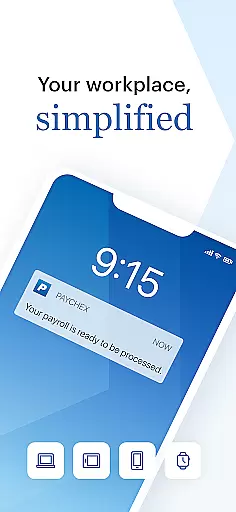
Paychex Flex is a comprehensive business management application designed specifically for employers and employees who are already registered users of Paychex Flex. This app provides seamless access to essential payroll and benefits features, ensuring that businesses can manage their operations efficiently from anywhere. With functionalities varying based on the company's plan options, it offers tools such as Touch ID and Face ID authentication, payroll submission, and detailed reporting.
The app allows employers to submit payroll on the go, access vital information like payroll reports, employee profiles, tax documents, and benefits details. Employees, on the other hand, can view their check stubs, W2s, retirement balances, and update personal information. Whether you're an employer needing to oversee your team's payroll or an employee wanting to manage personal employment details, Paychex Flex serves as a crucial tool in streamlining these processes.
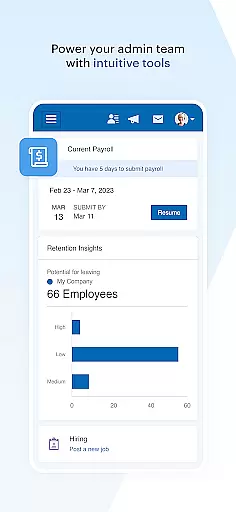
One of the standout features of Paychex Flex is its robust security measures, including Touch ID and Face ID authentication, which ensure that sensitive payroll and employee data remain secure. Employers can conveniently enter, review, and submit payroll from their mobile devices, allowing them to resume tasks started on other platforms like tablets or desktops. The app also provides extensive reporting capabilities, offering access to all necessary payroll reports, cash requirements, and employee-related documents.
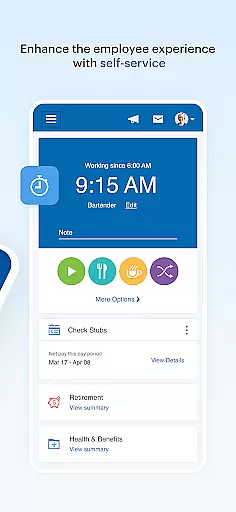
For employees, Paychex Flex offers easy access to personal employment information such as check stubs, W2s, retirement account details, and health benefits. The ability to update retirement contributions and investments directly through the app adds another layer of convenience. By consolidating these critical functions into one accessible platform, Paychex Flex enhances productivity and ensures that both employers and employees have the information they need at their fingertips.
Collaborative work features are essential for modern business applications as they enable seamless interaction between employers and employees. The Paychex Flex app excels in this area by providing distinct functionalities tailored to both employers and employees.
For employers, the app offers Touch ID and Face ID authentication, ensuring secure access. Employers can submit payroll on the go, review all necessary reports including payroll reports and cash requirements, and access comprehensive employee profiles. This includes compensation details, tax information, deduction specifics, and time-off balances, which collectively facilitate efficient workforce management.
Employees benefit from equally robust features. They can authenticate using Touch ID or Face ID, access their check stubs and W2s, and manage retirement contributions and investments. Additionally, employees can view detailed information about their health, dental, and life insurance benefits, alongside deductions and contact information, fostering a transparent and informed workplace environment.
The collaborative tools within Paychex Flex significantly enhance productivity by centralizing critical payroll and benefits data, making it easily accessible to authorized users anytime, anywhere.
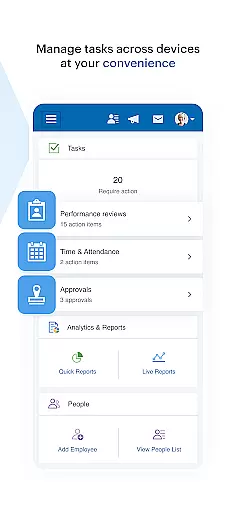
Effective task management is crucial for maintaining operational efficiency in any business setting. The Paychex Flex app addresses this need by offering streamlined processes that allow employers to handle various tasks efficiently.
Employers can utilize the app to enter, review, and submit payroll with ease. This mobile capability ensures that payroll operations are not hindered by location constraints, allowing for greater flexibility and responsiveness. Furthermore, the ability to resume payrolls initiated on other devices like tablets or desktops enhances continuity and convenience.
Beyond payroll, the app provides extensive reporting features. Employers have access to vital reports such as payroll summaries, cash flow requirements, and detailed employee profiles. These include tax documents, compensation breakdowns, and time-off balances, enabling thorough oversight and strategic planning.
By integrating these task management capabilities, Paychex Flex empowers businesses to maintain accurate records, meet regulatory compliance, and optimize resource allocation, ultimately leading to improved organizational performance.
User-friendly interface
Comprehensive payroll tools
Secure authentication methods
Detailed reporting features
Employee self-service options
Limited to registered users
Feature availability varies
No offline functionality
Potential learning curve
Dependent on company plan

Find the right fit, faster.
 4.70
4.70
Find work, shifts and gigs near you. Jobs lasting a few hours to a few months.
4.30
Drive and earn extra money
4.50
A secure, all-in-one team collaboration app
4.30
Use Generative Summary to understand your rental or insurance docs in seconds.
4.70
All your team communication in one place
4.70
Mobile POS for any business: sales, invoices, retail, restaurants & appointments
4.60
Access All PDF Files
3.40
Chat, meet, and collaborate to achieve more together, all in one place on Teams
4.60
BuildCalc - the easiest AND the most advanced construction calculator app.
4.80 4.70
4.70
Manage Your Shop
4.70
Get instant construction estimates: accurate home repair & material calculator.
4.70
USPS Mobile®Access USPS.com’s most popular tools on-the-go.
4.70
Grow your business and connect with more people with Meta Business Suite.
4.60
All Your Gig Work. One App.
4.30
Zoom built for Chrome OS
3.90
Quickly open and manage PDF files on your device.
3.80
Roadie connects people with stuff to send with drivers already going that way.
3.50


User Reviews