

NZ Topo50 Offline - South is a comprehensive offline mapping application that provides complete 1:50k topographic map coverage of the South Island using the LINZ NZTopo50 series maps. The app includes all maps within the installation package, ensuring users have seamless access without additional downloads or fees. Designed specifically for outdoor enthusiasts and professionals alike, this app is ideal for backcountry navigation where cellular service may be unavailable.
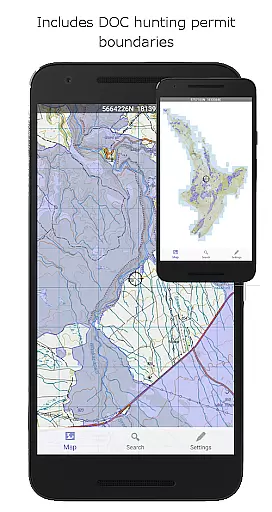
Key features include GPS positioning, track logging, user waypoints, orientation tools, altitude and speed display, distance measurement, and route creation capabilities. Users can search for specific locations, import/export tracks in KML or GPX formats, and benefit from specialized overlays such as DOC open permit hunting boundaries. Built on New Zealand's national map grid, it ensures accurate projections tailored to local geography.
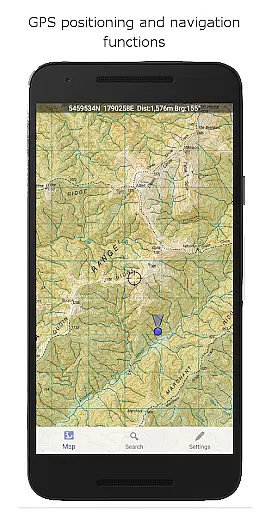
This app stands out with its robust set of navigation functions designed for diverse outdoor activities. It offers precise GPS positioning, allowing users to accurately track their location on detailed topographic maps. Track logging and waypoint management enable users to record journeys and mark important locations, while orientation tools provide compass functionality and display altitude and speed metrics.
Additional functionalities include measuring distances and bearings to points on the map, creating routes for future exploration, and following pre-established paths. The inclusion of various overlays like DOC open permit hunting areas enhances situational awareness. Furthermore, the app supports importing and exporting tracks and waypoints in industry-standard KML and GPX formats, facilitating data sharing across platforms.
A distinctive feature is its use of the NZ national map grid rather than the global WGS84 datum, ensuring unparalleled accuracy in map projections. This attention to detail guarantees that users experience minimal distortion when navigating through challenging terrains.
Map accuracy is crucial for reliable navigation, especially in remote areas. NZ Topo50 Offline - South excels in this domain by providing complete 1:50k offline topographic map coverage using the LINZ NZTopo50 series maps.
The app includes all maps fully with the install, ensuring no missing tiles or need for additional downloads. This seamless integration guarantees that users can pan and zoom across the whole South Island without interruptions.
Unlike many mapping applications that use the global average WGS84 datum, this app is built from the ground up to use the NZ national map grid. This results in perfectly parallel gridlines when the LINZ map is projected, offering unparalleled accuracy tailored specifically for New Zealand's unique geography.
Effective route planning can make a significant difference in outdoor adventures. NZ Topo50 Offline - South offers robust navigation functions including GPS positioning, track logging, user waypoints, and orientation features.
Users can create routes, follow predefined ones, and even search for named places and features on the map. The app displays altitude, speed, distance, and bearing to points on the map, enhancing the precision of any planned route.
Additionally, tracks and waypoints can be imported, exported, and shared in kml or gpx format, making it easy to collaborate with fellow trampers, walkers, bikers, runners, hunters, and search and rescue teams. Overlays such as DOC open permit hunting boundaries and Te Araroa tracks further enrich the route planning experience.
Comprehensive offline maps
Accurate GPS positioning
User-friendly interface
Supports KML/GPX formats
No internet required
Large storage space needed
Limited to South Island
Not suitable for casual use
Requires technical knowledge
Highly specialized focus

Offline maps & GPS for hiking, travel, fieldwork & outdoor adventures
 4.70
4.70
Turn your Android device into a real off-road GPS using off-line topo maps!
4.40
Find trails, organize your locations and navigate with offline maps.
4.60
All of NHSA's trail information at your fingertips for the 2025-2026 season
4.4
America’s largest public fast charging network, with over 500 charging stations.
4.50
Drive safe with real-time speed camera radar, police, and traffic alerts
3.80
Navigate MTA, NJ Transit, MBTA, SEPTA, BART, MARTA, CTA & 900+ cities
4.60
Navigation, weather, offline maps & tools for smarter, safer travel planning.
4.00
Get matched with a nearby driver — you’ll be on your way in minutes.
4.30
This app is military GPS coordinate systems helper. (MGRS, UTM & DMS Maps)
4.80
GPS Speedometer & Odometer: Track car, bike, truck speed & distance in real-time
4.70
Explore with GPS Navigation with GPS offline, voice GPS, speed camera radar
4.60
Rideshare, taxi cabs, and more for your airport travels and everyday trips.
4.50
GPS phone tracker, family locator, secure location sharing app
4.20
Get real-time bus and train schedules for easy, hassle-free city transportation.
3.90
Your guide to the recreational opportunities of the Bureau of Land Management!
3.40
Explore the world with Live Satellite View, 3D Maps, GPS Navigation & Earth Map.
2.90
Turn your tablet or Android powered unit into a full blow Android Auto headunit.
2.30
Compass is an accurate compass and a great tool for any outdoor activities
4.5


User Reviews