
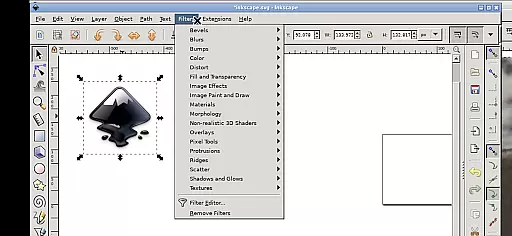
Inky is a powerful vector graphics editor that brings the full functionality of Inkscape to Android devices. This app allows users to create professional-grade vector images in Scalable Vector Graphics (SVG) format, while also supporting other file types for import and export. With its comprehensive feature set, Inky enables designers to work seamlessly on-the-go.
The application supports rendering of primitive vector shapes such as rectangles, ellipses, polygons, arcs, spirals, stars, and 3D boxes, along with text manipulation. Users can fill objects with solid colors, patterns, or gradients, and adjust transparency levels. The app also facilitates transformations like moving, rotating, scaling, and skewing, making it an indispensable tool for graphic designers.
Inky stands out with its complete adaptation of Inkscape's desktop features for mobile use. The app supports advanced vector editing capabilities including embedding and tracing raster graphics, enabling the creation of vector images from photos. Its touch-optimized interface allows users to perform actions like tapping for left-clicks, pinching to zoom, and using two-finger gestures for right-clicks.
One of the key advantages of Inky is its seamless integration with Android's file system. Users can access files directly from their Documents, Pictures, and other directories without the need for importing or exporting. The app also provides flexibility in desktop scaling through Android notifications and supports both phone and tablet usage, with optimal performance on tablets using a stylus.
Inky offers a comprehensive suite of creative tools that cater to both professional designers and hobbyists. The app provides full-featured vector graphics editing capabilities, allowing users to create intricate designs with ease.
With support for primitive vector shapes such as rectangles, ellipses, polygons, arcs, spirals, stars, and 3D boxes, Inky ensures that all fundamental design needs are met. Users can also work with text elements, applying solid colors, patterns, radial or linear color gradients to fills and strokes, each with adjustable transparency.
The inclusion of raster graphics embedding and tracing functionalities enables the transformation of photos and other raster sources into scalable vector images. This flexibility empowers creators to manipulate and refine their artwork using various transformations like moving, rotating, scaling, and skewing.
One of Inky's standout features is its canvas and format flexibility, which allows designers to work seamlessly across different mediums and resolutions. The app supports Scalable Vector Graphics (SVG) as the primary format, ensuring high-quality output regardless of scale.
In addition to SVG, Inky facilitates the import and export of other file formats, broadening its compatibility and making it easier to integrate with other design tools and workflows. This versatility is crucial for professionals who need to collaborate or transfer projects between platforms.
Users will appreciate the convenient access to files from the broader Android ecosystem, thanks to useful links in the home directory to locations like Documents and Pictures. This integration eliminates the need for cumbersome file imports and exports, streamlining the creative process and enhancing productivity.
User-friendly touch interface
Full-featured vector editing
Direct file system access
Optimized for tablets
Free and open-source
Steep learning curve
Complex for beginners
Performance may vary
Limited stylus support
Interface can be cluttered

Create color palette from Image, RGB & RYB Color wheel harmonies, Color Scheme
 4.50
4.50
Digital, Abstract, Classic - all types of color wheels in one app!
4.60
AI Art Generator transforms your words into AI generated art & paintings.
3.70
800+ Drawing, Painting Lessons App to Practice, Sketch & Paint Art.
4.30
Novices can also easily complete diamond painting masters
4.70
Your AI soulmate — meaningful chats, and unique emotional moments
4.70
Get creative and make art with your Sesame Friends!
4.00
Art of Combination Wear OS Watch faces (for Wear OS 5+ devices)
3.90
Bring One UI 8.5 Icons to life -elegant dark icons with a modern, premium touch.
4.30
Image resizer to resize, crop, rotate, flip, change dpi photo or picture in bulk
4.60
Get an overview over all your embroidery threads, projects and more.
4.60
AI Tattoo Generator: Create Tattoo Designs & Get Ideas! Ink & Stencil Maker
4.50
Stylish letters, Stylish Keyboard, Symbols, Emojis, Cool nickname
4.40
AI generated images & photos, turn your words into drawing, painting & pictures.
4.30
Sketch, plan, take notes and illustrate on an infinite canvas.
4.20
Sketch and paint on your device with the feel and freedom of drawing on paper
4.00
Design your dream room with AI. Get decor ideas & plan home interiors
3.90
Create sweet, cool and unique couple avatars easily, in just a few steps!
3.40
Download now for a stylish and functional timepiece
4.0


User Reviews