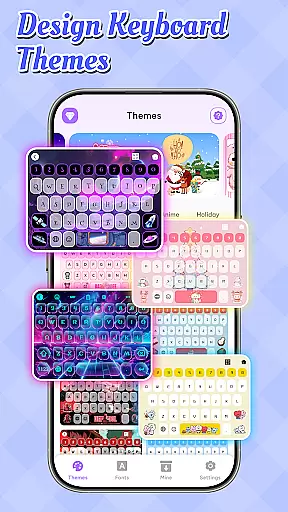
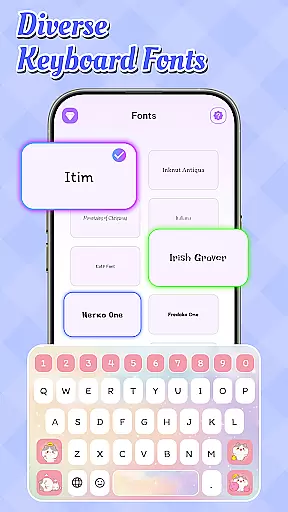
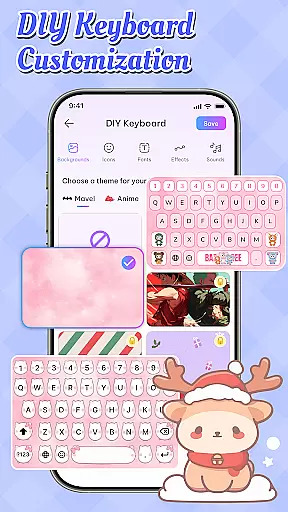
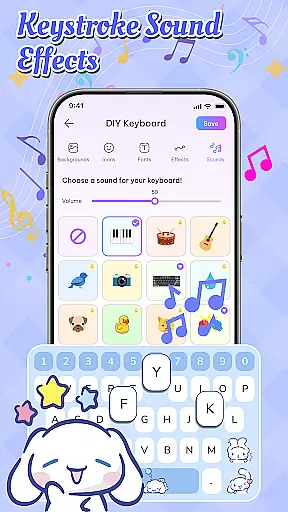
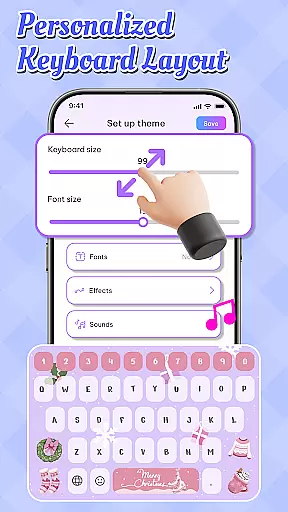
Emoji Font Keyboard & Themes is a powerful personalization app that allows users to transform their mobile typing experience. This app offers an extensive selection of unique fonts, stylish text options, and fun emoji keyboards, enabling users to design a truly personalized keyboard interface. Whether you're looking to add creative flair to your messages or simply want a more engaging typing experience, this app delivers both functionality and style.
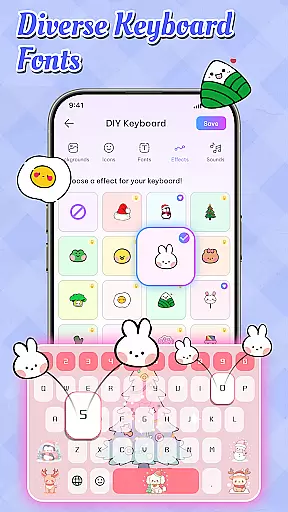
The application stands out with its diverse customization options, including DIY keyboard themes, dynamic typing effects, and delightful sound effects. Users can choose from various pre-designed themes like anime or festive styles, or create their own unique layouts using custom background images and icons. These features make it especially appealing for users who want their device to reflect their personal style while enjoying a more interactive typing experience.
With regular theme updates and a wide range of font choices, Emoji Font Keyboard & Themes ensures that your keyboard remains fresh and trendy. The app's ability to blend practicality with creativity makes it a must-have tool for anyone seeking to elevate their daily communication. By transforming routine typing into an enjoyable and expressive activity, this app adds significant value to the personalization category.
Emoji Font Keyboard & Themes boasts an impressive array of features that cater to users' desire for personalization and creativity. The app's most notable feature is its extensive collection of unique fonts and stylish text options, which allow users to customize their typing experience like never before. With hundreds of font styles ranging from professional to playful, users can ensure their messages stand out in any conversation.
Beyond fonts, the app offers comprehensive theme customization capabilities. Users can choose from pre-designed themes spanning various styles, including anime, seasonal, and cute designs, or create their own themes from scratch. The DIY customization feature lets users select background images, icon sets, and color schemes, while dynamic typing effects add an extra layer of personalization. Additionally, the app includes engaging typing sound effects that enhance the overall user experience.
What sets this app apart is its commitment to keeping content fresh and relevant. Regular updates bring new themes and font options, ensuring users always have access to the latest trends in keyboard personalization. The combination of these features creates a comprehensive personalization tool that goes beyond basic keyboard functionality, offering users unprecedented control over their typing interface while maintaining excellent performance and stability.
Customization options variety refers to the range and depth of personalization features available in an app, allowing users to tailor their experience to their unique preferences. Emoji Font Keyboard & Themes excels in this area by offering a vast selection of fonts, themes, and sound effects that cater to diverse tastes.
The app provides numerous stylish text options and creative symbols, enabling users to enhance their typing experience with trendy fonts. Whether you're looking for something sophisticated or playful, the extensive font choices ensure your messages stand out.
Moreover, the app offers a wide array of keyboard themes, including anime, festive Christmas designs, and adorable cute styles. These themes are regularly updated to reflect the latest trends, ensuring users always have fresh options to express their personality through their keyboard.
By leveraging these customization options, users can create a uniquely personalized keyboard that not only reflects their style but also makes every typing experience more enjoyable and engaging.
Theme compatibility involves how well an app's themes integrate with its overall design and functionality, providing a seamless and visually appealing user experience. Emoji Font Keyboard & Themes ensures high theme compatibility by offering a cohesive set of design elements that work harmoniously together.
Users can choose from various pre-designed themes such as anime, festive, and cute styles, each crafted to maintain visual consistency across different devices. This attention to detail ensures that no matter which theme you select, it will look great and function smoothly on your device.
In addition to aesthetic appeal, the app supports dynamic typing effects and customizable background images, icons, and fonts. These features allow users to fine-tune their keyboardu2019s appearance while maintaining optimal performance and usability.
Ultimately, the robust theme compatibility in Emoji Font Keyboard & Themes enhances user satisfaction by delivering a polished and intuitive interface that aligns perfectly with individual preferences and device capabilities.
Extensive font options
Versatile theme choices
User-friendly interface
Regular content updates
Custom sound effects
Premium features locked
Occasional ads display
High memory usage
Limited free themes
Complex setup process

Fingerprint Lock Screen & Live Animations with 4K Wallpapers as Live Wallpaper
 4.40
4.40
AI-powered Copilot. Personalized keyboard with gifs, stickers & themes
4.40
Add cute Shimeji pets to screen, interact with them and relax with cute motions
4.60
Dark icon pack based on One 8
4.80 4.50
4.50
Unleash Your Creativity and Connect with Loved Ones with Lockscreen Drawing!
4.20
Yandex Browser — stylish and secure, with voice search and data compression
4.40
One 8 icons glass color version
4.80
Transform your phone with stylish zipper lock themes and 4D live wallpaper
4.10
Shimeji adds cute animated characters to your screen, lively and fun.
4.70
Bring adorable pets to life on your screen. Playful, interactive and full of fun
4.60
Beautiful realistic hybrid watch face with numerous customization options.
4.50 4.50
4.50
The definitive Icon pack maker and editor
4.30
Launcher OS™ Pro without ads help make your phone simple and pretty
4.30
Create unique, fun emojis with Funny Emoji Maker! Unlimited creativity!
4.00
Your go to Weather App & Home Screen. Get your weather at a swipe of a finger!
3.80
Adaptive Dot Style IconPack with Light & Dark Theme.
3.70
Modern Glass Icon Pack with glossy icons, clean minimal theme & aesthetic style
4.3


User Reviews