
Vivid Navigation Gestures is a powerful tool that revolutionizes the way you interact with your Android device. This app allows users to control their devices through intuitive gestures instead of traditional button presses, offering a more modern and fluid user experience.
With features like beautiful visual effects during gesture execution and multiple gesture triggers across different screen areas, the app provides an immersive navigation experience. Whether you want to launch Google Assistant, toggle split-screen mode, or take screenshots, Vivid Navigation Gestures has got you covered with its extensive list of available actions.
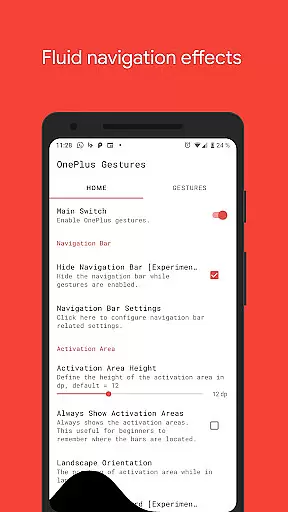
The app is especially useful for those who wish to utilize gesture controls without needing a new device or waiting for the latest Android version. It even offers advanced options such as hiding the stock navigation bar using ADB or root access, making it a versatile tool for power users seeking enhanced functionality.
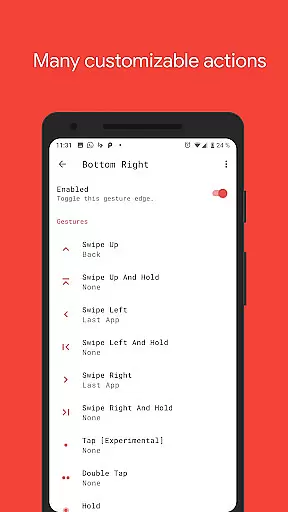
Vivid Navigation Gestures stands out with its comprehensive set of features designed to enhance user interaction. The app supports various gesture types including swipe up, swipe left, double tap, and more, each of which can be mapped to specific actions like launching apps, controlling media playback, or managing system settings.
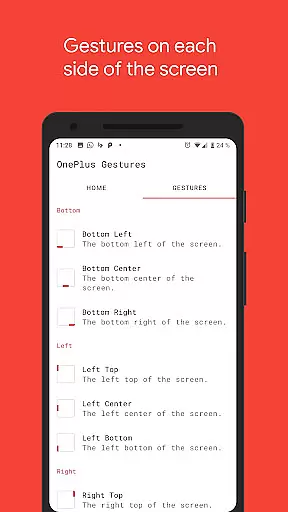
One of the key highlights is the ability to trigger gestures from multiple points on the screen, such as bottom left, right center, and others. This flexibility ensures that users can customize their navigation experience according to their preferences. Additionally, the inclusion of fluid visual effects during gesture execution adds a touch of elegance to everyday interactions.
For advanced users, the app provides options to hide the stock navigation bar and execute actions programmatically via accessibility services. These features require ADB or root access but offer unparalleled customization and control over the device's navigation system, making Vivid Navigation Gestures a top choice for tech-savvy individuals.
Gestures have become an essential part of modern mobile device interaction, and Vivid Navigation Gestures excels in providing accurate and effective gesture controls. The app allows users to replace traditional button presses with intuitive gestures, ensuring every swipe or tap is precisely registered and executed.
The app supports multiple gesture triggers from various screen locations, including bottom left, center, right, and more. This extensive coverage ensures that users can perform actions without straying too far from their usual grip positions, enhancing the overall usability and accessibility of their devices.
With a wide array of available actions such as launching Google Assistant, navigating back, going home, opening notifications, and even taking screenshots, Vivid Navigation Gestures proves its effectiveness by offering comprehensive control options. These actions are not only diverse but also highly responsive, making daily device interactions smoother and more efficient.
By integrating accessibility services, the app programmatically executes crucial actions like toggling split-screen mode or auto-rotation without collecting any personal data. This commitment to both functionality and privacy underscores the app's dedication to delivering a secure and reliable user experience.
Vivid Navigation Gestures stands out for its simple yet intuitive interface, which makes gesture-based navigation accessible even to those who may be new to this technology. By replacing traditional button presses with easy-to-learn gestures, the app simplifies how users interact with their devices on a fundamental level.
The visual effects during gesture execution add an element of fluidity and elegance, enhancing the overall user experience. These effects serve as intuitive feedback, confirming that the gesture has been recognized and the corresponding action is being performed, thus reducing any potential confusion or uncertainty.
Moreover, the app offers customizable options allowing users to tailor gestures according to their preferences. Whether itu2019s assigning specific actions to unique swipes or taps, these customization features ensure that each user can create an interface that feels most natural and comfortable for them.
Even advanced features like hiding the stock navigation bar require minimal setup through ADB commands, maintaining the simplicity of the core experience while still catering to power users seeking additional customization. Overall, Vivid Navigation Gestures combines ease-of-use with powerful functionality seamlessly.
Intuitive gesture controls
Beautiful visual effects
Extensive action options
Customizable triggers
Advanced ADB features
Requires learning curve
ADB setup needed
Limited to Android
No iOS support
Root access optional

 4.50
4.50
Easily install aab(Android App Bundle) files on your Android device with our app
4.80
Head tracking for PC sim games such as MSFS 2024 or Elite:Dangerous. No headset!
4.50
Safely recover deleted photos, videos, and files with a single easy tap.
3.70
card-reader app
2.20
An easy-to-use calculator designed to save time calculating and bending conduit
4.30
Mirror your screen to Chromecast and Android TV - Super fast and simple
4.60
Connect wirelessly to your computer to watch movies, browse the web, play games
5.00
Your personal health butler
3.60
Best leveling tool for your Android device. Hang paintings like a pro.
4.90
Keep track of your Palia friendships, tasks, and inventory with Palia Notebook
4.60
Play your X-Box games remotely in 1080p with any controller and zero latency
4.60
Quickly switch to an encrypted DNS server on Android TV
4.50
VESC Tool can monitor and configure VESC-compatible devices over BLE and Wifi
4.20
MS-DOS in your pocket. Play old DOS games anywhere you are ;)
4.10
Automate everything from settings to photos, SMS to speech. ADC2 prize winner.
4.10
Introducing Smart Printer, your ultimate destination for printing solutions!
4.00
Fun lie-detection pranks for friends and parties.
3.80
A recovery soft,it features photo recovery, video recovery, file recovery.
3.40


User Reviews