



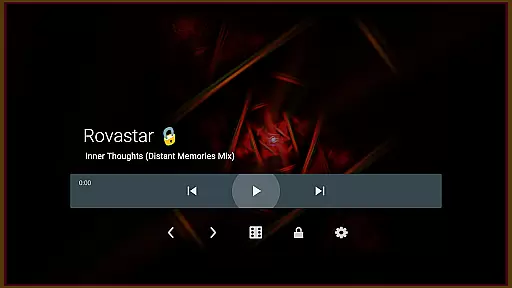

projectM Music Visualizer TV is a cutting-edge music visualization app designed specifically for Android TV. It offers the smoothest graphics and the most extensive collection of visual presets, making it highly responsive to any audio played on your device. Whether you're streaming music through Spotify, Pandora, or other platforms, projectM transforms your audio experience into stunning visuals. With compatibility for MilkDrop (.milk) presets, this app brings modernized features based on classic technologies.
The application allows users to control music playback directly from the interface, eliminating the need to switch between apps. You can play, pause, and skip tracks seamlessly while enjoying mesmerizing visual effects. Its advanced settings let you customize graphics quality by adjusting texture size and mesh size, ensuring an optimal balance between performance and visual fidelity. This makes projectM ideal for both casual listeners and audiophiles seeking an immersive audio-visual experience on their Android TV.
projectM Music Visualizer TV stands out with its impressive array of features tailored for an enhanced auditory and visual journey. The app boasts over 200 unique visual effects, each rendered at 60 FPS using pixel-shaded technology, delivering fluid animations that sync perfectly with your music. These effects are not only visually captivating but also highly customizable, allowing users to tweak settings such as texture size and mesh dimensions to optimize performance based on their device's capabilities.
Another key feature is its broad compatibility with various music players like Google Music, Spotify, Pandora, and PowerAMP. Users can control these players directly from projectM’s interface without interruption. This seamless integration enhances user convenience while maintaining focus on the audio-visual spectacle. As the official projectM release for Android by the original developers, this app ensures authenticity and superior quality in every aspect of its design and functionality.
projectM Music Visualizer TV offers an extensive library of over 200 visual effects, ensuring a rich and diverse audio-visual experience. This vast collection provides users with a wide array of visually stunning presets that cater to every musical genre and personal preference.
The application is not just about quantity but also quality and legality. Each preset within projectM is crafted with attention to detail, guaranteeing high-quality visuals that are copyright-authentic. Users can enjoy these visualizations with peace of mind, knowing they are experiencing genuine content developed by the original creators.
This expansive and authentic music visualization library ensures that whether you're listening to classical symphonies or modern electronic beats, there's a visual effect designed to enhance your auditory journey while respecting intellectual property rights.
One of the standout features of projectM Music Visualizer TV is its commitment to delivering top-tier audio quality. The app supports 60 FPS Pixel Shaded Rendering, providing ultra-smooth graphics that perfectly synchronize with your music for an immersive experience.
Users have the flexibility to configure graphics quality according to their preferences and device capabilities. By adjusting settings such as texture size and mesh size, you can fine-tune the visual output to achieve the perfect balance between performance and aesthetic appeal.
This dedication to customizable audio-visual excellence ensures that whether you're using a high-end sound system or standard speakers, projectM will optimize its output for the best possible sound and visual presentation on your Android TV.
Smoothest graphics
Extensive preset library
Music player control
Customizable settings
Official developer support
Requires compatible devices
High system resource usage
Limited mobile platform support
Preset customization complexity
No standalone music player

 4.70
4.70
Performance-Synthesizer & Multi-Track-Sequencer, polyphonic + multi timbral!
4.70
VB-AUDIO Software / VBAN-Receptor allows listening to any VBAN Streams
4.10
Brian Eno and Peter Chilvers’ acclaimed music app Bloom, radically reinvented.
4.80
The best music and audio player, with beautiful UI, music search and equalizer.
4.60
The official Sonos app
4.10
Slow music down without changing pitch.
3.70
Responsive piano with great sounds, graphics, and songs
4.80
Be a true music maker: create beats, mix and make music like a real DJ!
4.30
JBL PartyBox APP works with 110/310/710/120/320/520/Encore/Encore 2/Encore Ess 2
4.80
Simple & Intuitive Metronome
4.70
Recording studio w/ 10k beats, pro vocal FX and a network of 20M rappers & fans!
4.60
Formerly known as Spotistats! View your top tracks, artists, albums and more!
4.40
The alternative folder based music player.
4.20
No wifi music app. Mp3 offline. Tuner radio, young radio music. Music downloader
4.20
The original SP-1200 experience on your iPad
4.20
Background pads for your band
3.80
Powerful beat maker & DJ mixer to remix tracks, make music, & perform DJ mix
3.70
Simply convert wav to mp3. Clear. Reliable. Safe.
4.5


User Reviews