
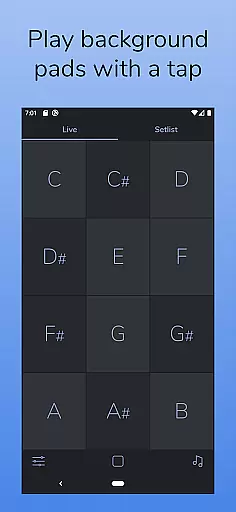
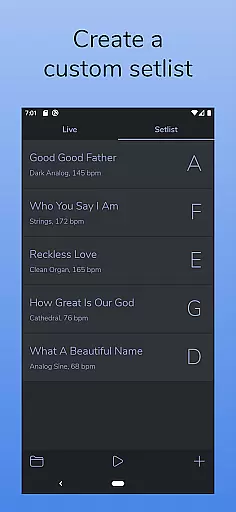
AutoPad is a versatile ambient pad loop application designed for musicians and audio professionals. This app allows users to seamlessly integrate atmospheric pad sounds into their live performances and recordings. With its intuitive interface, AutoPad provides instant access to twelve different keys in LIVE mode while offering customizable SETLIST mode for creating unique song arrangements.
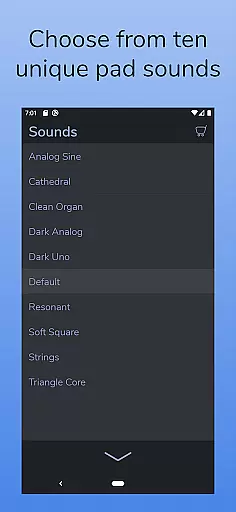
The app comes equipped with 10 expertly crafted pad sounds that create distinct atmospheres across all 12 musical keys. Users can further expand their sound library through in-app purchases or by importing custom WAV files. Key features include automatic crossfading between keys, a built-in metronome for band synchronization, and comprehensive sound control options such as crossfade time, filters, reverb, pan, and volume adjustments.
AutoPad's MIDI compatibility enables integration with external controllers, making it suitable for both studio and live stage environments. Its visually appealing dark theme ensures optimal visibility during performances. The app is particularly valuable for worship music and other genres where subtle background textures enhance the overall musical experience without overpowering lead instruments or vocals.
AutoPad distinguishes itself through its sophisticated feature set tailored for professional audio applications. The app's dual-mode functionality offers both immediate access to all keys in LIVE mode and customizable performance planning through SETLIST mode. This flexibility makes it suitable for various performance scenarios, from spontaneous jam sessions to structured concerts.
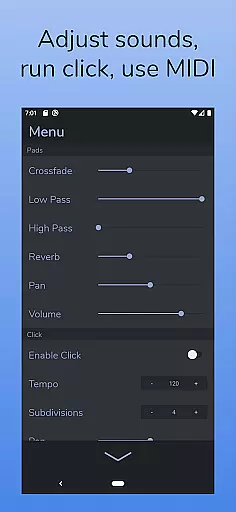
Sound quality and customization are at the core of AutoPad's design. The included library of 10 premium pad sounds has been meticulously crafted to provide unique atmospheres in every key. Advanced users can enhance their sonic palette by importing custom WAV files or purchasing additional sound packs. The app's comprehensive effects section includes two filters, reverb controls, panning options, and precise volume management, allowing detailed sound shaping.
Technical integration sets AutoPad apart from basic pad applications. Its MIDI implementation enables seamless connection with hardware controllers, while the automatic crossfade system ensures smooth transitions between keys. The built-in metronome function helps maintain timing accuracy during performances. These professional-grade features, combined with its optimized visual presentation and reliable looping mechanism, make AutoPad an essential tool for modern musicians seeking high-quality ambient support in their productions.
AutoPad offers a robust music library that includes 10 carefully designed pad sounds, each providing a unique atmosphere in all 12 keys. These sounds are crafted to bring ambient pad loops into your mix seamlessly.
In addition to the built-in library, users can expand their sound options by purchasing in-app sound packs or importing their own pad files. This flexibility ensures that musicians have access to a wide variety of high-quality sounds tailored to their specific needs.
All sounds provided by AutoPad are copyright-authentic, meaning they are either created in-house or properly licensed, ensuring that users can incorporate them into live performances and recordings without legal concerns.
The audio quality in AutoPad is engineered for professional use, with natural crossfades between keys handled automatically. This feature allows for smooth transitions and maintains the integrity of the soundscape during live performances.
AutoPad's menu provides control over various parameters such as crossfade time, two filters, reverb amount, pan, and volume. These controls enable users to fine-tune the audio output to match their performance environment perfectly.
Furthermore, AutoPad supports high-quality WAV files for imported pad sounds, ensuring that even custom sounds retain excellent audio fidelity. This attention to detail in audio processing makes AutoPad a reliable tool for musicians seeking both convenience and quality.
User-friendly interface
High-quality sound library
Customizable sound options
Seamless key transitions
MIDI compatibility
Limited file format support
No virtual MIDI on Android
Additional sound packs cost extra
Complex for beginners
Resource-intensive operation

Simply convert wav to mp3. Clear. Reliable. Safe.
 4.2
4.2
Equalizer, Bass Booster and Volume Booster (Eq & Bass) improve sound quality
4.30
Listen to live FM radio stations, sports, music and news on global radios online
4.70
Simple & Intuitive Metronome
4.70
More downloads than any other metronome. Includes drum machine & tempo trainer.
4.80
The only true audiophile music player with Hi-Fi audio rendering and DSP engine
3.90
AI Music Maker: Generate And Compose AI Tunes & AI Songs & AI Music & AI Melody!
4.60
Listen radio AM / FM Stations. Live AM / FM Radio App Station. Radio Com.
4.70
Customize Your Favorite Songs and Videos with booster.
4.70
Play your hearts out on TouchTunes jukeboxes & connect with fellow music lovers.
4.80
Bass Booster & Volume Equalizer Pro improves your music and video sound quality
4.60
Save hundreds of dollars for a physical strobe tuner and instead use this app.
4.50
Enjoy singing any song, no matter how high or low it is
4.30
Learn and play 2M+ music tabs & chords on guitar, ukulele, bass, and more
4.30
Smart piano keyboard, Classical to Pop, Real-time multiplayer connection!
4.20
The original SP-1200 experience on your iPad
4.20
Offline and always ad-free - stream in the highest quality available.
4.10
The ultimate media player for Android devices
3.90
Remove ads permanently from Music Visualizer
4.3


User Reviews