
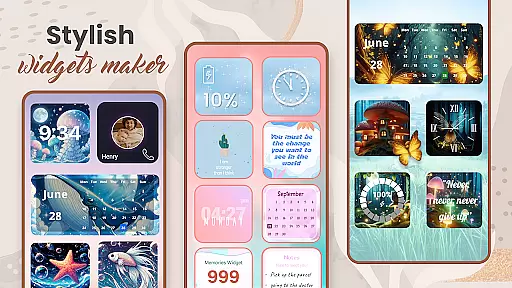
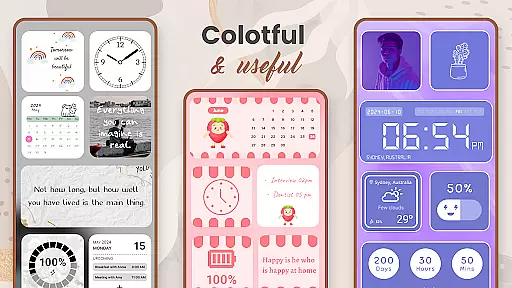
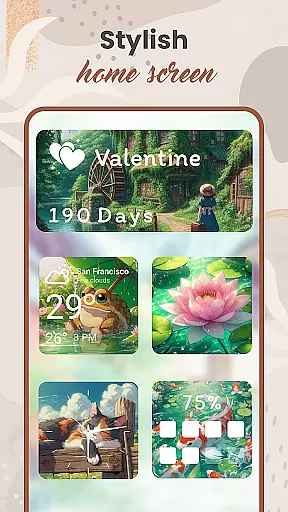
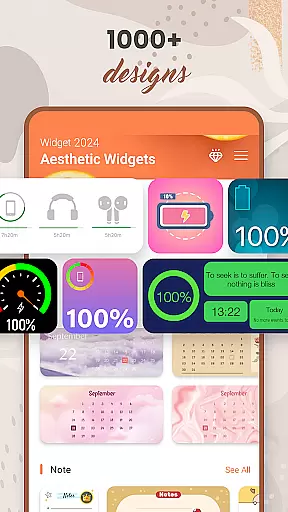
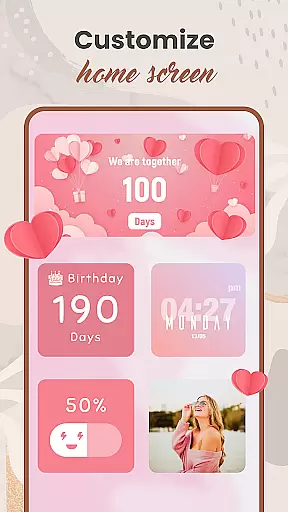
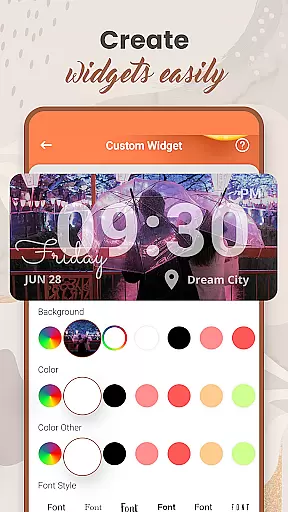
Widget 2025 is a powerful personalization app that allows Android users to transform their home screens with aesthetic and functional widgets. The app offers a comprehensive suite of customization tools, including color widget creation, photo widgets, weather displays, clock styles, calendar views, countdown timers, contact shortcuts, battery indicators, and more.
With over 1000 style options to choose from, users can create unique home screen layouts that perfectly match their personal preferences. The intuitive interface makes it easy to customize fonts, colors, backgrounds, and widget dimensions. Whether you want to display motivational quotes, keep track of important dates, or simply enhance your device's visual appeal, Widget 2025 provides all the necessary tools in one convenient package.
This application is particularly valuable for users who want to maintain quick access to essential information while expressing their individual style through their device's appearance. The combination of practical functionality and aesthetic customization makes it an ideal solution for Android users seeking to optimize both the form and function of their home screens.
Widget 2025 distinguishes itself through its extensive feature set designed to maximize both customization and usability. The app's Color Widget Maker enables users to create custom-colored widgets that perfectly match their desired color schemes. The Photo Widget functionality allows placement of personal images directly on the home screen, while maintaining optimal performance and visual quality.
The application includes advanced customization options such as font selection, background pattern creation, and precise layout control. Users can incorporate practical elements like weather forecasts, clock displays, and calendar events without sacrificing aesthetic appeal. The built-in widget editor provides granular control over element positioning, size adjustments, and transparency settings.
Additional notable features include a day counter, note-taking functionality, and contact shortcuts. Each widget type supports multiple configuration options, ensuring seamless integration with various Android devices and user preferences. The app's optimization ensures smooth performance even with multiple active widgets, making it suitable for both casual users and power users seeking maximum customization capabilities.
Customization options variety is a crucial aspect of any personalization app, and Widget 2025 excels in this area. The app offers over 1000 aesthetic widgets that users can choose from to enhance their Android device's home screen. These widgets include color widget makers, photo widgets, weather and clock styles, calendar displays, countdowns, contact information, and battery indicators.
Widget 2025 allows users to fully customize their widgets with an easy-to-use interface. Users can modify colors, fonts, styles, and backgrounds to match their unique preferences. This level of customization ensures that each user's device reflects their personal style and needs. The app also features a powerful widget editor, enabling users to tailor widgets specifically to their requirements.
The ability to add multiple photo widgets on the home screen provides additional personalization opportunities. Users can keep their favorite images close at hand while enjoying a beautifully customized interface. With such a wide array of customization options, Widget 2025 empowers users to create a truly unique and personalized Android experience.
Theme compatibility is another standout feature of Widget 2025, ensuring that all customizations seamlessly integrate with the overall design of the user's device. The app supports various themes and styles, allowing users to maintain visual consistency across their home screens. Whether you prefer minimalist designs or vibrant, colorful layouts, Widget 2025 has options that cater to every taste.
Users can select from numerous pre-designed themes or create their own using the app's intuitive customization tools. The flexibility in theme selection means that whether you're looking for professional, fun, or artistic aesthetics, Widget 2025 can accommodate your preferences. This versatility ensures that users can achieve a cohesive look that enhances their device's usability and appearance.
Moreover, the app's compatibility extends beyond just visual elements. It integrates smoothly with other functionalities like weather updates, calendar reminders, and countdown timers. This comprehensive approach to theme compatibility makes Widget 2025 a top choice for users seeking a harmonious and personalized Android experience.
Extensive customization
User-friendly interface
Versatile widget options
High-performance operation
Regular feature updates
May overwhelm beginners
Some features require premium
Occasional compatibility issues
Learning curve for advanced tools
Battery usage slightly increased

Wear Os Watch Face - Seasonal - Animated Snow Effect - 9 Animals
 4.20
4.20
Gun Chase - Let the chase begin.
4.80
More than 3000+ themes and 9000+ wallpapers for everybody!
4.10
Customize glowing edges, wallpapers, and caller screen with EdgeAura.
3.50
Custom edge gestures for volume control, brightness, apps, and shortcuts.
4.0
Unleash Your Creativity and Connect with Loved Ones with Lockscreen Drawing!
4.20
Crystal-clear, square icon provides a sleek and sophisticated visual upgrade
4.00
300+ widgets inspired by Material You and Material 3 expressive design.
4.60
Cool custom fonts & keyboard themes! Symbols & font changer for Instagram
4.50
Dark icon pack based on One 8
4.80
Ultimate Gallery Lock App - Hide Pictures, Videos and Lock Apps Instantly!
4.60
Customizable screen pets that play, climb, and keep you company.
4.50 4.50
4.50 4.50
4.50
Launcher OS™ Pro without ads help make your phone simple and pretty
4.30
Create unique, fun emojis with Funny Emoji Maker! Unlimited creativity!
4.00
Design your screen with unique, vibrant clocks
3.80
Adorable pets roam and play right on your phone screen!
3.30
⭐ OneUI inspired Fluffy Icon Pack – Soft. Stylish. Standout. ⭐
4.2


User Reviews