
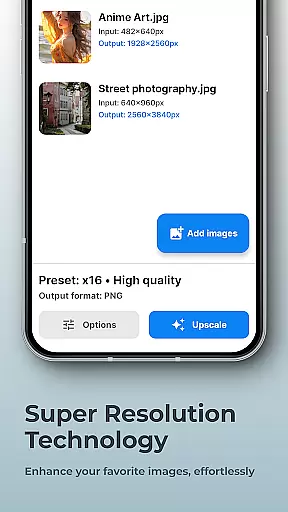
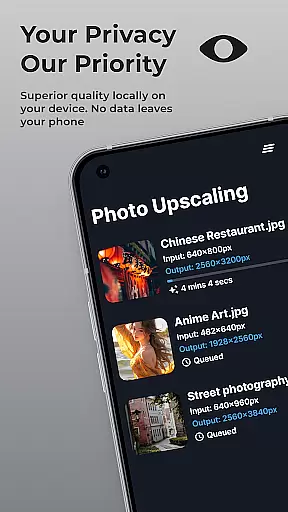
SuperImage Pro is an advanced AI-powered photo editing application designed for photography enthusiasts and professionals alike. This all-in-one photo toolbox offers a comprehensive suite of features that run entirely on your device, ensuring maximum privacy and security. The app's core functionality revolves around image enhancement, background removal, and portrait refinement, making it an essential tool for anyone looking to elevate their photography game.
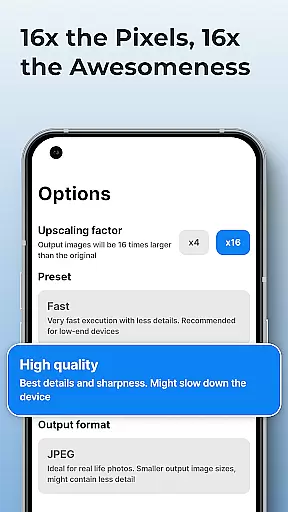
What sets SuperImage Pro apart is its commitment to on-device AI processing. Unlike cloud-based solutions, this app utilizes optimized AI models that work seamlessly with modern hardware, eliminating the need for an internet connection. Whether you're upscaling images up to 16x their original resolution or creating transparent cutouts, the app delivers professional-grade results while keeping your photos completely private.
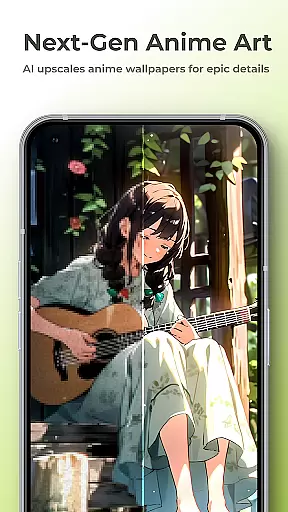
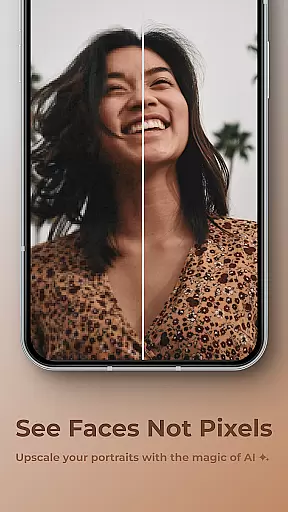
The application finds particular value in scenarios where both quality and privacy are paramount. Photographers can enhance low-resolution portraits, sharpen details in wallpapers, and even load custom AI models for specialized tasks. This combination of powerful features makes SuperImage Pro an indispensable tool for anyone who needs to process and enhance images without compromising their privacy.
SuperImage Pro distinguishes itself through its impressive array of AI-powered features. The app's most notable capability is its image enhancement engine, which can upscale photos up to 16x their original resolution while maintaining exceptional clarity. This feature proves particularly valuable when working with low-quality source images or when preparing images for high-resolution displays.
Another standout feature is the app's robust background removal tool. Using advanced AI algorithms, SuperImage Pro can isolate subjects and create transparent cutouts with remarkable precision. The app also includes specialized tools for portrait enhancement, allowing users to refine facial features and improve overall image quality. For power users, the application supports custom model loading in multiple formats including PyTorch, ONNX, and MNN, providing unparalleled flexibility.
The implementation of these features demonstrates a deep understanding of user needs. Each tool has been optimized for speed and accuracy, delivering near-instant results while maintaining professional-grade quality. The app's offline functionality ensures that all processing happens locally on the device, addressing growing concerns about data privacy in cloud-based services. These thoughtful design choices make SuperImage Pro a compelling choice for both casual users and professional photographers.
Real-time capture and preview functionality is essential for photography applications as it allows users to see exactly what the camera is capturing before taking a shot. SuperImage Pro excels in this area by providing an intuitive interface that displays accurate colors, lighting, and details directly on your device's screen.
The app leverages advanced AI models optimized for modern hardware to ensure that the preview is smooth and responsive. This means you can adjust settings like exposure, focus, and white balance in real time, giving you greater control over the final image quality.
Users benefit from this feature by being able to make precise adjustments before capturing an image, thus reducing the need for post-processing. The ability to preview changes instantly also enhances creativity, allowing photographers to experiment with different settings without any lag or delay.
Ultimately, SuperImage Prou2019s real-time capture and preview capabilities empower users to take better photos with confidence, knowing exactly how the end result will look even before pressing the shutter button.
AI beauty and enhancement features are increasingly popular in photography apps, offering tools to refine facial features, enhance skin tones, and improve overall image quality. SuperImage Pro stands out by ensuring these enhancements appear natural rather than overly processed or artificial.
The application uses sophisticated algorithms to analyze facial structures and apply subtle improvements that maintain the subject's original appearance. Whether sharpening details, refining facial features, or enhancing background clarity, the results are designed to look authentic and true-to-life.
This approach benefits users who seek professional-grade edits without sacrificing the genuine essence of their portraits. By keeping enhancements natural, SuperImage Pro helps preserve the emotional connection and authenticity of each photograph.
In summary, SuperImage Prou2019s AI beauty and enhancement features provide users with powerful yet restrained editing capabilities, ensuring every portrait looks its best while retaining a lifelike quality that resonates with viewers.
Advanced AI processing
Complete privacy protection
Multiple enhancement tools
Custom model support
Offline functionality
Steep learning curve
High system requirements
Limited free features
No cloud backup
Complex interface

[3DSteroid Pro] is a stereoscopic application for Android.
 4.30
4.30
Automatically backup your photos and videos to computer, NAS and Cloud services
4.60
Raw Image Viewer. Gallery with support of raw images (.cr3, .cr2, .nef, .raf).
2.00
Hair color changer, AI haircut app, fun hair editor and buzz cut filter for all!
3.80
RAW video capture with advanced controls
4.40
The original Rarevision VHS look seen everywhere!
4.70
A unique animation app. Powerful, easy to use, and lots of fun.
4.30
Solocator stamps photos you take with GPS location, Compass Direction, Date/Time
3.80
Edit photos with the picture generator: PS2 & AI Clay filters, cartoon effects.
4.50
Photo prints, cards, & gifts at Walgreens. Easy ordering & fast local pickup !
4.80
Safe & smart flight with Go Fly drone controller for 40+ drone camera, zone map
4.50
Use AI Video Generator to turn your words to ai generated videos.
4.50
A reflected light meter with spot metering and incident light metering.
4.40
Natural Beauty, Selfie Retouch
4.30
Transform Photos: Edit, Beautify and Craft Memories & Make Collages!
4.10
Catch sunlight, sunrise sunset times and sun phases with the AR sun tracker.
4.10
Astrophotography with your smartphone, photo live stacking and much more!
3.90
Over 800 film simulation recipes for Fujifilm. Black Friday Offer!
4.3
Add a dreamy vibe to your selfies and videos with soft style filters
4.0


User Reviews