
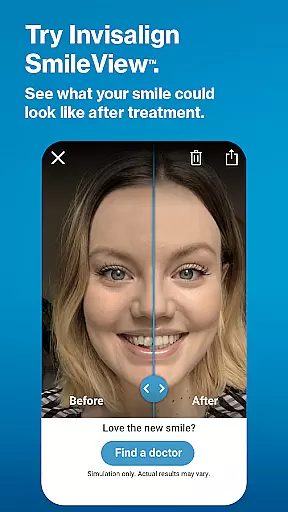
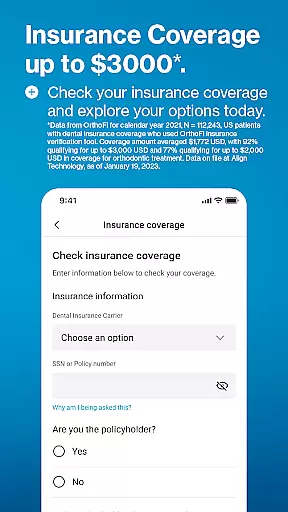
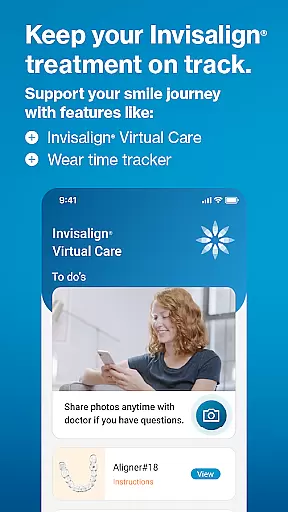
My Invisalign is a comprehensive application designed specifically for users of the advanced clear aligner system, offering both prospective and current patients an all-in-one solution. The app provides detailed information about Invisalign treatment options, including educational resources and tools like SmileView™ to simulate potential results. For those already undergoing treatment, it offers features such as ClinCheck® treatment plan viewing, Virtual Care for remote check-ins with doctors, and wear-time tracking.
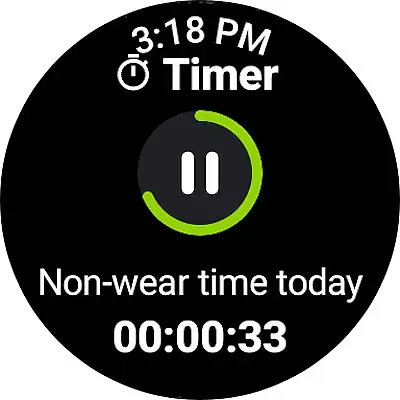
The app also includes practical utilities to help patients stay on track with their treatment schedules. Users can personalize their calendars, set reminders for aligner changes, and monitor daily wear time through a custom timer. Additionally, My Invisalign facilitates seamless communication between patients and dental professionals, enhancing the overall treatment experience by keeping everyone informed and engaged throughout the process.
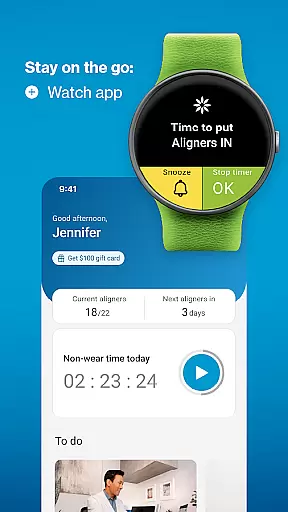
Whether you're just starting your smile transformation journey or are midway through treatment, My Invisalign ensures that every step is smooth, supported, and efficient. By integrating with Wear OS devices, the app extends its functionality to smartwatches, providing convenient access to essential features right from your wrist.
My Invisalign stands out due to its wide array of specialized features tailored to enhance the orthodontic treatment experience. One of its key functionalities is the SmileView™ simulation tool, which allows users to visualize their potential new smile and share these simulations with friends and family. This feature not only educates but also motivates users considering the treatment.
For existing patients, the app offers advanced tools such as ClinCheck® treatment plan viewing and Invisalign® Virtual Care, enabling remote monitoring and feedback from dental professionals. These features ensure continuous progress tracking and timely interventions if needed. Moreover, the app's wear-time tracker and personalized treatment calendar help users maintain discipline and adhere to their treatment schedules effectively.
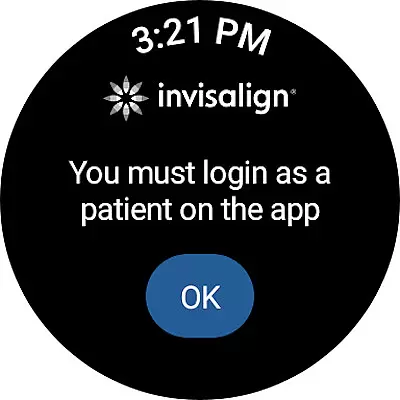
Integration with Wear OS enhances user convenience by allowing access to critical features directly from a smartwatch. Notifications for aligner changes and progress tracking are readily available, ensuring users never miss an important step in their treatment. Overall, My Invisalign combines education, engagement, and practical utilities to deliver a superior treatment experience.
Companion app integration is crucial for users who want a seamless experience between their mobile devices and wearables. The My Invisalign app excels in this area by offering comprehensive connectivity with Wear OS devices.
Through the My Invisalign app, users can sync their treatment data with their smartwatches, ensuring they have access to critical information at a glance. This includes aligner wear-time tracking and timely reminders for aligner changes, which are essential for maintaining treatment schedules.
The benefits of this integration are manifold. Users can enjoy the convenience of monitoring their treatment progress directly from their wrists, thus fostering better adherence to prescribed routines. Additionally, having real-time updates on hand ensures that patients remain engaged and proactive in managing their dental health.
This level of companion app integration not only enhances user experience but also significantly contributes to the overall effectiveness of the Invisalign treatment process.
Device compatibility is a key factor when evaluating apps designed for wearable technology. The My Invisalign app offers robust support for Wear OS, making it accessible to a wide range of smartwatch users.
By ensuring broad compatibility with various Wear OS devices, the app allows more patients undergoing Invisalign treatment to utilize its features without concern for device limitations. Whether tracking daily aligner usage or receiving notifications, users can rely on consistent performance across different hardware models.
This compatibility extends the app's utility beyond smartphones, providing an additional touchpoint for patient engagement. Patients benefit from having continuous access to their treatment plans and progress updates, regardless of whether they're using their phone or smartwatch.
Ultimately, the My Invisalign app's commitment to Wear OS/device compatibility underscores its dedication to delivering flexible, reliable, and user-centric solutions for modern orthodontic care.
User-friendly interface
Comprehensive treatment tools
Remote doctor consultations
Personalized treatment tracking
Wear OS integration
Limited to Invisalign patients
Some features require doctor invitation
Premium subscription may be costly
Dependent on smartphone connectivity
Initial setup can be complex

Diet tracker for weight loss - track calories, food and macros. Simple and easy!
 4.70
4.70
Highly customizable hybrid watch face for Wear OS, perfect for everyday use.
4.60
A watch face that fuses motorsport precision with contemporary smartwatch design
4.0
Elegant animated Christmas tree with multiple customization options
4.20
Be an elegant and classy secret agent, with this carefully detailed watch face
4.70
The most customizable minimal watch face. For Wear OS 5.0, API 34+ and later
4.70
Nutrition, Macro tracker: Food, fitness & healthy diet tracking for weight loss
4.60
Minimalistic design modern digital watch face.
4.5
Hybrid Vibrant Health Watch Face for Wear OS
4.5
Hyperlocal rain alerts by MyRadar using patent-pending technology, radar & more
4.80
Your second brain for organizing your life: to-do, calendar, reminder.
4.70
Real-time results, stats, schedules and player profiles for all leagues
4.60
Deck out your Wear OS Watch face with a beautifully decorated pine wreath!
4.50
The ultimate destination for kids ages 3-8 to explore the Marvel Universe!
4.30
Calming & relaxing sounds for sleeping and stress relief. Stay focused all day!
4.20
Watch face for Wear OS.
4.20
Embrace the festive spirit with our Christmas Countdown watchface for Wear OS
4.10
Watch face designed for Thanksgiving Day. 7 Background Styles included.
3.20
Stylish digital watch face for Wear OS devices with customizable features
4.2


User Reviews