



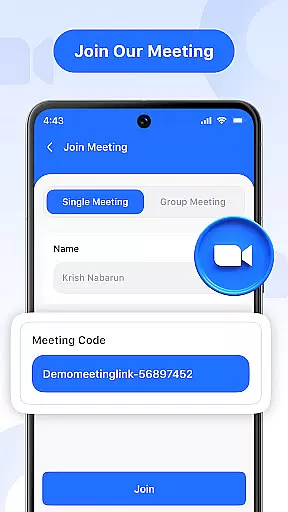
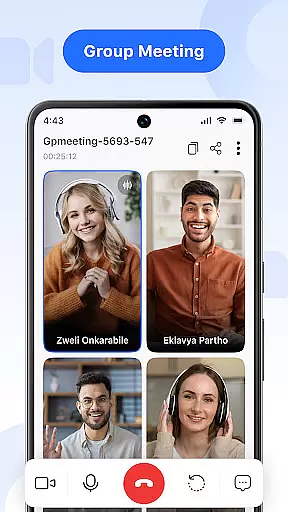


Video Meeting is a cutting-edge video conferencing app designed to enhance virtual communication and collaboration. With features like HD video calls, real-time interaction, and secure meeting access, it ensures seamless connectivity for both professional and personal use. The app supports various meeting formats including one-on-one chats, group hangouts, and screen sharing sessions.
Whether you're conducting business meetings, hosting virtual classrooms, or catching up with friends, Video Meeting provides a reliable platform that adapts to your needs. Its intuitive interface and advanced functionalities such as instant meeting hosting, quick join via codes, and multi-language support make it an ideal choice for global users seeking efficient online communication solutions.
Video Meeting stands out with its comprehensive set of features tailored for productive virtual interactions. The app allows users to instantly host meetings and invite participants through secure codes, ensuring privacy and controlled access. It offers crystal-clear HD video and audio quality, making every conversation feel natural and engaging.
Additional capabilities include real-time chat for seamless communication without interrupting the call, easy audio and video controls for personalized settings, and screen sharing options for presentations or collaborative work. These features collectively create an immersive experience that caters to diverse user requirements, from professional environments to casual social gatherings.
Real-time messaging speed and reliability are crucial for effective communication in any video conferencing app. In Video Meeting, this feature ensures that messages are delivered instantly and without fail, maintaining the flow of conversation.
The application employs advanced algorithms to optimize data transmission, ensuring minimal latency even under fluctuating network conditions. This means users can send text messages, emojis, or files during a call without experiencing delays.
For the user, this translates into seamless interaction where chat complements the audio and video streams, allowing for an integrated communication experience. Participants can quickly respond to queries or share thoughts without interrupting the natural rhythm of dialogue.
Ultimately, reliable real-time messaging enhances productivity by keeping all meeting members on the same page, reducing misunderstandings, and enabling swift decision-making processes within teams.
Media sharing support is a vital component of modern communication platforms, allowing users to exchange information beyond simple text. Video Meeting excels in this area by providing robust capabilities for sharing various types of media during video calls.
This app enables participants to present documents, slides, or applications live with just one tap. The screen sharing feature is designed to be intuitive, ensuring that users can easily broadcast their screens to collaborators or friends without technical hurdles.
Users benefit from high-quality transmission of shared content, which maintains clarity even when displaying detailed graphics or fast-moving videos. This facilitates engaging presentations and interactive discussions, regardless of geographical distances between participants.
By integrating comprehensive media sharing options, Video Meeting empowers teams and individuals alike to collaborate more effectively, making virtual meetings as dynamic and informative as face-to-face interactions.
User-friendly interface
HD video and audio quality
Secure meeting access
Real-time chat functionality
Multi-language support
Limited free features
Occasional connectivity issues
High resource consumption
Requires stable internet
No offline mode

Manage your data, talk & text - affordable phone plans & data usage made simple
 4.30
4.30
Manage BoostMobile Account
4.60
At select facilities, you now have an easy way to video visit your loved ones!
3.30
Quickly and easily identify and block unknown callers
3.70
This app enables the phone to receive and send FT8 traffic!
3.80
Create a secure hotspot on-the-go with Portable WiFi - Mobile hotspot.
4.40
Comprehensive and powerful scan tool app with enhanced functions
3.00
An app dedicated solely to marriage, not dating, and supported by a rigorous verification mechanism to ensure seriousness.
4.3
A customizable phone number in the cloud
4.20
FolderSync enables easy sync of files between cloud storage and Android devices.
4.60
Browse fast on Opera Mini, with Data Saving, News, Football Scores, and Download
4.60
Get through your inbox faster with the mail app designed to simplify your life.
4.40
2nd Phone Number Line for Anonymous Texting, Calling, and Picture Messages
4.30
Enjoy secure messaging & calling. Safe Messenger: group chats, calls, messages.
4.20
SMS Messenger is a lightning-fast messaging app.
4.20
Telegram is a messaging app with a focus on speed and security.
4.00
Tether to Windows, OS X, Linux PCs or Android tablets. No root. No tether fees.
3.90
Secure Messaging App to Enhance Messenger Texting Experience and Organize SMS.
3.50
Manage Phone Calls, call history, and contacts easily with Phone Pro.
4.1


User Reviews