
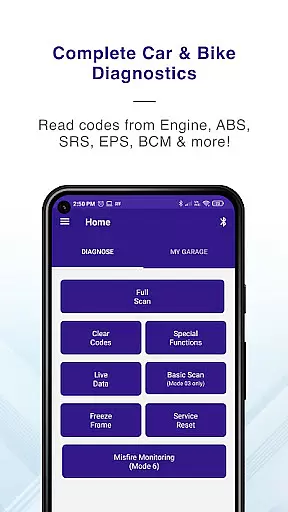
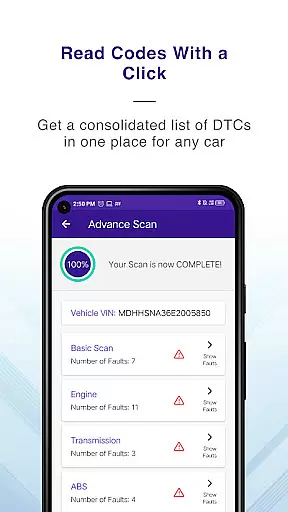
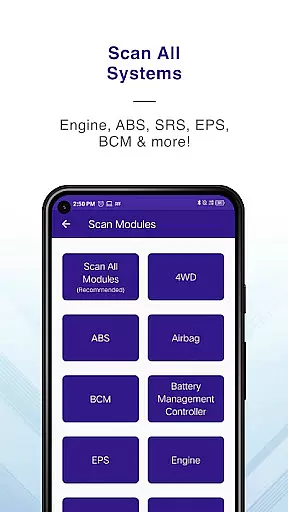
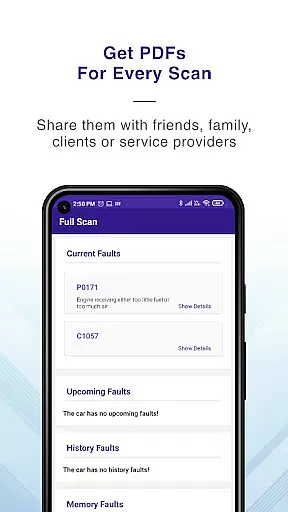
GaragePro is a comprehensive OBD scanning app designed for vehicle owners, repair shops, and DIY enthusiasts. It provides access to over 200 diagnostic functions across cars, bikes, and heavy vehicles, supporting multiple systems such as Engine, ABS, Airbag, and more. The app allows users to retrieve real-time data, monitor live sensor information, and perform advanced functions like Injector coding and DPF regeneration.
One of the standout features of GaragePro is its compatibility with any OBD2 scanner, including ELM327 devices, offering wireless Bluetooth connectivity. This ensures convenience and ease of use without tangled cables. Additionally, it offers detailed PDF reports, email support, and special functions such as throttle reset and steering angle recalibration. Whether you're diagnosing issues or optimizing vehicle performance, GaragePro delivers professional-grade tools directly to your smartphone.
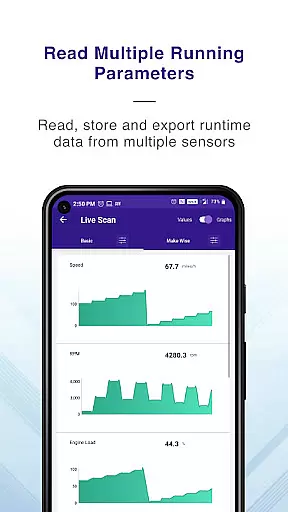
GaragePro stands out with its extensive range of diagnostic capabilities. The app supports advanced OBD scanning across multiple ECUs, including Engine, Transmission, ABS, and Airbag systems. Users can access real-time data, read and clear trouble codes, and even perform specialized functions like DPF regeneration and injector coding. With over 100 live data parameters available, users can track crucial metrics such as RPM, coolant temperature, and fuel trim through intuitive graphs.
Another key feature is its multi-mode coverage, which includes service IDs like Mode 01, Mode 03, and Mode 06, allowing in-depth analysis of misfires, EVAP systems, and more. The app also supports smog checks, VIN reading, and freeze frame data retrieval. Its wireless Bluetooth connectivity eliminates the need for physical cables, making diagnostics seamless. For motorcycles, GaragePro offers specific functionalities like DTC deletion and live data streaming, ensuring versatility across vehicle types.
Accessing detailed vehicle information is crucial for effective diagnostics and maintenance. GaragePro provides comprehensive OBD coverage, enabling users to scan and retrieve real-time data from multiple systems such as Engine, ABS, SRS, EPS, BCM, Transmission, HVAC, and more.
The app goes beyond basic diagnostics by offering advanced features like Injector coding, DPF regeneration, Throttle Reset, ABS bleeding, and Steering angle reset. These functions allow users to perform specialized tasks that are typically available only in professional repair shops.
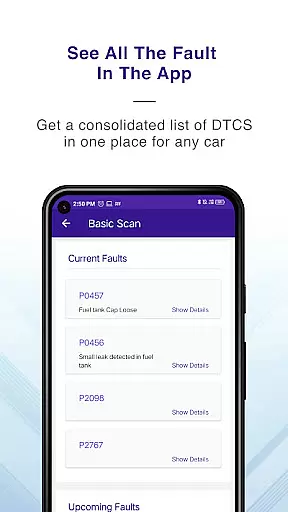
With over 200 diagnostic functions, GaragePro supports cars, bikes, and heavy vehicles. It provides detailed explanations for trouble codes, live data monitoring of over 100 crucial sensor data points, and the ability to export data for further analysis. This ensures users can track their vehicle's performance accurately and make informed decisions.
By using GaragePro, users gain access to a wide variety of modes/service IDs, including modes 01, 02, 03, 04, 06, 07, 09, 0A, and many more. This extensive coverage empowers users to understand their vehicle's health comprehensively and address potential issues efficiently.
Price transparency is essential for users to understand the value they receive from an application. GaragePro offers its core functionalities such as scanning and live data monitoring for free, ensuring users can access vital vehicle diagnostics without any initial cost.
For users seeking advanced features, GaragePro provides affordable paid plans starting at just $10. These plans include higher-level functions such as special diagnostics, injector coding, and various reset operations, which are crucial for comprehensive vehicle maintenance.
The pricing structure is straightforward, with no hidden fees or complex subscription models. Users can choose a plan that best suits their needs, whether they are vehicle owners, DIY enthusiasts, or professional mechanics.
This transparent approach allows users to manage their budgets effectively while accessing high-quality diagnostic tools. By clearly outlining the costs and benefits, GaragePro ensures users can make informed decisions about their vehicle maintenance investments.
User-friendly interface
Wide vehicle compatibility
Comprehensive diagnostic tools
Wireless convenience
Detailed live data monitoring
Paid features can be pricey
Bluetooth connection issues
Steep learning curve
Limited free functionality
Device compatibility concerns

Ultimate OBD2 Car Scanner: Diagnostics, Service and Modification Tool
 4.30
4.30
Theme for Car Launcher
4.3
Play what you want through Android Auto
4.90
Autolist - The Largest Selection of Local Used Cars and Trucks
4.50
Discover new and used cars in Syria easily! Browse ads and connect with sellers.
3.70
By enthusiasts, for enthusiasts
4.00
Your Path to Driving Licensing Success Begins Here! Develop your driving skills.
4.40
Take state-specific DMV permit tests and ace the exam.
3.90
Shop cars & see your financing
4.60
The Texaco App allows you to pay for fuel from the comfort of your car!
4.80
The ExtraMile App allows you to pay for fuel from the comfort of your car!
4.70
Your go-to app for car, truck & SUV parts, DIY tools, and expert repair help.
4.70
Launcher for use in the car
4.40
Realtime Charts is a plugin for the Torque Pro App (OBD 2 & Car)
4.20
* This app needs an adapter cable and a certain OBD2 adapter to work *
4.20
OBD diagnostics, Live Data, DPF regeneration for BMW
4.00
Earn and save with Fuel Rewards®
3.20
App Mirroring for Tesla Car's Browser
2.80
Theme for Car Launcher
4.2


User Reviews