
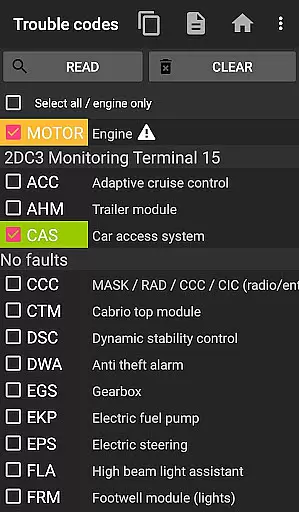
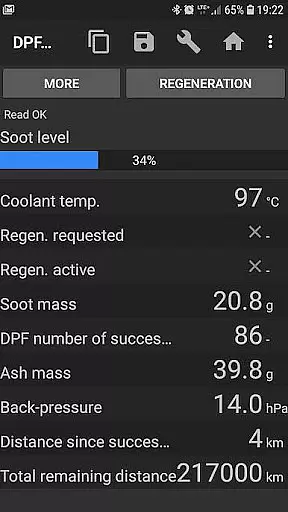
bimmer-tool is a comprehensive diagnostic application specifically designed for BMW car owners and enthusiasts. This powerful app allows users to read and clear fault codes, request DPF regeneration, and access real-time engine data directly from their mobile devices. With compatibility across various BMW models, the application provides an essential toolkit for monitoring vehicle health and performance.
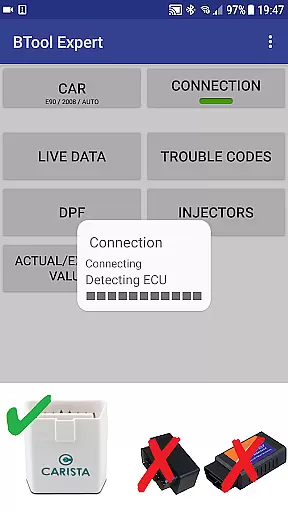
The app supports multiple connection methods including K+DCan USB cables, ENET adapters for newer F/G series vehicles, and Bluetooth/WiFi ELM adapters. While wireless connections may present limitations with older models (pre-2008), the application ensures reliable functionality through its recommended cable connections. Whether you're performing routine maintenance or diagnosing complex issues, bimmer-tool delivers professional-grade capabilities right in your hands.
One of the key strengths of bimmer-tool lies in its ability to handle advanced functions such as injector adjustments, exhaust fumes pressure readings, and detailed DPF status reports. The application also enables users to log critical data to CSV files for further analysis, making it an invaluable resource for both DIY mechanics and professional technicians working on BMW vehicles.
bimmer-tool distinguishes itself through its extensive feature set tailored specifically for BMW diagnostics. The application's core functionality includes reading and clearing fault codes across various vehicle systems, providing users with immediate insight into potential mechanical issues. Its unique capability to request and monitor DPF regeneration processes sets it apart from generic OBD-II scanners, offering specialized support for diesel-powered BMW models.
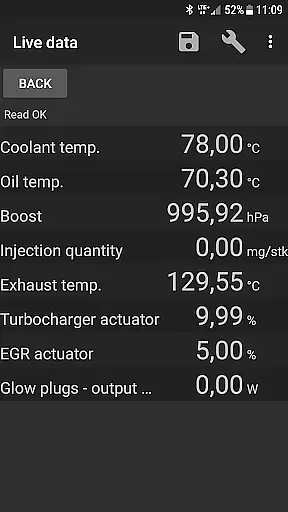
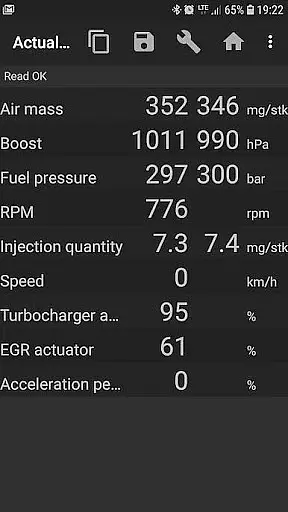
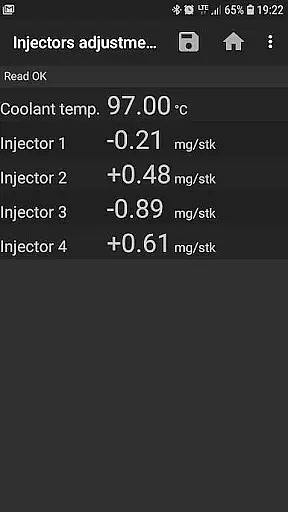
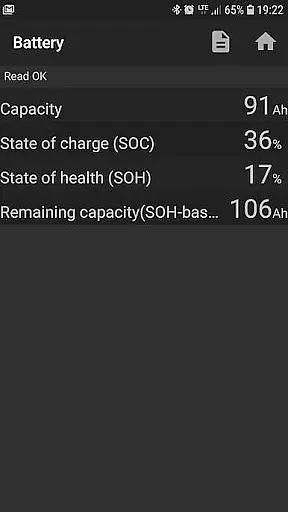
The app's live data monitoring system represents another significant advantage, allowing users to access real-time information about crucial engine parameters such as air mass flow, intake manifold pressure, and fuel pressure. This feature extends beyond basic diagnostic tools by providing detailed injector adjustment values and enabling battery replacement registration without altering battery properties. Additionally, the application supports essential maintenance functions like resetting oil/brake service intervals and clearing blocked lamp circuits due to short-circuit errors in E-series vehicles.
What truly makes bimmer-tool stand out is its compatibility with multiple connection protocols and adapter types. From reliable K+DCan USB cables to modern ENET adapters, the application ensures stable communication with BMW's sophisticated onboard systems. The inclusion of Bluetooth and WiFi connectivity options, while subject to certain limitations with older models, demonstrates the developer's commitment to accommodating various user preferences and technical requirements.
bimmer-tool provides comprehensive access to detailed vehicle information, which is crucial for BMW owners who want to understand their car's performance and health. The app allows users to read engine live data, including parameters such as air mass, intake manifold pressure, and fuel pressure. This real-time insight into the vehicle's operations enables proactive maintenance and troubleshooting.
Moreover, bimmer-tool goes beyond just reading data; it also permits users to log this information into a CSV file. This feature is particularly beneficial for those looking to conduct further analysis or maintain records of their vehicle's performance over time. By having access to actual and expected values for various engine metrics, users can make informed decisions regarding necessary repairs or adjustments.
The ability to read injectors' adjustments and exhaust fumes pressure adds another layer of detail to the vehicle diagnostics. These features are essential for ensuring optimal engine performance and longevity. With bimmer-tool, users have at their fingertips the tools needed to keep their BMW running smoothly and efficiently.
While bimmer-tool itself does not deal with monetary transactions, it offers a different kind of price transparency by clearly outlining the hardware requirements needed for its operation. Users are informed that the application works best with reliable OBD adapters, and it lists specific models like Vgate vLinker and UniCarScan, which ensures that customers know exactly what they need to purchase for full compatibility.
This approach eliminates guesswork and hidden costs associated with using diagnostic tools, as users can buy the recommended adapters upfront. Furthermore, the app provides guidance on choosing the right settings for different adapters, such as D-Can mode for certain UniCarScan models, ensuring users get the most out of their investment without additional expenses.
By recommending K+DCan USB cables for older BMW models and detailing connection procedures, bimmer-tool empowers users to select the most cost-effective solution for their needs. This transparency in required equipment and setup helps users avoid unexpected costs and ensures a seamless diagnostic experience.
User-friendly interface
Comprehensive BMW support
Advanced diagnostic features
Multiple connection options
Detailed live data monitoring
Limited old model support
Requires specific adapters
Wireless connection issues
Complex setup process
Premium pricing structure

Theme for Car Launcher
 4.2
4.2
Attention! This is the theme for the Car Launcher app
4.0
Theme for Car Launcher
4.0
AlfaOBD software for Fiat Group cars native diagnostic
3.70
Oil change service & coupons for car maintenance at Valvoline Instant Oil Change
4.70
Digital Car Key/Launcher, Screen Mirror, Android Dashboard, Remote Wireless Link
4.40
Instantly redesign your car with AI. From sporty to futuristic, try it all.
4.50
Find Fast EV Chargers | Charge Your Vehicle at 1,100+ Fast Car Charging Stations
4.60
A smarter way to park and reserve your spot ahead of time.
4.40
7-Day Returns on All Cars
4.80
Your go-to app for car, truck & SUV parts, DIY tools, and expert repair help.
4.70
View your car’s service records and find out when maintenance is due.
4.70
Taximeter; the professional's choice
4.30
AI Powered - Automotive Mechanic Assistant
4.30
Available in select states.
4.00
Simplify your drive
3.90
Club Car Wash Mobile App—the fast lane to managing your wash membership.
3.30
Monitor specific TOYOTA parameters by adding this plugin to Torque Pro.
2.00
Ferrari inspired analog & digital watch face with quick access and premium style
4.0


User Reviews